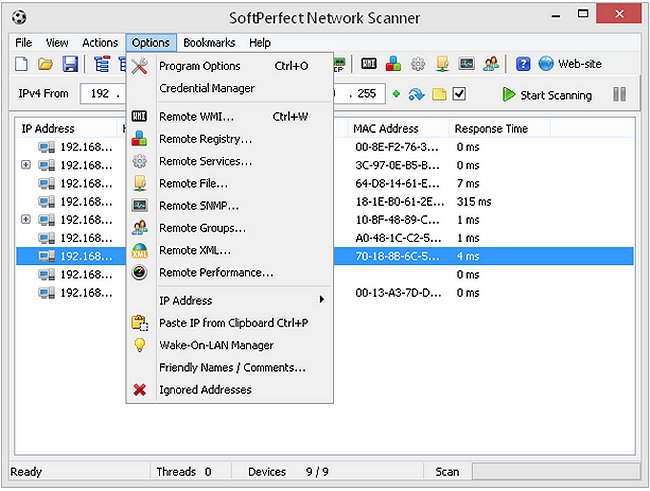
SoftPerfect Network Scanner version 26.9 has been released, enhancing its capabilities as a multi-threaded scanner for IP, NetBIOS, and SNMP protocols. Designed for both system administrators and everyday users concerned with network security, it features a sleek and modern interface paired with advanced functionalities.
This powerful tool enables users to ping computers to identify listening TCP ports and reveal shared resources on the network, including both visible and hidden folders. Users can easily mount shared folders as network drives, allowing for seamless browsing via Windows Explorer. The scanner can also detect user-defined open ports, resolve hostnames, and automatically identify local and external IP ranges.
Additional features include remote shutdown capabilities, Wake-On-LAN support, and the ability to filter and export scan results in various formats such as HTML, XML, CSV, and TXT. It effectively detects hardware (MAC) addresses even across routers, retrieves information on currently logged-on users, supports launching third-party applications, and can gather extensive data through Windows Management Instrumentation (WMI). Notably, SoftPerfect Network Scanner is completely free, requires no installation, and is devoid of adware, spyware, or malware.
In terms of network management, it also offers users guidance on improving wireless network performance, resetting network settings on Windows 10 and 11, resetting TCP/IP, and flushing the Windows DNS cache. These resources provide comprehensive support for users looking to optimize their network experience or troubleshoot connectivity issues.
In conclusion, the latest version of SoftPerfect Network Scanner is an invaluable tool for enhancing network security and management, offering a range of features that cater to both novice and experienced users. Future updates could enhance its functionalities further, potentially incorporating additional protocols or integration with cloud-based network management tools, making it an even more indispensable resource for network administration
This powerful tool enables users to ping computers to identify listening TCP ports and reveal shared resources on the network, including both visible and hidden folders. Users can easily mount shared folders as network drives, allowing for seamless browsing via Windows Explorer. The scanner can also detect user-defined open ports, resolve hostnames, and automatically identify local and external IP ranges.
Additional features include remote shutdown capabilities, Wake-On-LAN support, and the ability to filter and export scan results in various formats such as HTML, XML, CSV, and TXT. It effectively detects hardware (MAC) addresses even across routers, retrieves information on currently logged-on users, supports launching third-party applications, and can gather extensive data through Windows Management Instrumentation (WMI). Notably, SoftPerfect Network Scanner is completely free, requires no installation, and is devoid of adware, spyware, or malware.
In terms of network management, it also offers users guidance on improving wireless network performance, resetting network settings on Windows 10 and 11, resetting TCP/IP, and flushing the Windows DNS cache. These resources provide comprehensive support for users looking to optimize their network experience or troubleshoot connectivity issues.
In conclusion, the latest version of SoftPerfect Network Scanner is an invaluable tool for enhancing network security and management, offering a range of features that cater to both novice and experienced users. Future updates could enhance its functionalities further, potentially incorporating additional protocols or integration with cloud-based network management tools, making it an even more indispensable resource for network administration
SoftPerfect Network Scanner 26.9 released
SoftPerfect Network Scanner is a multi-threaded IP, NetBIOS and SNMP scanner with a modern interface and several advanced features.