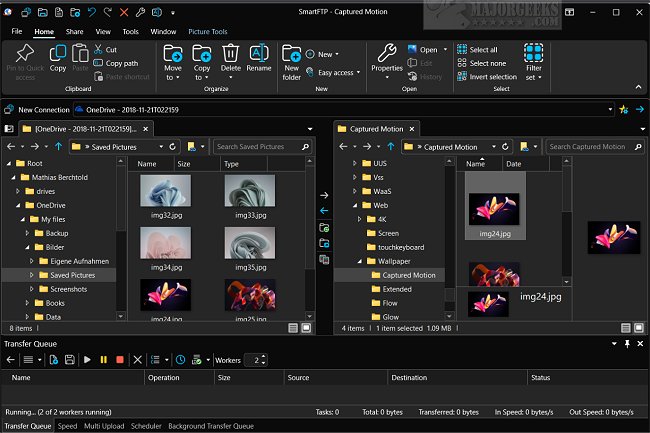
SmartFTP is a comprehensive and user-friendly client that facilitates file transfers using various protocols, including FTP, FTPS, SFTP, WebDAV, and cloud storage options such as Amazon S3, Backblaze B2, Google Drive, and OneDrive. The latest release, version 10.0.3334, enhances its capabilities, making it an ideal solution for users needing efficient and secure file management.
Key Features and Functionality
SmartFTP is designed for a wide range of users, from web developers managing websites to individuals looking for reliable backup solutions. The application’s user-friendly interface includes features like drag-and-drop functionality, simplifying the process of organizing and transferring files.
The software supports strong security protocols, ensuring that sensitive data is transferred securely. It handles large files and extensive datasets efficiently, providing features such as SSL support, FXP for server-to-server transfers, multiple connection capabilities, and proxy firewall support.
Notable features of SmartFTP include:
- Support for multiple protocols (FTP, FTPS, SFTP, WebDAV, cloud services)
- Advanced security measures (HIPAA compliance, FIPS compliance)
- A modern graphical user interface with high DPI support
- File and folder synchronization capabilities
- Multilingual support (over 20 languages)
- Automated transfer processes to enhance efficiency
- Features like remote editing, bulk renaming, and a search function for files on the server
- Transfer integrity verification (XCRC, XMD5, XSHA)
- Scheduling options for automated transfers (available in the Enterprise Edition)
Who Can Benefit from SmartFTP?
SmartFTP caters to anyone needing to transfer files between local and remote systems. Its robust set of features is beneficial for professionals in web development, IT administration, and anyone involved in data management. It provides peace of mind with secure transfers, allowing users to focus on their projects without concerns about data safety.
Conclusion
SmartFTP 10.0.3334 stands as a reliable and efficient file transfer solution. With its enhanced security features, user-friendly interface, and support for multiple protocols, it ensures that users can manage their data swiftly and securely. Whether you're engaged in complex web development or simply need a dependable backup tool, SmartFTP provides a versatile platform to meet your file transfer needs effectively.
Looking Ahead
As technology evolves, SmartFTP is well-positioned to adapt to new file transfer protocols and security standards. Future updates may include further integrations with emerging cloud services, enhanced automation features, and improved user experience to ensure that it remains a top choice for file transfer solutions
Key Features and Functionality
SmartFTP is designed for a wide range of users, from web developers managing websites to individuals looking for reliable backup solutions. The application’s user-friendly interface includes features like drag-and-drop functionality, simplifying the process of organizing and transferring files.
The software supports strong security protocols, ensuring that sensitive data is transferred securely. It handles large files and extensive datasets efficiently, providing features such as SSL support, FXP for server-to-server transfers, multiple connection capabilities, and proxy firewall support.
Notable features of SmartFTP include:
- Support for multiple protocols (FTP, FTPS, SFTP, WebDAV, cloud services)
- Advanced security measures (HIPAA compliance, FIPS compliance)
- A modern graphical user interface with high DPI support
- File and folder synchronization capabilities
- Multilingual support (over 20 languages)
- Automated transfer processes to enhance efficiency
- Features like remote editing, bulk renaming, and a search function for files on the server
- Transfer integrity verification (XCRC, XMD5, XSHA)
- Scheduling options for automated transfers (available in the Enterprise Edition)
Who Can Benefit from SmartFTP?
SmartFTP caters to anyone needing to transfer files between local and remote systems. Its robust set of features is beneficial for professionals in web development, IT administration, and anyone involved in data management. It provides peace of mind with secure transfers, allowing users to focus on their projects without concerns about data safety.
Conclusion
SmartFTP 10.0.3334 stands as a reliable and efficient file transfer solution. With its enhanced security features, user-friendly interface, and support for multiple protocols, it ensures that users can manage their data swiftly and securely. Whether you're engaged in complex web development or simply need a dependable backup tool, SmartFTP provides a versatile platform to meet your file transfer needs effectively.
Looking Ahead
As technology evolves, SmartFTP is well-positioned to adapt to new file transfer protocols and security standards. Future updates may include further integrations with emerging cloud services, enhanced automation features, and improved user experience to ensure that it remains a top choice for file transfer solutions
SmartFTP 10.0.3334 released
SmartFTP is an easy-to-use FTP, FTPS, SFTP, WebDAV, Amazon S3, Backblaze B2, Google Drive, OneDrive, and SSH Terminal client.