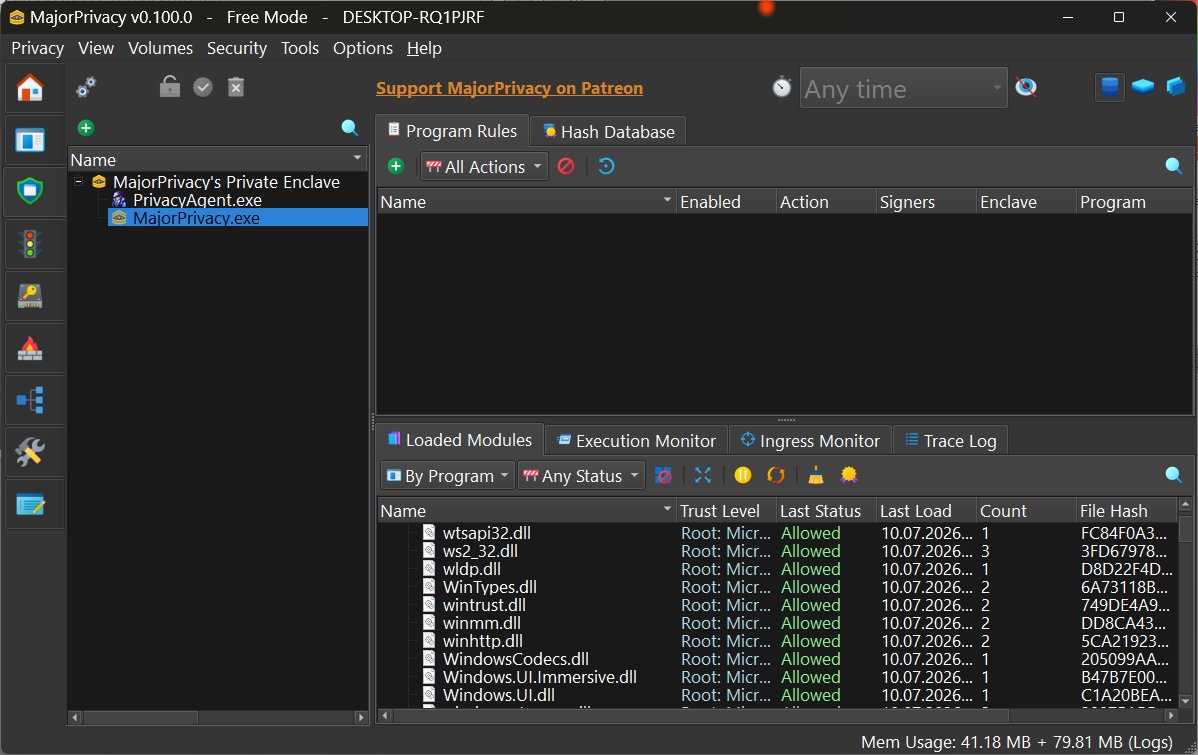
MajorPrivacy is a sophisticated privacy and system protection tool tailored for Windows users, offering extensive control over applications, files, network activity, and sensitive data. Created by Xanasoft, the developer known for Sandboxie and Diskcryptor, MajorPrivacy targets power users and security enthusiasts seeking greater insight than standard Windows security tools can provide.
Core Features of MajorPrivacy
The software serves as a comprehensive solution by merging application control, privacy management, network monitoring, file protection, and system hardening into one user-friendly interface. As an evolution of PrivateWin10, MajorPrivacy goes beyond basic privacy tweaks, offering active monitoring and enforcement instead of just altering Windows settings. It employs kernel-level protection components to oversee processes, restrict file access, control network activity, and block unwanted applications, making it feel like a full-fledged system control center.
Why Use MajorPrivacy?
While Windows has built-in security features, it often lacks transparency regarding application behaviors. MajorPrivacy bridges this gap by revealing hidden activities. For instance, if a new app unexpectedly connects to the internet, MajorPrivacy can identify and block that connection, as well as monitor programs that access sensitive directories or run background tasks without a clear purpose. This functionality is especially beneficial for IT professionals and advanced users who require detailed monitoring and enforcement capabilities.
Notable Features
1. Flexible Installation: Users can opt for a traditional install or a portable version, making it easy to test the software or deploy it across multiple systems.
2. Rule Import/Export: After configuring application restrictions and network policies, users can easily transfer settings between systems, saving time.
3. Activity Logging: The comprehensive logging feature provides insights into background activities, simplifying troubleshooting and investigation.
4. Encrypted Disk Images: MajorPrivacy allows users to create and mount encrypted virtual drives, adding an extra layer of protection for sensitive files.
User Experience
Upon installation, MajorPrivacy presents various modules for application control, network management, privacy settings, and monitoring tools within an intuitive interface. While it is well-designed and organized, some users may find certain areas lack sufficient explanations. However, the built-in setup wizard eases the learning curve by guiding users through recommended settings.
Considerations and Limitations
The primary challenge with MajorPrivacy is its complexity. Designed for users seeking deep control, it has a learning curve, and some advanced settings could benefit from more documentation. Additionally, while the tool is open-source, some features require a registration key, which is free for 90 days but necessitates renewal. Supporters can obtain a key for ongoing access without renewal, which aligns with the development effort involved in such a tool. Importantly, personal licenses can be used across multiple devices owned by the user, while commercial users must license each PC separately.
Conclusion
MajorPrivacy transcends basic privacy tools by providing meaningful oversight and control over Windows environments. Its portable deployment, rule management, detailed monitoring, and user-friendly interface make it an excellent choice for users who require more than simple privacy tweaks. However, users should be prepared to invest time learning the tool's features and navigating its complexities. For those ready to enhance their system's privacy and security, MajorPrivacy stands out as one of the most effective solutions available. For support, users are encouraged to visit the MajorGeeks Forums for community assistance.
Future Enhancements
Looking ahead, future updates could focus on simplifying the user experience by enhancing documentation and contextual help for advanced settings. Additionally, improving the onboarding process for new users and expanding the capabilities of the logging features could further enhance the tool's usability
Core Features of MajorPrivacy
The software serves as a comprehensive solution by merging application control, privacy management, network monitoring, file protection, and system hardening into one user-friendly interface. As an evolution of PrivateWin10, MajorPrivacy goes beyond basic privacy tweaks, offering active monitoring and enforcement instead of just altering Windows settings. It employs kernel-level protection components to oversee processes, restrict file access, control network activity, and block unwanted applications, making it feel like a full-fledged system control center.
Why Use MajorPrivacy?
While Windows has built-in security features, it often lacks transparency regarding application behaviors. MajorPrivacy bridges this gap by revealing hidden activities. For instance, if a new app unexpectedly connects to the internet, MajorPrivacy can identify and block that connection, as well as monitor programs that access sensitive directories or run background tasks without a clear purpose. This functionality is especially beneficial for IT professionals and advanced users who require detailed monitoring and enforcement capabilities.
Notable Features
1. Flexible Installation: Users can opt for a traditional install or a portable version, making it easy to test the software or deploy it across multiple systems.
2. Rule Import/Export: After configuring application restrictions and network policies, users can easily transfer settings between systems, saving time.
3. Activity Logging: The comprehensive logging feature provides insights into background activities, simplifying troubleshooting and investigation.
4. Encrypted Disk Images: MajorPrivacy allows users to create and mount encrypted virtual drives, adding an extra layer of protection for sensitive files.
User Experience
Upon installation, MajorPrivacy presents various modules for application control, network management, privacy settings, and monitoring tools within an intuitive interface. While it is well-designed and organized, some users may find certain areas lack sufficient explanations. However, the built-in setup wizard eases the learning curve by guiding users through recommended settings.
Considerations and Limitations
The primary challenge with MajorPrivacy is its complexity. Designed for users seeking deep control, it has a learning curve, and some advanced settings could benefit from more documentation. Additionally, while the tool is open-source, some features require a registration key, which is free for 90 days but necessitates renewal. Supporters can obtain a key for ongoing access without renewal, which aligns with the development effort involved in such a tool. Importantly, personal licenses can be used across multiple devices owned by the user, while commercial users must license each PC separately.
Conclusion
MajorPrivacy transcends basic privacy tools by providing meaningful oversight and control over Windows environments. Its portable deployment, rule management, detailed monitoring, and user-friendly interface make it an excellent choice for users who require more than simple privacy tweaks. However, users should be prepared to invest time learning the tool's features and navigating its complexities. For those ready to enhance their system's privacy and security, MajorPrivacy stands out as one of the most effective solutions available. For support, users are encouraged to visit the MajorGeeks Forums for community assistance.
Future Enhancements
Looking ahead, future updates could focus on simplifying the user experience by enhancing documentation and contextual help for advanced settings. Additionally, improving the onboarding process for new users and expanding the capabilities of the logging features could further enhance the tool's usability
MajorPrivacy 0.101.0 released
Major Privacy is an advanced Windows privacy and system protection tool designed to give you granular control over applications, files, network activity, and sensitive data.