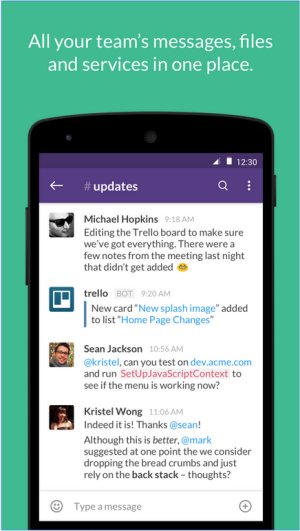
Slack has recently released version 4.51.180, reinforcing its role as a comprehensive team communication platform. This tool centralizes team communications through real-time messaging, file sharing, and both one-on-one and group conversations.
Overview of Slack's Capabilities
Slack is designed to minimize the use of email and enhance collaboration among teams. Its intuitive interface allows for real-time chatting, video calls, and file sharing, making it indispensable for businesses and remote teams. The platform's standout feature is its organized Channels, which categorize discussions by project, department, or topic, allowing users to maintain focus and easily access relevant information. In addition to Channels, direct messaging facilitates quick conversations.
Slack also excels in its extensive integration capabilities, connecting with numerous productivity applications such as Google Drive, Trello, Zoom, and Asana. This transforms Slack from a mere messaging tool into a central hub for collaboration, project management, and workflow automation. Key features include:
- Channels & Direct Messages: Organizes discussions effectively.
- File Sharing: Directly upload files within chats.
- Integrations: Connects with a plethora of third-party apps.
- Searchable History: Effortlessly retrieve past messages.
- Automation & Bots: Utilize Slackbot for reminders and FAQs.
- Voice & Video Calls: Facilitate communication without switching platforms.
Pricing Structure
Slack offers a free plan that serves as a good introduction, allowing access to 90 days of message history, 10 integrations, and one-on-one video calls. For teams needing more capabilities, paid plans like Pro, Business+, and Enterprise Grid provide increased message history, advanced integrations, and enhanced security features.
Comparison with Competitors
In comparison to alternatives like Microsoft Teams and Google Chat, Slack is noted for its user-friendly design and adaptability, making it particularly beneficial for remote teams. However, its free plan's limitations on message history and integrations can hinder growth, and costs can accumulate for larger organizations.
Pros & Cons
*Pros:*
- Intuitive interface
- Extensive third-party integrations
- Organized communication via Channels
- Cross-device functionality
- Searchable history with paid plans
*Cons:*
- 90-day limit on message history in the free plan
- Potential for notification overload
- Paid plans can be costly for larger teams
Conclusion
Overall, Slack remains a top choice for teams seeking to enhance communication and productivity. With its robust feature set and seamless user experience, it serves as a vital collaboration tool for diverse teams, provided they can manage costs effectively. As organizations strive for streamlined communication and integrated workflows, Slack continues to be a reliable partner in achieving these goals.
Future Developments
As work environments evolve, Slack is likely to continue expanding its features and integrations to meet the changing demands of teamwork. Enhanced AI capabilities, better notification management, and more robust security measures could be on the horizon, ensuring that Slack remains at the forefront of team collaboration tools
Overview of Slack's Capabilities
Slack is designed to minimize the use of email and enhance collaboration among teams. Its intuitive interface allows for real-time chatting, video calls, and file sharing, making it indispensable for businesses and remote teams. The platform's standout feature is its organized Channels, which categorize discussions by project, department, or topic, allowing users to maintain focus and easily access relevant information. In addition to Channels, direct messaging facilitates quick conversations.
Slack also excels in its extensive integration capabilities, connecting with numerous productivity applications such as Google Drive, Trello, Zoom, and Asana. This transforms Slack from a mere messaging tool into a central hub for collaboration, project management, and workflow automation. Key features include:
- Channels & Direct Messages: Organizes discussions effectively.
- File Sharing: Directly upload files within chats.
- Integrations: Connects with a plethora of third-party apps.
- Searchable History: Effortlessly retrieve past messages.
- Automation & Bots: Utilize Slackbot for reminders and FAQs.
- Voice & Video Calls: Facilitate communication without switching platforms.
Pricing Structure
Slack offers a free plan that serves as a good introduction, allowing access to 90 days of message history, 10 integrations, and one-on-one video calls. For teams needing more capabilities, paid plans like Pro, Business+, and Enterprise Grid provide increased message history, advanced integrations, and enhanced security features.
Comparison with Competitors
In comparison to alternatives like Microsoft Teams and Google Chat, Slack is noted for its user-friendly design and adaptability, making it particularly beneficial for remote teams. However, its free plan's limitations on message history and integrations can hinder growth, and costs can accumulate for larger organizations.
Pros & Cons
*Pros:*
- Intuitive interface
- Extensive third-party integrations
- Organized communication via Channels
- Cross-device functionality
- Searchable history with paid plans
*Cons:*
- 90-day limit on message history in the free plan
- Potential for notification overload
- Paid plans can be costly for larger teams
Conclusion
Overall, Slack remains a top choice for teams seeking to enhance communication and productivity. With its robust feature set and seamless user experience, it serves as a vital collaboration tool for diverse teams, provided they can manage costs effectively. As organizations strive for streamlined communication and integrated workflows, Slack continues to be a reliable partner in achieving these goals.
Future Developments
As work environments evolve, Slack is likely to continue expanding its features and integrations to meet the changing demands of teamwork. Enhanced AI capabilities, better notification management, and more robust security measures could be on the horizon, ensuring that Slack remains at the forefront of team collaboration tools
Slack 4.51.180 released
Slack puts all your team communications in one place wherever you go with real-time messaging, file sharing, and one-to-one and group conversations.