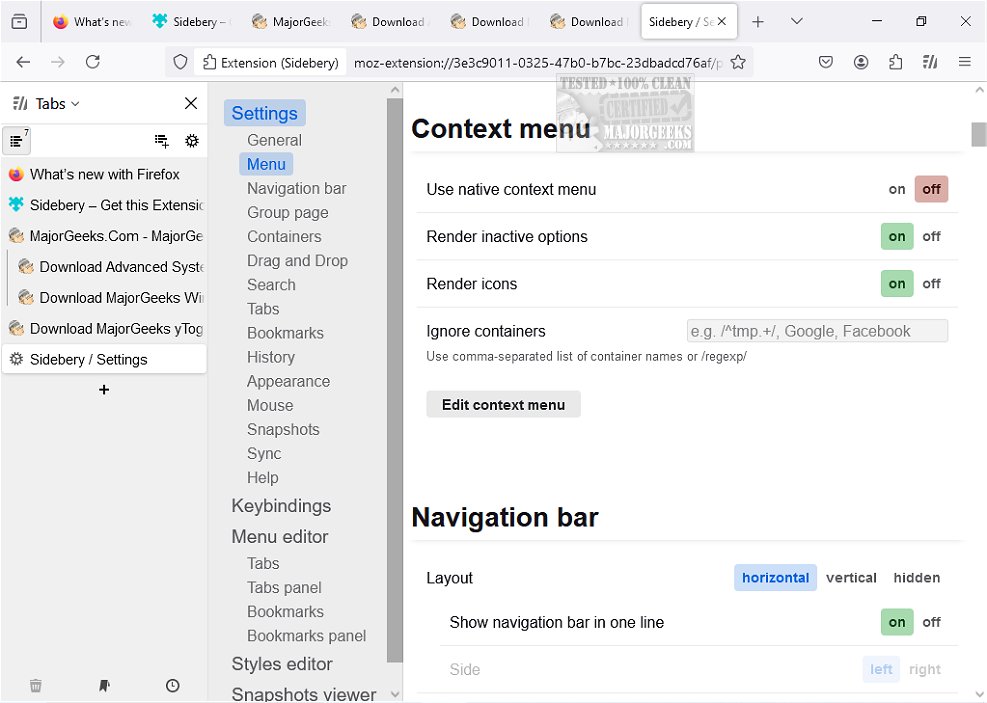
Sidebery, a versatile sidebar add-on for Firefox, has recently released version 5.5.2, enhancing its array of customizable panels designed to improve user navigation and organization. The add-on features a tree-structured tab list that allows users to manage their open tabs efficiently. Key functionalities include personalized bookmarks, browsing history access, and an overall emphasis on providing a fast and customizable user experience.
Upon installation, Sidebery's icon opens a sidebar housing all your tabs, which can be positioned to the left or right of the browser as per user preference. New tabs appear within this sidebar, and users have the flexibility to arrange them, create containers for specific pages, and organize tasks into panels, which is especially useful for maintaining focus on multiple projects while browsing.
The add-on's settings menu is packed with customization options, letting users tailor the sidebar's behavior, context menus, tab interactions, and even the sidebar's visual theme. Moreover, Sidebery supports cross-device synchronization, allowing users to maintain their preferred settings across different devices.
Sidebery's features include:
Tabs:
- Flat list or tree format with adjustable tree limits.
- Grouping tabs into folders for better organization.
- Automatic or manual tab colorization based on domains or URLs.
- Sorting options by title, URL, or access time.
- Automatic unloading of inactive tabs in folded branches or panels.
- Customizable tab titles.
Bookmarks:
- View in tree or chronological order.
- Sorting by name, URL, or creation time.
- Basic bookmark operations like open, create, edit, or delete.
- Highlighting open bookmarks and tab activation without opening duplicates.
- Automatic deletion of bookmarks upon opening from designated folders.
Tabs/Bookmark Panels:
- Organize browsing with dedicated panels.
- Convert between open tabs and bookmarks seamlessly.
- Auto-move tabs by URL to configured panels.
Containers:
- Bind containers to tabs for organized browsing.
- Reopen tabs in specific containers automatically based on URLs.
- Proxy configuration and UserAgent header setup for container tabs.
Customizable Context Menu:
- Modify the context menu for tabs and bookmarks with customizable options, sub-menus, and separators.
Customizable Mouse/Keyboard Controls:
- Enable mouse-wheel tab switching and configure drag-and-drop behaviors.
- A growing list of customizable mouse and keyboard actions.
Customizable Styles:
- Full control over the sidebar and group page styles through CSS variables.
Snapshots:
- Automatic snapshots to preserve information about open windows and tabs.
Overall, Sidebery stands out as a powerful tool for Firefox users looking to streamline their browsing experience with extensive customization options. The new version offers numerous enhancements, making it a vital addition for anyone seeking better organization and efficiency in their web navigation.
As digital browsing continues to evolve, tools like Sidebery are crucial for enabling users to tailor their online experiences, particularly in an increasingly multi-tasking world. With continuous updates and feature enhancements, Sidebery is poised to remain a top choice for Firefox users looking for a more organized and personalized browsing environment
Upon installation, Sidebery's icon opens a sidebar housing all your tabs, which can be positioned to the left or right of the browser as per user preference. New tabs appear within this sidebar, and users have the flexibility to arrange them, create containers for specific pages, and organize tasks into panels, which is especially useful for maintaining focus on multiple projects while browsing.
The add-on's settings menu is packed with customization options, letting users tailor the sidebar's behavior, context menus, tab interactions, and even the sidebar's visual theme. Moreover, Sidebery supports cross-device synchronization, allowing users to maintain their preferred settings across different devices.
Sidebery's features include:
Tabs:
- Flat list or tree format with adjustable tree limits.
- Grouping tabs into folders for better organization.
- Automatic or manual tab colorization based on domains or URLs.
- Sorting options by title, URL, or access time.
- Automatic unloading of inactive tabs in folded branches or panels.
- Customizable tab titles.
Bookmarks:
- View in tree or chronological order.
- Sorting by name, URL, or creation time.
- Basic bookmark operations like open, create, edit, or delete.
- Highlighting open bookmarks and tab activation without opening duplicates.
- Automatic deletion of bookmarks upon opening from designated folders.
Tabs/Bookmark Panels:
- Organize browsing with dedicated panels.
- Convert between open tabs and bookmarks seamlessly.
- Auto-move tabs by URL to configured panels.
Containers:
- Bind containers to tabs for organized browsing.
- Reopen tabs in specific containers automatically based on URLs.
- Proxy configuration and UserAgent header setup for container tabs.
Customizable Context Menu:
- Modify the context menu for tabs and bookmarks with customizable options, sub-menus, and separators.
Customizable Mouse/Keyboard Controls:
- Enable mouse-wheel tab switching and configure drag-and-drop behaviors.
- A growing list of customizable mouse and keyboard actions.
Customizable Styles:
- Full control over the sidebar and group page styles through CSS variables.
Snapshots:
- Automatic snapshots to preserve information about open windows and tabs.
Overall, Sidebery stands out as a powerful tool for Firefox users looking to streamline their browsing experience with extensive customization options. The new version offers numerous enhancements, making it a vital addition for anyone seeking better organization and efficiency in their web navigation.
As digital browsing continues to evolve, tools like Sidebery are crucial for enabling users to tailor their online experiences, particularly in an increasingly multi-tasking world. With continuous updates and feature enhancements, Sidebery is poised to remain a top choice for Firefox users looking for a more organized and personalized browsing environment
Sidebery for Firefox 5.5.2 released
Sidebery is a flexible Firefox sidebar add-on that provides a wide variety of customizable panels. Its tab list is structured in a tree format, providing a well-organized navigation experience.