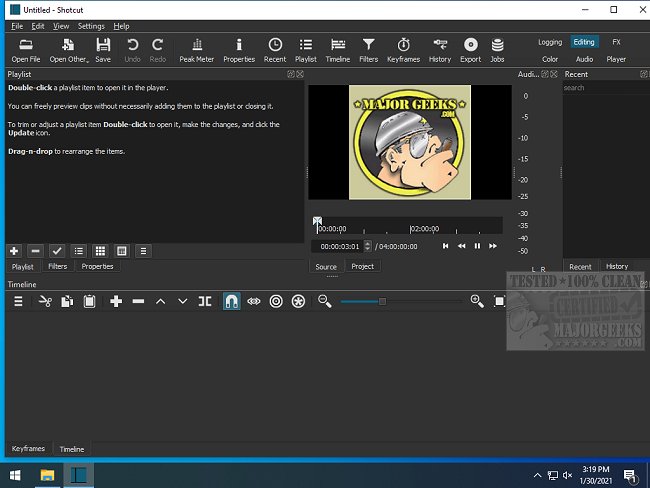
Shotcut is a free, open-source, cross-platform video editing software that supports a wide array of video file formats, making it a versatile choice for both casual users and professionals. Unlike many video editing tools that impose paywalls or watermark final products, Shotcut offers an extensive suite of features at no cost, making it an appealing option for anyone looking to edit videos without breaking the bank.
Why Shotcut Stands Out
Shotcut is not designed for flashy templates or gimmicky effects; it focuses on delivering robust editing capabilities. Its integration with FFmpeg allows for the handling of various formats, from standard MP4s to high-resolution 4K videos. The user-friendly drag-and-drop timeline simplifies the editing process, enabling users to efficiently cut, edit, and enhance their videos.
The software includes essential video editing tools such as filters, transitions, keyframe animations, and chroma key for green screen effects. Additionally, it provides solid audio editing features, including equalization, compression, and real-time audio analysis. With GPU acceleration, Shotcut ensures smoother playback and quicker exports, particularly beneficial for large files, although users may encounter some quirks in this area.
Practical Applications of Shotcut
Shotcut is ideal for transforming raw footage from personal events—like birthday parties, family gatherings, or fun outings—into polished videos that can be shared with loved ones. Users can easily add transitions, captions, and background music, and utilize slow-motion effects for memorable moments. The software is well-suited for creating vlogs, educational tutorials, or gaming highlight reels, with features that allow for text and image motion through keyframe animations.
Key Features of Shotcut:
- Multi-format timeline supporting various resolutions and frame rates.
- Screen, webcam, and audio capture (Linux only).
- Network stream playback capabilities.
- JACK Transport Sync and deinterlacing for improved audio-video sync and video quality.
- Comprehensive media management tools and customizable user interface.
- Encoding and transcoding support for numerous formats and codecs.
- Capture and streaming options from various sources.
Pros and Cons
Pros:
- Completely free and open-source with no hidden fees or watermarks.
- Supports a vast range of video and audio formats.
- Advanced features including keyframes and GPU acceleration.
- Compatible with Windows, Mac, and Linux operating systems.
Cons:
- The user interface may feel outdated compared to premium options.
- A steeper learning curve for beginners.
- Interface may become unstable with excessive item movement.
- Lacks a built-in asset library, requiring external sourcing for music and effects.
Geek Verdict
While Shotcut may have its rough edges, it provides an impressive editing suite for those willing to invest time in learning its functionalities. Whether you are compiling family memories or starting a YouTube channel, Shotcut empowers users to create without limitations, making it a formidable choice in the realm of video editing software.
In conclusion, Shotcut stands as a testament to the capabilities of open-source software, proving that powerful tools can be accessible to everyone. As it continues to evolve, users can expect ongoing enhancements and updates that further refine its features and usability
Why Shotcut Stands Out
Shotcut is not designed for flashy templates or gimmicky effects; it focuses on delivering robust editing capabilities. Its integration with FFmpeg allows for the handling of various formats, from standard MP4s to high-resolution 4K videos. The user-friendly drag-and-drop timeline simplifies the editing process, enabling users to efficiently cut, edit, and enhance their videos.
The software includes essential video editing tools such as filters, transitions, keyframe animations, and chroma key for green screen effects. Additionally, it provides solid audio editing features, including equalization, compression, and real-time audio analysis. With GPU acceleration, Shotcut ensures smoother playback and quicker exports, particularly beneficial for large files, although users may encounter some quirks in this area.
Practical Applications of Shotcut
Shotcut is ideal for transforming raw footage from personal events—like birthday parties, family gatherings, or fun outings—into polished videos that can be shared with loved ones. Users can easily add transitions, captions, and background music, and utilize slow-motion effects for memorable moments. The software is well-suited for creating vlogs, educational tutorials, or gaming highlight reels, with features that allow for text and image motion through keyframe animations.
Key Features of Shotcut:
- Multi-format timeline supporting various resolutions and frame rates.
- Screen, webcam, and audio capture (Linux only).
- Network stream playback capabilities.
- JACK Transport Sync and deinterlacing for improved audio-video sync and video quality.
- Comprehensive media management tools and customizable user interface.
- Encoding and transcoding support for numerous formats and codecs.
- Capture and streaming options from various sources.
Pros and Cons
Pros:
- Completely free and open-source with no hidden fees or watermarks.
- Supports a vast range of video and audio formats.
- Advanced features including keyframes and GPU acceleration.
- Compatible with Windows, Mac, and Linux operating systems.
Cons:
- The user interface may feel outdated compared to premium options.
- A steeper learning curve for beginners.
- Interface may become unstable with excessive item movement.
- Lacks a built-in asset library, requiring external sourcing for music and effects.
Geek Verdict
While Shotcut may have its rough edges, it provides an impressive editing suite for those willing to invest time in learning its functionalities. Whether you are compiling family memories or starting a YouTube channel, Shotcut empowers users to create without limitations, making it a formidable choice in the realm of video editing software.
In conclusion, Shotcut stands as a testament to the capabilities of open-source software, proving that powerful tools can be accessible to everyone. As it continues to evolve, users can expect ongoing enhancements and updates that further refine its features and usability
Shotcut 26.6.25 released
Shotcut is an Open Source, cross-platform video editor capable of converting and editing video files in various formats.