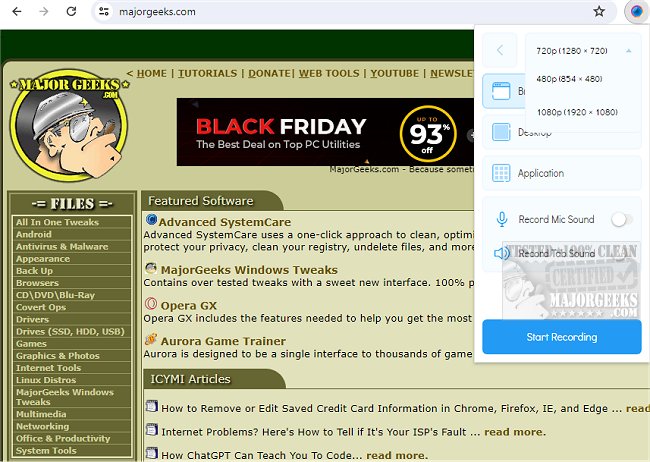
Scrnli - Screenshot and Screen Recorder Tool has released version 4.3.10, enhancing its capabilities as a comprehensive content creation tool available as a free Chrome extension. This tool enables users to take screenshots and record their screens effortlessly, and it also provides a variety of editing options, allowing for easy downloads and sharing.
Beyond basic screen capturing and recording functionalities, Scrnli offers advanced features that facilitate the creation of diverse content. Users can record from their display monitor or webcam, saving the videos in various formats for convenient sharing with team members or loved ones. Additionally, the tool includes a built-in feature for online video file conversions, ensuring compatibility across different devices.
Capturing screens is made simple with the option to select either the entire page or a specific area, and users can easily annotate their captures with text, shapes, lines, or arrows to enhance communication. The user-friendly interface allows for quick access to necessary features, promoting efficient collaboration without the need for lengthy textual explanations.
With Scrnli, sharing files is straightforward; users can generate links for instant sharing or save content directly to their devices. There is even an option to print materials for offline use, making it a versatile solution for various content creation needs.
In summary, Scrnli - Screenshot and Screen Recorder Tool is an all-in-one application ideal for users looking to create high-quality content effortlessly. It combines the functionality of screenshot capturing, video recording, and file conversion with user-friendly features that promote easy sharing and collaboration. As technology continues to evolve, tools like Scrnli will likely expand their capabilities further, possibly incorporating advanced features such as cloud storage integration, enhanced collaboration tools, and improved editing functionalities to meet the growing demands of users in an increasingly digital workspace
Beyond basic screen capturing and recording functionalities, Scrnli offers advanced features that facilitate the creation of diverse content. Users can record from their display monitor or webcam, saving the videos in various formats for convenient sharing with team members or loved ones. Additionally, the tool includes a built-in feature for online video file conversions, ensuring compatibility across different devices.
Capturing screens is made simple with the option to select either the entire page or a specific area, and users can easily annotate their captures with text, shapes, lines, or arrows to enhance communication. The user-friendly interface allows for quick access to necessary features, promoting efficient collaboration without the need for lengthy textual explanations.
With Scrnli, sharing files is straightforward; users can generate links for instant sharing or save content directly to their devices. There is even an option to print materials for offline use, making it a versatile solution for various content creation needs.
In summary, Scrnli - Screenshot and Screen Recorder Tool is an all-in-one application ideal for users looking to create high-quality content effortlessly. It combines the functionality of screenshot capturing, video recording, and file conversion with user-friendly features that promote easy sharing and collaboration. As technology continues to evolve, tools like Scrnli will likely expand their capabilities further, possibly incorporating advanced features such as cloud storage integration, enhanced collaboration tools, and improved editing functionalities to meet the growing demands of users in an increasingly digital workspace
Scrnli - Screenshot and Screen Recorder Tool 4.3.10 released
Scrnli - Screenshot & Screen Recorder Tool lets you take screenshots or screen recordings, edit, download, and share through a free, easy-to-use Chrome extension.
Scrnli - Screenshot and Screen Recorder Tool 4.3.10 released @ MajorGeeks