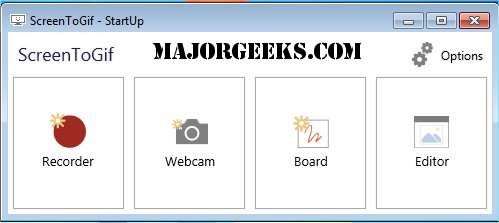
ScreenToGif is a lightweight application that enables users to record specific areas of their screen and save the recordings as animated GIFs or videos. This tool is particularly useful for those who prefer visual demonstrations over lengthy written explanations, making it ideal for tutorials, bug reports, and quick showcases of interesting finds.
Why Choose ScreenToGif?
Unlike many other screen recording tools, ScreenToGif combines recording and editing functionalities into one seamless interface, eliminating the need to switch between multiple applications. This efficiency is a significant advantage for users who want to create high-quality content without the hassle of complex software.
Practical Applications
Imagine assisting a colleague with VPN login procedures. Instead of sending an elaborate message, you can record your screen to demonstrate the steps clearly. Similarly, if you encounter a UI bug that is difficult to explain, you can capture the issue in real-time, edit out unnecessary parts, and send a crisp, clear report to your development team. The tool is also invaluable for UX designers and product developers, as it allows for quick demonstrations of prototype interactions or app features through short GIF snippets.
User-Friendly Features
Upon launching ScreenToGif, users can choose from four main modes:
1. Recorder: This mode allows you to select a resizable area of your screen to record. You can pause your recording with a simple keystroke and resume when ready.
2. Webcam: Perfect for adding facecam overlays to tutorials or reaction videos.
3. Board: Serves as a digital whiteboard for quick sketches or educational purposes.
4. Editor: This is where the real editing magic happens. After recording, your media appears in a timeline format where you can trim clips, add text, blur sensitive information, and insert transitions. You can save your project and return to it later, ensuring you can edit at your convenience.
Once satisfied with your creation, you can export it in various formats (GIF, AVI, MP4) and customize settings like resolution, frame rate, and looping options, providing flexibility that exceeds expectations for a free tool.
Performance and Accessibility
ScreenToGif is impressively compact, under 5MB in size, open-source, and compatible with recent Windows versions. It operates without cluttering your system and does not run in the background unnecessarily. Users can even run multiple instances simultaneously, making it a versatile choice for various projects. The software supports drag-and-drop functionality and allows for frame-by-frame editing, akin to a Photoshop timeline.
Conclusion
ScreenToGif is a must-have tool for anyone involved in teaching, software troubleshooting, or content creation that benefits from visual demonstration. Its intuitive design, combined with powerful editing capabilities, makes it a valuable addition to any workflow. Once integrated into your routine, it’s likely to become indispensable.
Explore More
For those interested in optimizing their Windows experience, consider checking out related guides on taking screenshots or restoring the Windows Photo Viewer
Why Choose ScreenToGif?
Unlike many other screen recording tools, ScreenToGif combines recording and editing functionalities into one seamless interface, eliminating the need to switch between multiple applications. This efficiency is a significant advantage for users who want to create high-quality content without the hassle of complex software.
Practical Applications
Imagine assisting a colleague with VPN login procedures. Instead of sending an elaborate message, you can record your screen to demonstrate the steps clearly. Similarly, if you encounter a UI bug that is difficult to explain, you can capture the issue in real-time, edit out unnecessary parts, and send a crisp, clear report to your development team. The tool is also invaluable for UX designers and product developers, as it allows for quick demonstrations of prototype interactions or app features through short GIF snippets.
User-Friendly Features
Upon launching ScreenToGif, users can choose from four main modes:
1. Recorder: This mode allows you to select a resizable area of your screen to record. You can pause your recording with a simple keystroke and resume when ready.
2. Webcam: Perfect for adding facecam overlays to tutorials or reaction videos.
3. Board: Serves as a digital whiteboard for quick sketches or educational purposes.
4. Editor: This is where the real editing magic happens. After recording, your media appears in a timeline format where you can trim clips, add text, blur sensitive information, and insert transitions. You can save your project and return to it later, ensuring you can edit at your convenience.
Once satisfied with your creation, you can export it in various formats (GIF, AVI, MP4) and customize settings like resolution, frame rate, and looping options, providing flexibility that exceeds expectations for a free tool.
Performance and Accessibility
ScreenToGif is impressively compact, under 5MB in size, open-source, and compatible with recent Windows versions. It operates without cluttering your system and does not run in the background unnecessarily. Users can even run multiple instances simultaneously, making it a versatile choice for various projects. The software supports drag-and-drop functionality and allows for frame-by-frame editing, akin to a Photoshop timeline.
Conclusion
ScreenToGif is a must-have tool for anyone involved in teaching, software troubleshooting, or content creation that benefits from visual demonstration. Its intuitive design, combined with powerful editing capabilities, makes it a valuable addition to any workflow. Once integrated into your routine, it’s likely to become indispensable.
Explore More
For those interested in optimizing their Windows experience, consider checking out related guides on taking screenshots or restoring the Windows Photo Viewer
ScreenToGif 2.43.2 released
ScreenToGif is a small tool that allows you to record a selected area of your screen and save it as a GIF.