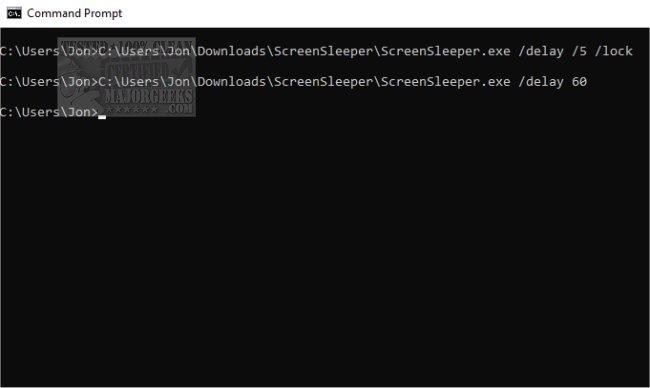
ScreenSleeper version 1.4.0 has been released, offering users a straightforward way to manage their monitors and PC security through the Command Line interface. This application is designed to simplify the process of putting monitors into standby, idle mode, or locking the PC, even for those who may not be comfortable with Command Line commands.
Key features include the ability to set delays before the monitors turn off, control standby time, and automatically lock the PC for security when the monitors are shut down. Users can easily implement predefined commands based on specific time variables, allowing for a customizable experience.
For example, users can execute commands to turn off monitors immediately, after a set delay, or when the system has been idle for a certain period. Additionally, commands include options for locking the computer post-monitor shutdown and putting monitors into standby mode before turning them off.
The application operates using various command-line parameters, such as:
- `/idle` to wait for a specified idle time before executing,
- `/delay` to define how long to wait before turning off the monitors,
- `/standby` to set the standby duration before shutdown,
- `/lock` to enable PC locking after the monitors are turned off.
Furthermore, users can access help and detailed instructions through the command `/h` or `/?`.
To enhance user experience, the application could be extended with a graphical user interface (GUI) option for those who prefer not to use the Command Line. Additionally, integrating scheduling features could allow users to automate monitor management based on their daily routines, providing even more control over their PC environment. Lastly, incorporating feedback mechanisms could help users suggest new features or report issues, ensuring continuous improvement of the application
Key features include the ability to set delays before the monitors turn off, control standby time, and automatically lock the PC for security when the monitors are shut down. Users can easily implement predefined commands based on specific time variables, allowing for a customizable experience.
For example, users can execute commands to turn off monitors immediately, after a set delay, or when the system has been idle for a certain period. Additionally, commands include options for locking the computer post-monitor shutdown and putting monitors into standby mode before turning them off.
The application operates using various command-line parameters, such as:
- `/idle` to wait for a specified idle time before executing,
- `/delay` to define how long to wait before turning off the monitors,
- `/standby` to set the standby duration before shutdown,
- `/lock` to enable PC locking after the monitors are turned off.
Furthermore, users can access help and detailed instructions through the command `/h` or `/?`.
To enhance user experience, the application could be extended with a graphical user interface (GUI) option for those who prefer not to use the Command Line. Additionally, integrating scheduling features could allow users to automate monitor management based on their daily routines, providing even more control over their PC environment. Lastly, incorporating feedback mechanisms could help users suggest new features or report issues, ensuring continuous improvement of the application
ScreenSleeper 1.4.0 released
ScreenSleeper allows you to control your monitor(s) standby, idle, and lock your PC via the Command Line.