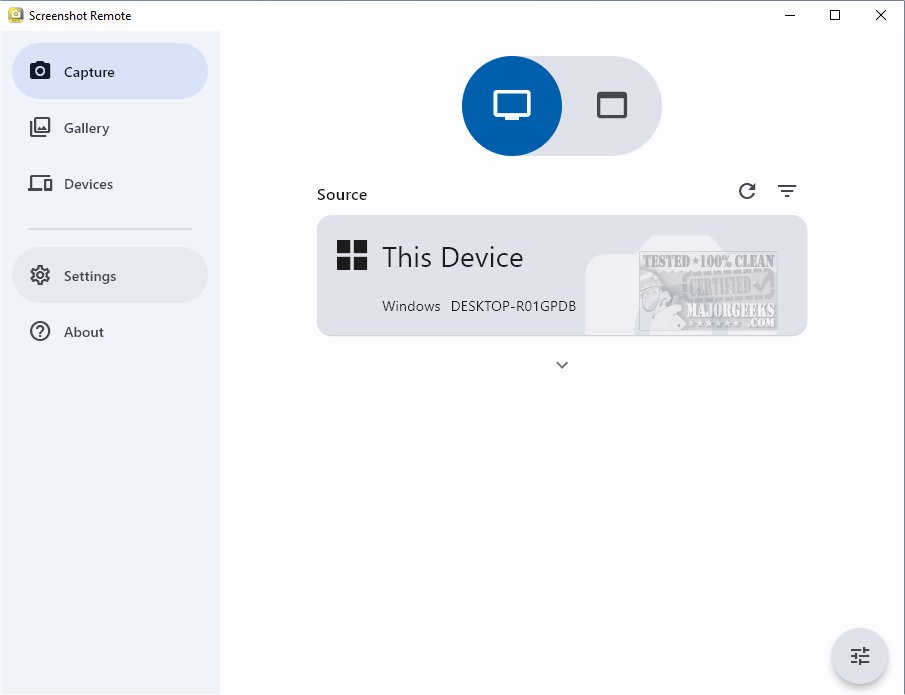
Screenshot Remote, now at version 1.1.5, is an innovative tool designed to efficiently capture and organize screenshots across various platforms, providing users with a secure management solution. This application simplifies the process of capturing and categorizing screenshots from desktops, web browsers, and mobile devices, allowing users to consolidate their visual content in one accessible location.
Key Features and Functionality
One of the standout features of Screenshot Remote is its ability to capture screenshots on remote computers using a smartphone, tablet, or another computer connected via a local network or Wi-Fi. This offers unparalleled convenience and flexibility, catering to diverse use cases ranging from personal needs to business applications such as technical support and monitoring.
While Screenshot Remote is designed to be multi-platform, it comes with some limitations. Users can fully utilize screen capture functionalities on PC and Mac, but restrictions apply to Android and iOS devices due to strict policy guidelines, limiting screenshot capabilities to remote computers.
Security Measures
Security is a top priority for Screenshot Remote. The application ensures that all data remains stored locally on user devices, eliminating concerns about external server uploads. The transfer of images and commands between devices occurs securely over a local network or Wi-Fi, employing industry-standard encryption protocols. Furthermore, users can customize their screen capture settings, tailoring their experience to meet specific requirements.
Multi-Monitor Support and User Experience
For users with multiple monitors, Screenshot Remote offers the ability to select which monitor to capture, enhancing precision during the screenshot process. Additionally, the Gallery tab functions as a dedicated storage area for screenshots, equipped with editing tools and sharing options to streamline the workflow from capture to usage.
To establish a secure connection for seamless screenshot management, users must initiate a pairing process between their devices. Pairing requests can be sent directly from the Capture tab, and a dedicated Devices tab allows users to manage their paired devices effectively.
Conclusion and Future Potential
With its user-friendly interface and robust features, Screenshot Remote 1.1.5 is poised to become an essential tool for individuals and businesses alike. Its commitment to security, multi-monitor support, and efficient management of visual content sets it apart in the screenshot capturing landscape. As the application continues to evolve, future updates may further enhance functionality and expand compatibility across more devices, ensuring that users have the best possible experience in managing their screenshots effectively.
Related Resources:
- How to Take Screenshots in Windows 10 & 11
- How to Create Screen Snip Shortcut in Windows 10 & 11
- How to Take High-Resolution Screenshots in Windows 10 & 1
Key Features and Functionality
One of the standout features of Screenshot Remote is its ability to capture screenshots on remote computers using a smartphone, tablet, or another computer connected via a local network or Wi-Fi. This offers unparalleled convenience and flexibility, catering to diverse use cases ranging from personal needs to business applications such as technical support and monitoring.
While Screenshot Remote is designed to be multi-platform, it comes with some limitations. Users can fully utilize screen capture functionalities on PC and Mac, but restrictions apply to Android and iOS devices due to strict policy guidelines, limiting screenshot capabilities to remote computers.
Security Measures
Security is a top priority for Screenshot Remote. The application ensures that all data remains stored locally on user devices, eliminating concerns about external server uploads. The transfer of images and commands between devices occurs securely over a local network or Wi-Fi, employing industry-standard encryption protocols. Furthermore, users can customize their screen capture settings, tailoring their experience to meet specific requirements.
Multi-Monitor Support and User Experience
For users with multiple monitors, Screenshot Remote offers the ability to select which monitor to capture, enhancing precision during the screenshot process. Additionally, the Gallery tab functions as a dedicated storage area for screenshots, equipped with editing tools and sharing options to streamline the workflow from capture to usage.
To establish a secure connection for seamless screenshot management, users must initiate a pairing process between their devices. Pairing requests can be sent directly from the Capture tab, and a dedicated Devices tab allows users to manage their paired devices effectively.
Conclusion and Future Potential
With its user-friendly interface and robust features, Screenshot Remote 1.1.5 is poised to become an essential tool for individuals and businesses alike. Its commitment to security, multi-monitor support, and efficient management of visual content sets it apart in the screenshot capturing landscape. As the application continues to evolve, future updates may further enhance functionality and expand compatibility across more devices, ensuring that users have the best possible experience in managing their screenshots effectively.
Related Resources:
- How to Take Screenshots in Windows 10 & 11
- How to Create Screen Snip Shortcut in Windows 10 & 11
- How to Take High-Resolution Screenshots in Windows 10 & 1
Screenshot Remote 1.1.5 released
Screenshot Remote seamlessly captures and organizes screenshots across different platforms while ensuring secure and efficient management.