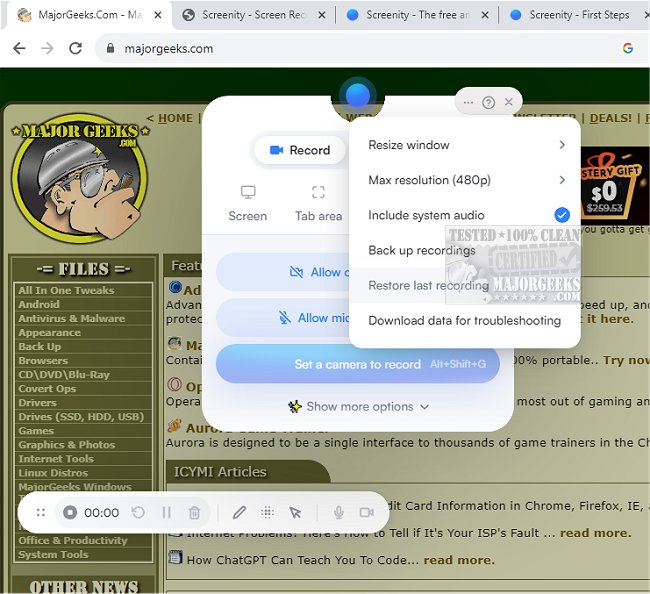
Screenity for Chrome has released version 4.6.0, enhancing its capabilities as a user-friendly screen recording extension. This tool allows users to capture high-quality videos of their screens with audio, making it ideal for creating tutorials, presentations, demos, and various video content without requiring a sign-in. Privacy-focused, Screenity is completely free, which adds to its appeal.
The extension offers unlimited recording options, enabling users to record their entire desktop, specific applications, or even their web camera. Users can capture audio from their microphone or internal sources and utilize push-to-talk features. One of Screenity's standout functions is its annotation capabilities, allowing users to add drawings, text, arrows, and shapes directly onto their recordings.
Additionally, Screenity integrates AI-powered backgrounds for camera recordings and includes a smooth zoom feature to emphasize certain areas of the screen. Users can also easily blur any sensitive information to maintain privacy. The comprehensive editing options let users cut, trim, or crop videos and adjust audio tracks as needed.
Screenity for Chrome also includes features such as setting alarms for automatic recording stoppage, exporting recordings as MP4, GIF, or WebM formats, and saving directly to Google Drive for easy sharing. Users can customize their recording experience with options like countdown timers and UI adjustments.
With no restrictions on the number or length of recordings, Screenity for Chrome stands out as a versatile tool for anyone looking to create high-quality video content effortlessly. Permissions for microphone and camera access are required to utilize all features fully.
In summary, Screenity for Chrome 4.6.0 continues to enhance the screen recording experience with its user-friendly interface and robust features, making it an excellent choice for individuals and teams looking to create engaging visual content efficiently. Future updates may further refine its capabilities or introduce new features to enhance user experience
The extension offers unlimited recording options, enabling users to record their entire desktop, specific applications, or even their web camera. Users can capture audio from their microphone or internal sources and utilize push-to-talk features. One of Screenity's standout functions is its annotation capabilities, allowing users to add drawings, text, arrows, and shapes directly onto their recordings.
Additionally, Screenity integrates AI-powered backgrounds for camera recordings and includes a smooth zoom feature to emphasize certain areas of the screen. Users can also easily blur any sensitive information to maintain privacy. The comprehensive editing options let users cut, trim, or crop videos and adjust audio tracks as needed.
Screenity for Chrome also includes features such as setting alarms for automatic recording stoppage, exporting recordings as MP4, GIF, or WebM formats, and saving directly to Google Drive for easy sharing. Users can customize their recording experience with options like countdown timers and UI adjustments.
With no restrictions on the number or length of recordings, Screenity for Chrome stands out as a versatile tool for anyone looking to create high-quality video content effortlessly. Permissions for microphone and camera access are required to utilize all features fully.
In summary, Screenity for Chrome 4.6.0 continues to enhance the screen recording experience with its user-friendly interface and robust features, making it an excellent choice for individuals and teams looking to create engaging visual content efficiently. Future updates may further refine its capabilities or introduce new features to enhance user experience
Screenity for Chrome 4.6.0 released
Screenity for Chrome is a user-friendly screen recording extension designed to provide a seamless and unlimited recording experience.