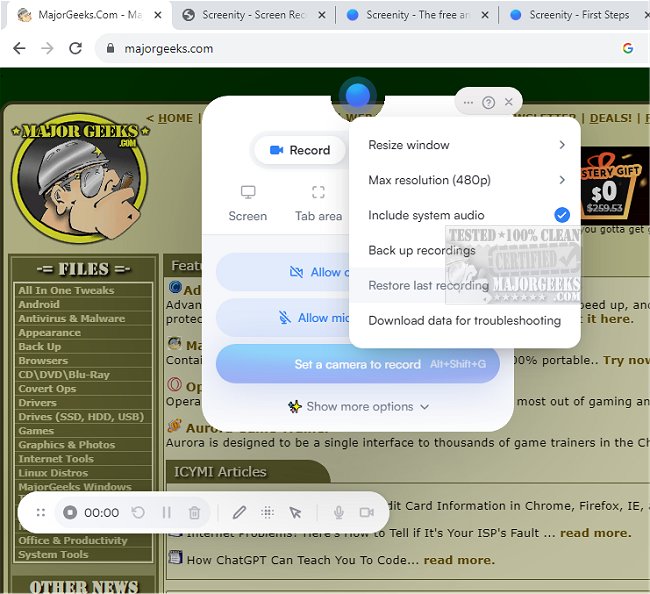
Screenity for Chrome has recently released version 4.4.9, further enhancing its capabilities as a screen recording extension. This user-friendly tool allows users to effortlessly record high-quality video content from their screen, complete with audio, annotations, and highlights. With its intuitive interface and customizable options, Screenity is ideal for creating tutorials, demos, presentations, and more, all without the need for a sign-in, ensuring a seamless experience for users.
As a privacy-centric screen recorder, Screenity excels in versatility, enabling users to capture videos from their entire desktop, specific applications, or even their webcam. It supports both microphone and internal audio recording and features like push-to-talk for convenient audio capture. The annotation tools allow users to draw on the screen, add text, shapes, and arrows, enhancing the informative value of their recordings.
The latest version introduces AI-powered camera backgrounds and a blur effect to improve video quality. Users can smoothly zoom in on specific areas and blur sensitive information to maintain privacy. The built-in editor offers comprehensive options for cutting, trimming, or cropping videos, as well as the ability to highlight clicks and cursor movements or activate spotlight mode for emphasis.
Screenity also includes practical features like setting alarms to automatically stop recordings, exporting videos in formats such as mp4, gif, and WebM, and saving directly to Google Drive for easy sharing. Users can set countdowns before recording starts, hide user interface elements, and move them around as needed.
One of the standout benefits of Screenity for Chrome is its unlimited recording capability, allowing users to create as many videos as they want for any duration. The only requirement is granting permission for microphone and camera access.
In addition to its core features, Screenity can be a valuable tool for educators, marketers, and business professionals looking to create engaging, high-quality video content with ease. Its free and user-friendly nature makes it accessible to a broad audience, empowering users to communicate more effectively through visual content.
Overall, Screenity for Chrome version 4.4.9 is a powerful and flexible tool that meets the diverse needs of users seeking to document, present, and share their ideas through video
As a privacy-centric screen recorder, Screenity excels in versatility, enabling users to capture videos from their entire desktop, specific applications, or even their webcam. It supports both microphone and internal audio recording and features like push-to-talk for convenient audio capture. The annotation tools allow users to draw on the screen, add text, shapes, and arrows, enhancing the informative value of their recordings.
The latest version introduces AI-powered camera backgrounds and a blur effect to improve video quality. Users can smoothly zoom in on specific areas and blur sensitive information to maintain privacy. The built-in editor offers comprehensive options for cutting, trimming, or cropping videos, as well as the ability to highlight clicks and cursor movements or activate spotlight mode for emphasis.
Screenity also includes practical features like setting alarms to automatically stop recordings, exporting videos in formats such as mp4, gif, and WebM, and saving directly to Google Drive for easy sharing. Users can set countdowns before recording starts, hide user interface elements, and move them around as needed.
One of the standout benefits of Screenity for Chrome is its unlimited recording capability, allowing users to create as many videos as they want for any duration. The only requirement is granting permission for microphone and camera access.
In addition to its core features, Screenity can be a valuable tool for educators, marketers, and business professionals looking to create engaging, high-quality video content with ease. Its free and user-friendly nature makes it accessible to a broad audience, empowering users to communicate more effectively through visual content.
Overall, Screenity for Chrome version 4.4.9 is a powerful and flexible tool that meets the diverse needs of users seeking to document, present, and share their ideas through video
Screenity for Chrome 4.4.9 released
Screenity for Chrome is a user-friendly screen recording extension designed to provide a seamless and unlimited recording experience.