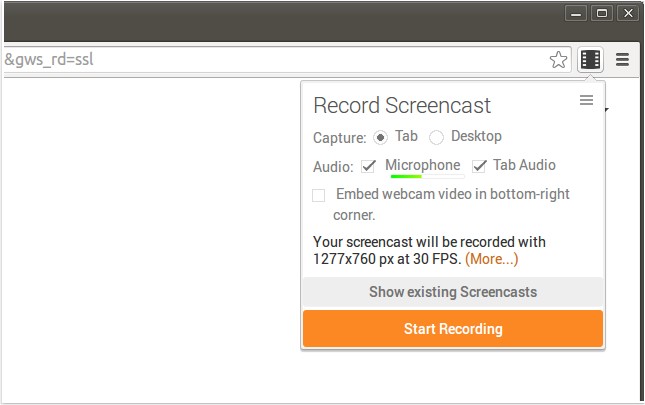
Screencastify has released version 4.23.0 of its screen recording extension for Chrome, designed to capture all screen activity along with audio. This makes it an ideal tool for creating YouTube tutorials, presentations, and more. The recordings are saved in WebM/vp8 format with Ogg Vorbis audio, and users can choose from various storage options, including saving to local disk, uploading directly to YouTube, or storing in Google Drive.
One of the standout features of Screencastify is its seamless integration with Google Drive, allowing users to access their recordings from anywhere while also conserving local storage, particularly beneficial for Chromebook users. Sharing content is made easy, as users can upload their recordings to YouTube with just a click, receiving a link for easy access. Furthermore, Screencastify enables users to add a webcam feed, enhancing the personal touch of their recordings, and offers customizable keyboard shortcuts for quick start recording.
In addition to its primary features, Screencastify provides users with additional resources, including tips on managing browser settings and troubleshooting common issues like video playback problems.
To extend this information, Screencastify continuously evolves by incorporating user feedback, potentially introducing new features such as advanced editing tools, improved video quality options, or enhanced collaboration features for teams. Future updates may also focus on expanding compatibility with various platforms or introducing analytics tools to help users track engagement with their recorded content. As remote learning and digital content creation become increasingly popular, tools like Screencastify are likely to remain essential for educators, content creators, and professionals alike
One of the standout features of Screencastify is its seamless integration with Google Drive, allowing users to access their recordings from anywhere while also conserving local storage, particularly beneficial for Chromebook users. Sharing content is made easy, as users can upload their recordings to YouTube with just a click, receiving a link for easy access. Furthermore, Screencastify enables users to add a webcam feed, enhancing the personal touch of their recordings, and offers customizable keyboard shortcuts for quick start recording.
In addition to its primary features, Screencastify provides users with additional resources, including tips on managing browser settings and troubleshooting common issues like video playback problems.
To extend this information, Screencastify continuously evolves by incorporating user feedback, potentially introducing new features such as advanced editing tools, improved video quality options, or enhanced collaboration features for teams. Future updates may also focus on expanding compatibility with various platforms or introducing analytics tools to help users track engagement with their recorded content. As remote learning and digital content creation become increasingly popular, tools like Screencastify are likely to remain essential for educators, content creators, and professionals alike
Screencastify for Chrome 4.23.0 released
Screencastify for Chrome will record all your screen activity including audio making it perfect for YouTube tutorials, presentations and more.