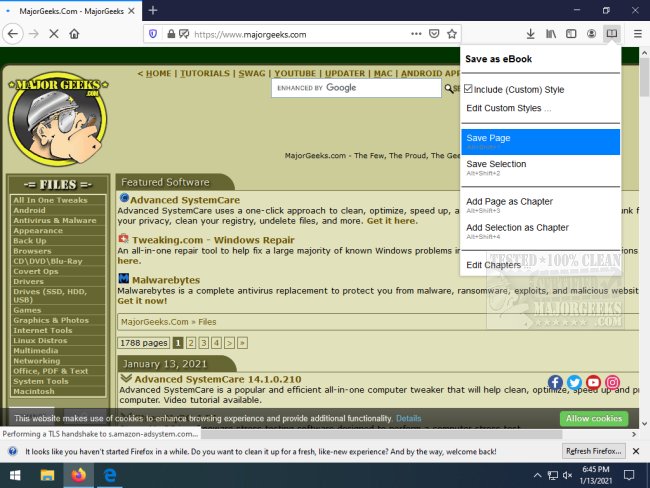
The "Save as eBook" extension for Chrome and Firefox has been updated to version 2.0.0, allowing users to save their favorite webpages in EPUB format with enhanced functionality. This user-friendly tool simplifies the process of saving content from the web: users simply click the extension icon and select the "save as eBook" option.
One of the key features is the ability to customize the saved eBook by including specific styles, editing custom CSS styles, and organizing content into chapters. Users can save entire pages or select specific content, making it ideal for capturing information from lengthy articles, recipes, or educational resources such as Wikipedia entries.
The extension retains all images and links from the original webpage, ensuring a comprehensive reading experience. For those who want to compile multi-page information into a single file, the "Add Page as Chapter" feature allows users to aggregate content from various sources seamlessly.
To read eBooks on tablets, users will need Calibre or a similar app to convert the EPUB files into MOBI format. This tool is particularly beneficial for students, educators, and anyone who needs to create tailored eBooks for easy reference.
In extending these features, future updates could include enhanced sharing options, integration with cloud storage services for easier access, or additional formatting tools to further customize the appearance of saved eBooks. Additionally, introducing a collaborative feature could allow users to share their created eBooks with peers, fostering a community of resource sharing and educational collaboration
One of the key features is the ability to customize the saved eBook by including specific styles, editing custom CSS styles, and organizing content into chapters. Users can save entire pages or select specific content, making it ideal for capturing information from lengthy articles, recipes, or educational resources such as Wikipedia entries.
The extension retains all images and links from the original webpage, ensuring a comprehensive reading experience. For those who want to compile multi-page information into a single file, the "Add Page as Chapter" feature allows users to aggregate content from various sources seamlessly.
To read eBooks on tablets, users will need Calibre or a similar app to convert the EPUB files into MOBI format. This tool is particularly beneficial for students, educators, and anyone who needs to create tailored eBooks for easy reference.
In extending these features, future updates could include enhanced sharing options, integration with cloud storage services for easier access, or additional formatting tools to further customize the appearance of saved eBooks. Additionally, introducing a collaborative feature could allow users to share their created eBooks with peers, fostering a community of resource sharing and educational collaboration
Save as eBook for Chrome and Firefox 2.0.0 released
Save as eBook for Chrome and Firefox allows you to save your favorite webpages in EPUB format incorporating several useful features.
Save as eBook for Chrome and Firefox 2.0.0 released @ MajorGeeks