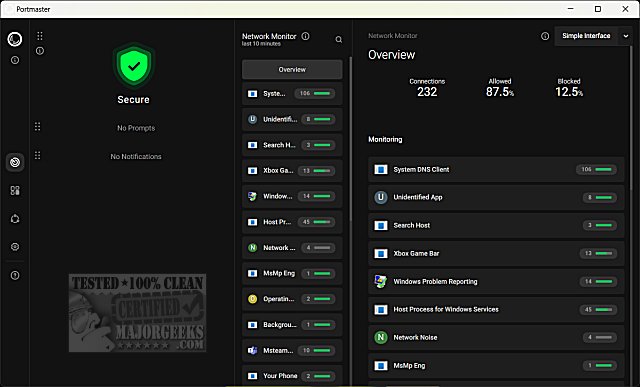
The recently released version 2.1.18 of Safing Portmaster is an open-source application designed to empower users by giving them greater control over their computer's network connections. The app features a straightforward setup process that allows users to customize default settings, including options for tracker blocking and secure DNS.
Upon completing the initial setup, users can access a dashboard that provides a comprehensive overview of their current security status, network activity, and connection details. The interface includes navigation shortcuts; however, some features may still be in development, such as a simplified interface that is currently non-functional.
Users can click on individual network connections to view detailed information, including the number of active connections, destination countries, and a history of connections made. Safing Portmaster not only enables users to monitor their network but also to block and manage all incoming and outgoing connections effectively.
In addition to Portmaster, there are various resources available for managing network connections through built-in Windows tools, such as the Windows Defender Firewall. These include instructions for allowing or blocking programs, adding context menu options, and restoring default settings in the firewall.
To extend this information further, Safing Portmaster's user interface is continuously being improved, with future updates expected to enhance functionality and usability. Users can look forward to more robust features that may include advanced analytics for connection monitoring, additional privacy settings, and integration with other security tools. As the application evolves, it aims to provide users with a more holistic view of their network activity while ensuring their online privacy and security are maintained
Upon completing the initial setup, users can access a dashboard that provides a comprehensive overview of their current security status, network activity, and connection details. The interface includes navigation shortcuts; however, some features may still be in development, such as a simplified interface that is currently non-functional.
Users can click on individual network connections to view detailed information, including the number of active connections, destination countries, and a history of connections made. Safing Portmaster not only enables users to monitor their network but also to block and manage all incoming and outgoing connections effectively.
In addition to Portmaster, there are various resources available for managing network connections through built-in Windows tools, such as the Windows Defender Firewall. These include instructions for allowing or blocking programs, adding context menu options, and restoring default settings in the firewall.
To extend this information further, Safing Portmaster's user interface is continuously being improved, with future updates expected to enhance functionality and usability. Users can look forward to more robust features that may include advanced analytics for connection monitoring, additional privacy settings, and integration with other security tools. As the application evolves, it aims to provide users with a more holistic view of their network activity while ensuring their online privacy and security are maintained
Safing Portmaster 2.1.18 released
Portmaster is a free and Open Source application that puts you back in charge of your computer's network connections.