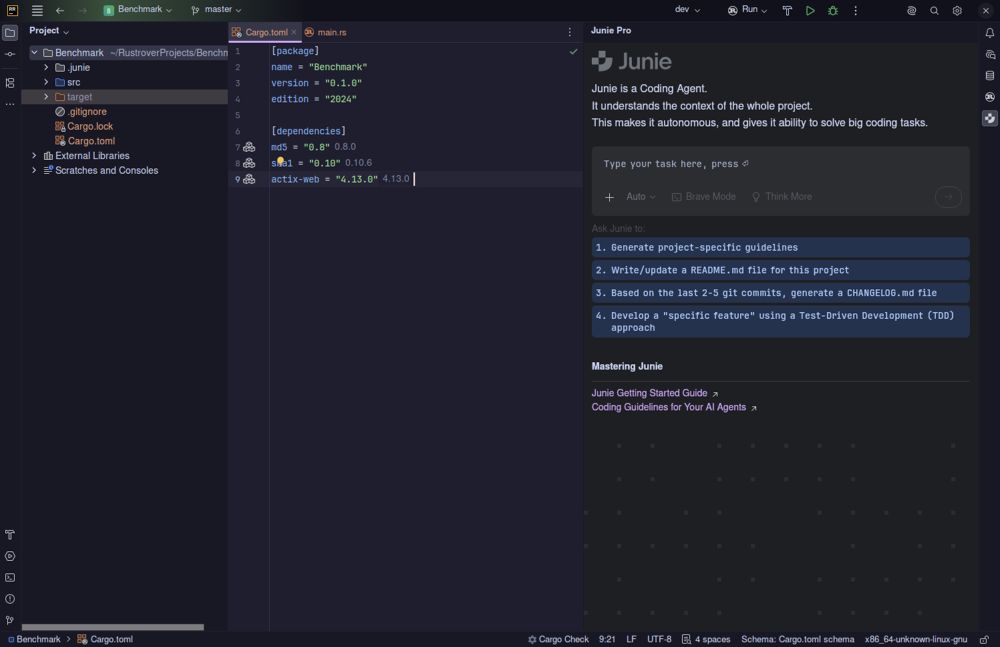
The latest version of RustRover is designed to streamline the development process for Rust programmers by eliminating the usual struggles associated with plugin installation and configuration. This integrated development environment (IDE) from JetBrains offers a comprehensive suite of tools necessary for writing, testing, and debugging Rust code right from the start.
Key Features of RustRover
RustRover sets itself apart by providing a zero-configuration setup that includes essential features like Cargo support, TOML editing, remote development capabilities, and Docker management. Users can simply open the IDE, point it to their Cargo.toml file, and start coding without the hassle of dealing with missing extensions or broken setups, a common frustration among developers using other editors like VS Code.
However, the trade-off for this convenience may be higher memory usage, as JetBrains IDEs are known for being resource-intensive. Users with older machines may experience slowdowns when handling large projects, while modern systems typically run the software without issues.
AI Features and Integration
RustRover includes built-in AI capabilities, allowing integration with various models such as Claude, GPT-4, and more, while also supporting JetBrains Junie and GitHub Copilot. The AI functions are designed to enhance the coding experience, offering context-aware code suggestions and efficient error handling patterns. The platform's transparency regarding costs is a plus, as users are not locked into a subscription model if they have existing API keys.
Collaboration and Database Tools
The IDE’s real-time collaboration feature facilitates remote pair programming, allowing teams to share project settings and configurations seamlessly. Git integration is also comprehensive, covering essential version control tasks without needing additional extensions. Additionally, RustRover includes robust database tools sourced from DataGrip, which simplifies database management directly within the IDE.
Licensing and Accessibility
RustRover is free for non-commercial use, making it an attractive option for hobbyists, learners, and open-source contributors. However, any commercial development work necessitates a paid license. This model provides a professional-grade Rust development environment without the typical costs associated with such tools.
Pros and Cons of RustRover
Pros:
- Comprehensive zero-configuration setup
- Native AI integration with contextual understanding
- Integrated database and Docker management tools
- Free for non-commercial users
Cons:
- High memory consumption, particularly on older systems
- Paid license required for commercial use
- User interface can feel cluttered for those seeking simplicity
- Limited plugin ecosystem compared to platforms like VS Code
Conclusion
RustRover presents a polished development experience that minimizes setup time and maximizes productivity for Rust developers. The IDE's powerful features and AI capabilities enhance the coding process, making it a compelling choice for everyday Rust development. While resource usage may be a concern for some users, the benefits in terms of reduced friction in project setup and management are significant. For developers looking to dive into Rust programming without the typical setup pains, RustRover is a robust solution worth considering
Key Features of RustRover
RustRover sets itself apart by providing a zero-configuration setup that includes essential features like Cargo support, TOML editing, remote development capabilities, and Docker management. Users can simply open the IDE, point it to their Cargo.toml file, and start coding without the hassle of dealing with missing extensions or broken setups, a common frustration among developers using other editors like VS Code.
However, the trade-off for this convenience may be higher memory usage, as JetBrains IDEs are known for being resource-intensive. Users with older machines may experience slowdowns when handling large projects, while modern systems typically run the software without issues.
AI Features and Integration
RustRover includes built-in AI capabilities, allowing integration with various models such as Claude, GPT-4, and more, while also supporting JetBrains Junie and GitHub Copilot. The AI functions are designed to enhance the coding experience, offering context-aware code suggestions and efficient error handling patterns. The platform's transparency regarding costs is a plus, as users are not locked into a subscription model if they have existing API keys.
Collaboration and Database Tools
The IDE’s real-time collaboration feature facilitates remote pair programming, allowing teams to share project settings and configurations seamlessly. Git integration is also comprehensive, covering essential version control tasks without needing additional extensions. Additionally, RustRover includes robust database tools sourced from DataGrip, which simplifies database management directly within the IDE.
Licensing and Accessibility
RustRover is free for non-commercial use, making it an attractive option for hobbyists, learners, and open-source contributors. However, any commercial development work necessitates a paid license. This model provides a professional-grade Rust development environment without the typical costs associated with such tools.
Pros and Cons of RustRover
Pros:
- Comprehensive zero-configuration setup
- Native AI integration with contextual understanding
- Integrated database and Docker management tools
- Free for non-commercial users
Cons:
- High memory consumption, particularly on older systems
- Paid license required for commercial use
- User interface can feel cluttered for those seeking simplicity
- Limited plugin ecosystem compared to platforms like VS Code
Conclusion
RustRover presents a polished development experience that minimizes setup time and maximizes productivity for Rust developers. The IDE's powerful features and AI capabilities enhance the coding process, making it a compelling choice for everyday Rust development. While resource usage may be a concern for some users, the benefits in terms of reduced friction in project setup and management are significant. For developers looking to dive into Rust programming without the typical setup pains, RustRover is a robust solution worth considering
RustRover 2026.2.5 released
RustRover drops the plugin hunting and config headaches by shipping with everything needed to write, test, and debug Rust code right out of the box.