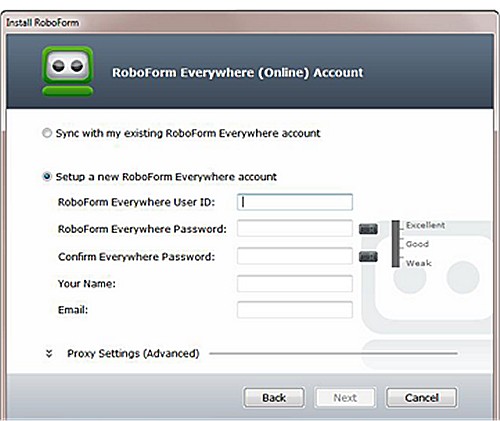
RoboForm has recently released version 9.9.9.1 of its password management software, RoboForm Everywhere, compatible with Windows, Chrome, Firefox, Edge, and Android. This software is designed to simplify online interactions by securely filling out web forms and managing passwords through an advanced Artificial Intelligence (AI) system.
Overview of RoboForm:
- Category: Password Managers
- Platforms: Available on Windows, macOS, iOS, Android, and as browser extensions.
- Security Model: Employs zero-knowledge architecture with AES-256 encryption.
- Core Features: Includes a password vault, auto-fill capabilities, a password generator, and secure sharing options.
- Phishing Protection: The auto-fill feature is restricted to exact URL matches, enhancing security against phishing attacks.
- Best For: Users seeking reliable and secure password management.
- Pricing: Offers a free version with a premium subscription available for additional features.
Importance of Using a Password Manager:
Managing passwords without a dedicated tool can lead to risks such as reusing passwords across multiple accounts, creating weak passwords, or forgetting them altogether. RoboForm addresses these issues by allowing users to generate and store unique, strong passwords securely. This means users only need to remember one master password, significantly reducing the potential for security breaches.
Security Features:
RoboForm's zero-knowledge architecture ensures that only the user has access to their data, as the master password is never shared with the company's servers. This encryption model protects user information even from RoboForm itself, as all data is encrypted locally before being transmitted.
Key Features:
- One-Click Login: Simplifies the login process by auto-filling passwords.
- Password Generator: Creates complex passwords that are difficult to guess.
- Cross-Platform Sync: Allows access to passwords across various devices.
- Secure Sharing: Enables users to share logins safely.
- Sorting Options: Organize passwords and notes efficiently.
- Two-Factor Authentication (2FA): Adds an extra layer of security.
Pros and Cons:
- Pros: Strong security, user-friendly interface, seamless cross-device sync, and a long history of reliability.
- Cons: Some premium features require a subscription, and resetting the master password can lead to lost data if not handled carefully.
Conclusion:
With over two decades of trust and reliability, RoboForm is highly recommended for those who prioritize security and convenience in password management. Its robust features and zero-knowledge security model provide peace of mind, making it an essential tool for managing online credentials effectively.
Future Developments:
As digital security continues to evolve, RoboForm is expected to enhance its features further, possibly incorporating more AI-driven functionalities and improved user interfaces to keep up with the changing landscape of cybersecurity. Users can anticipate continuous updates and improvements that will maintain RoboForm's status as a leader in password management solutions
Overview of RoboForm:
- Category: Password Managers
- Platforms: Available on Windows, macOS, iOS, Android, and as browser extensions.
- Security Model: Employs zero-knowledge architecture with AES-256 encryption.
- Core Features: Includes a password vault, auto-fill capabilities, a password generator, and secure sharing options.
- Phishing Protection: The auto-fill feature is restricted to exact URL matches, enhancing security against phishing attacks.
- Best For: Users seeking reliable and secure password management.
- Pricing: Offers a free version with a premium subscription available for additional features.
Importance of Using a Password Manager:
Managing passwords without a dedicated tool can lead to risks such as reusing passwords across multiple accounts, creating weak passwords, or forgetting them altogether. RoboForm addresses these issues by allowing users to generate and store unique, strong passwords securely. This means users only need to remember one master password, significantly reducing the potential for security breaches.
Security Features:
RoboForm's zero-knowledge architecture ensures that only the user has access to their data, as the master password is never shared with the company's servers. This encryption model protects user information even from RoboForm itself, as all data is encrypted locally before being transmitted.
Key Features:
- One-Click Login: Simplifies the login process by auto-filling passwords.
- Password Generator: Creates complex passwords that are difficult to guess.
- Cross-Platform Sync: Allows access to passwords across various devices.
- Secure Sharing: Enables users to share logins safely.
- Sorting Options: Organize passwords and notes efficiently.
- Two-Factor Authentication (2FA): Adds an extra layer of security.
Pros and Cons:
- Pros: Strong security, user-friendly interface, seamless cross-device sync, and a long history of reliability.
- Cons: Some premium features require a subscription, and resetting the master password can lead to lost data if not handled carefully.
Conclusion:
With over two decades of trust and reliability, RoboForm is highly recommended for those who prioritize security and convenience in password management. Its robust features and zero-knowledge security model provide peace of mind, making it an essential tool for managing online credentials effectively.
Future Developments:
As digital security continues to evolve, RoboForm is expected to enhance its features further, possibly incorporating more AI-driven functionalities and improved user interfaces to keep up with the changing landscape of cybersecurity. Users can anticipate continuous updates and improvements that will maintain RoboForm's status as a leader in password management solutions
Roboform 9.9.9.1 released
Roboform Everywhere for Windows, Chrome, Firefox, Edge, and Android is a push-button web form filler with some serious Artificial Intelligence (AI) inside.