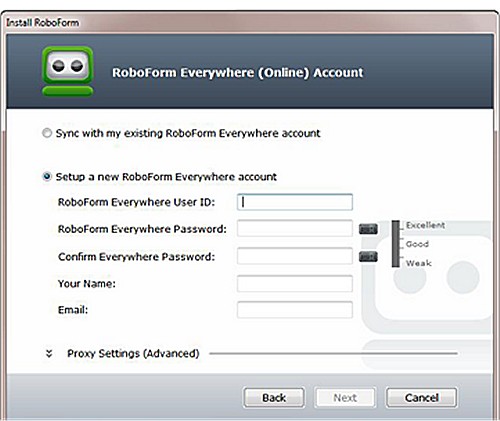
RoboForm has launched version 10.0.1.1 of its password manager, RoboForm Everywhere, which is compatible with Windows, Chrome, Firefox, Edge, and Android. This tool is designed to simplify online security and password management through an intuitive interface and advanced features powered by Artificial Intelligence (AI).
Overview of RoboForm:
- Category: Password Managers
- Platforms: Windows, macOS, iOS, Android, and browser extensions
- Security Model: Employs a zero-knowledge architecture with AES-256 encryption, ensuring that even RoboForm cannot access user passwords.
- Core Features: Includes a password vault, auto-fill capabilities, a password generator, and secure sharing options.
- Phishing Protection: Auto-fill functionality is restricted to exact website URLs, enhancing security against phishing attempts.
- Best For: Users seeking reliability and robust security.
- Pricing: Offers a free version; premium features are available through a subscription.
The Importance of Using RoboForm:
Managing passwords without a dedicated tool poses significant risks, such as password reuse and weak password creation, which can lead to security breaches. RoboForm helps mitigate these issues by securely storing unique passwords for each account, which users can access with a single master password. This eliminates the need for insecure password storage methods like sticky notes.
RoboForm's auto-fill feature not only streamlines login processes but also acts as a safeguard against phishing. If a user lands on a fraudulent site with a slightly altered URL, RoboForm will not autofill the credentials, preventing potential data theft.
Security Features and Architecture:
RoboForm's zero-knowledge architecture ensures maximum security. Users create a master password that is never shared with RoboForm servers, and their data is encrypted locally on devices using military-grade encryption before being transmitted. This means that even if servers are compromised, user data remains secure and unreadable without the master password.
Key Features:
- One-Click Login: Instant password autofill.
- Password Generator: Creates strong, random passwords.
- Cross-Platform Sync: Access passwords across multiple devices and browsers.
- Secure Sharing: Safely share logins without exposing passwords.
- Sorting Options: Organize passwords and notes effectively.
- Two-Factor Authentication: Additional security layer beyond the master password.
Pros and Cons:
- Pros: Exceptional security, user-friendly interface, cross-device synchronization, long-standing reliability.
- Cons: Premium features come with a subscription fee; loss of the master password can lead to data loss if not managed properly.
Final Verdict:
RoboForm has been trusted by users for over two decades, making it a reliable choice for anyone seeking a password manager that prioritizes security and convenience. Its zero-knowledge architecture ensures that only users have access to their data, making it a recommended tool for enhancing online security and simplifying password management.
Future Considerations:
As cyber threats evolve, it will be essential for password managers like RoboForm to continuously innovate and adapt. Features such as biometric security options, AI-driven security alerts, and integration with other security tools could further enhance user experience and protection. Users should also be encouraged to stay informed about best practices for password security and the importance of regular updates to their password management tools
Overview of RoboForm:
- Category: Password Managers
- Platforms: Windows, macOS, iOS, Android, and browser extensions
- Security Model: Employs a zero-knowledge architecture with AES-256 encryption, ensuring that even RoboForm cannot access user passwords.
- Core Features: Includes a password vault, auto-fill capabilities, a password generator, and secure sharing options.
- Phishing Protection: Auto-fill functionality is restricted to exact website URLs, enhancing security against phishing attempts.
- Best For: Users seeking reliability and robust security.
- Pricing: Offers a free version; premium features are available through a subscription.
The Importance of Using RoboForm:
Managing passwords without a dedicated tool poses significant risks, such as password reuse and weak password creation, which can lead to security breaches. RoboForm helps mitigate these issues by securely storing unique passwords for each account, which users can access with a single master password. This eliminates the need for insecure password storage methods like sticky notes.
RoboForm's auto-fill feature not only streamlines login processes but also acts as a safeguard against phishing. If a user lands on a fraudulent site with a slightly altered URL, RoboForm will not autofill the credentials, preventing potential data theft.
Security Features and Architecture:
RoboForm's zero-knowledge architecture ensures maximum security. Users create a master password that is never shared with RoboForm servers, and their data is encrypted locally on devices using military-grade encryption before being transmitted. This means that even if servers are compromised, user data remains secure and unreadable without the master password.
Key Features:
- One-Click Login: Instant password autofill.
- Password Generator: Creates strong, random passwords.
- Cross-Platform Sync: Access passwords across multiple devices and browsers.
- Secure Sharing: Safely share logins without exposing passwords.
- Sorting Options: Organize passwords and notes effectively.
- Two-Factor Authentication: Additional security layer beyond the master password.
Pros and Cons:
- Pros: Exceptional security, user-friendly interface, cross-device synchronization, long-standing reliability.
- Cons: Premium features come with a subscription fee; loss of the master password can lead to data loss if not managed properly.
Final Verdict:
RoboForm has been trusted by users for over two decades, making it a reliable choice for anyone seeking a password manager that prioritizes security and convenience. Its zero-knowledge architecture ensures that only users have access to their data, making it a recommended tool for enhancing online security and simplifying password management.
Future Considerations:
As cyber threats evolve, it will be essential for password managers like RoboForm to continuously innovate and adapt. Features such as biometric security options, AI-driven security alerts, and integration with other security tools could further enhance user experience and protection. Users should also be encouraged to stay informed about best practices for password security and the importance of regular updates to their password management tools
Roboform 10.0.1.1 released
Roboform Everywhere for Windows, Chrome, Firefox, Edge, and Android is a push-button web form filler with some serious Artificial Intelligence (AI) inside.