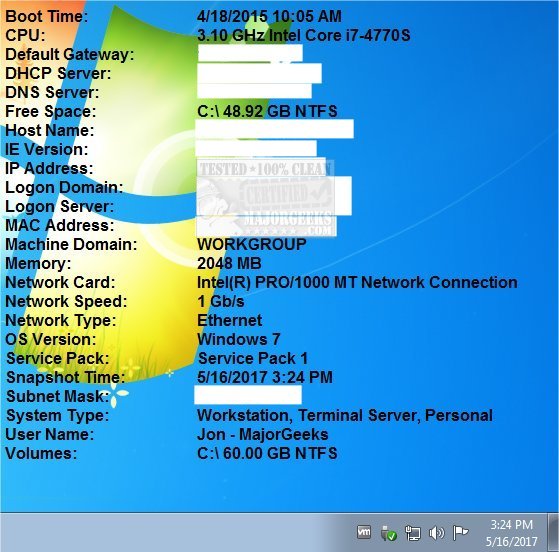
BGInfo 4.34 has been released, offering an efficient solution for displaying pertinent information about Windows computers directly on the desktop background. This tool is particularly useful for users who frequently need to access system details like the computer name, IP address, and operating system version without navigating through multiple diagnostic windows.
For those managing several machines, BGInfo can streamline the process by automatically presenting this essential information in a customizable format. Users can modify text fields, adjust font styles, and change background colors to suit their preferences. Furthermore, BGInfo can be configured to launch at every startup or even set as the background for the login screen.
One of the advantages of BGInfo is its minimal impact on system resources; it generates a new desktop bitmap and exits, ensuring that it does not interfere with other applications. However, users should be aware that if they wish to revert to their previous wallpaper, they can easily do so through display properties, as the program solely alters the wallpaper.
In addition to its core functionality, BGInfo is part of a broader ecosystem of utilities that can enhance Windows system management. These include tools for troubleshooting Windows problems, updating drivers, checking memory specifications, improving wireless network performance, and retrieving product keys for Windows and Office software.
Overall, BGInfo is a valuable tool for IT professionals and anyone who needs quick access to system information, making it easier to manage multiple computers efficiently. With its latest version, users can expect even more reliability and customization options
For those managing several machines, BGInfo can streamline the process by automatically presenting this essential information in a customizable format. Users can modify text fields, adjust font styles, and change background colors to suit their preferences. Furthermore, BGInfo can be configured to launch at every startup or even set as the background for the login screen.
One of the advantages of BGInfo is its minimal impact on system resources; it generates a new desktop bitmap and exits, ensuring that it does not interfere with other applications. However, users should be aware that if they wish to revert to their previous wallpaper, they can easily do so through display properties, as the program solely alters the wallpaper.
In addition to its core functionality, BGInfo is part of a broader ecosystem of utilities that can enhance Windows system management. These include tools for troubleshooting Windows problems, updating drivers, checking memory specifications, improving wireless network performance, and retrieving product keys for Windows and Office software.
Overall, BGInfo is a valuable tool for IT professionals and anyone who needs quick access to system information, making it easier to manage multiple computers efficiently. With its latest version, users can expect even more reliability and customization options
BGInfo 4.34 released
BGInfo automatically displays relevant information about a Windows computer on the desktop's background.