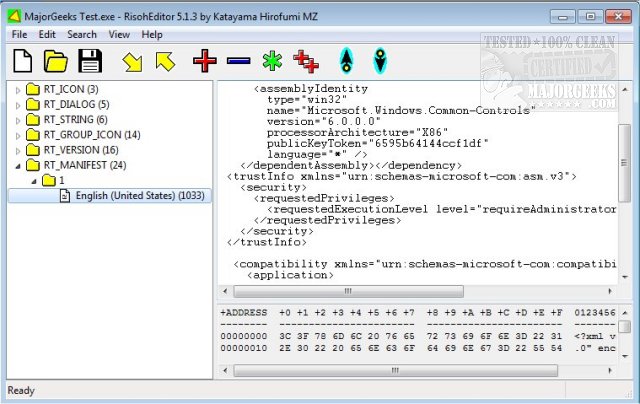
RisohEditor 6.2.2 has been released, providing an efficient tool for managing resource data in DLL and EXE files at no cost. This user-friendly application enables users to easily add, edit, extract, and remove various Windows resources, such as dialogs, menus, icons, cursors, string tables, and message tables. The name "Risoh" means "ideal" in Japanese, reflecting the software's goal of simplifying the resource editing process through a clean and intuitive interface.
With color coding features for quick identification, RisohEditor is designed to streamline the editing tasks, making it accessible even for those with limited programming knowledge. Users can modify source code for Windows applications without the distractions of a complex interface. The tool also supports extensive features, including high scalability and full Unicode support, ensuring it can handle international resources effectively. Additionally, it can read the "resource.h" header file and allows for GUI editing. Resources exported from RisohEditor are compatible with Visual C++ 2017, enhancing its utility for developers.
It is important to note that users should avoid installing RisohEditor in "C:\Program Files" or "C:\Program Files (x86)" directory, as the resource compiler (windres) does not accept spaces in file paths, which can hinder functionality.
In summary, RisohEditor 6.2.2 is a powerful yet accessible tool for resource editing in Windows applications, catering to both novice and experienced users. Its latest version reinforces its commitment to user-friendly design and robust functionality, making it a valuable addition to any developer's toolkit
With color coding features for quick identification, RisohEditor is designed to streamline the editing tasks, making it accessible even for those with limited programming knowledge. Users can modify source code for Windows applications without the distractions of a complex interface. The tool also supports extensive features, including high scalability and full Unicode support, ensuring it can handle international resources effectively. Additionally, it can read the "resource.h" header file and allows for GUI editing. Resources exported from RisohEditor are compatible with Visual C++ 2017, enhancing its utility for developers.
It is important to note that users should avoid installing RisohEditor in "C:\Program Files" or "C:\Program Files (x86)" directory, as the resource compiler (windres) does not accept spaces in file paths, which can hinder functionality.
In summary, RisohEditor 6.2.2 is a powerful yet accessible tool for resource editing in Windows applications, catering to both novice and experienced users. Its latest version reinforces its commitment to user-friendly design and robust functionality, making it a valuable addition to any developer's toolkit
RisohEditor 6.2.2 released
RisohEditor is designed for adding, editing, extracting, and removing the resource data from DLL/EXE files for free.