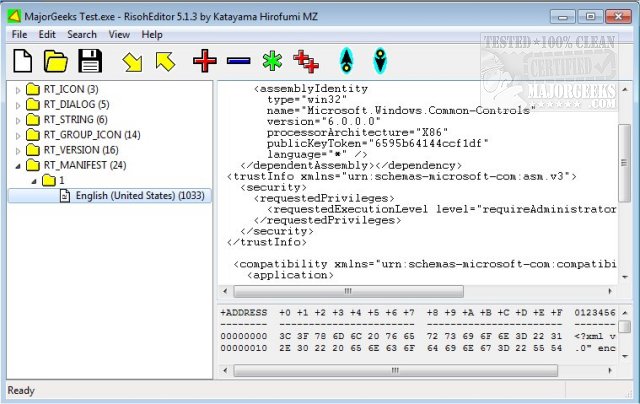
RisohEditor 6.0.0 has been released, providing a free tool for the addition, editing, extraction, and removal of resource data from DLL and EXE files. This software simplifies the editing of various Windows resources, including Dialogs, Menus, Icons, Cursors, String Tables, and Message Tables. The name "Risoh" translates to "ideal" in Japanese, reflecting its user-friendly design that allows for efficient resource editing without the hassle of a complex interface.
One of the key features of RisohEditor is its intuitive layout, which is particularly beneficial for users with basic programming knowledge. The application includes color coding for easy identification of different elements, further streamlining the editing process. Users can modify texts and descriptions, as well as add or remove components within programs.
However, users are advised to avoid installation in "C:\Program Files" or "C:\Program Files (x86)" directories because the resource compiler (windres) does not handle spaces in file paths well. Among its notable features, RisohEditor boasts high scalability, full Unicode support for international resources, compatibility with "resource.h" header files, GUI editing capabilities, and the ability to export resources that can be read by Visual C++ 2017.
In extending this overview, it is worth noting that RisohEditor can significantly benefit developers looking to customize and enhance their applications without deep technical knowledge. Its straightforward interface and robust features make it an accessible option for hobbyists and professionals alike. Furthermore, users looking to streamline their development process may find that RisohEditor complements other programming tools they already use, offering a versatile solution for resource management in Windows applications
One of the key features of RisohEditor is its intuitive layout, which is particularly beneficial for users with basic programming knowledge. The application includes color coding for easy identification of different elements, further streamlining the editing process. Users can modify texts and descriptions, as well as add or remove components within programs.
However, users are advised to avoid installation in "C:\Program Files" or "C:\Program Files (x86)" directories because the resource compiler (windres) does not handle spaces in file paths well. Among its notable features, RisohEditor boasts high scalability, full Unicode support for international resources, compatibility with "resource.h" header files, GUI editing capabilities, and the ability to export resources that can be read by Visual C++ 2017.
In extending this overview, it is worth noting that RisohEditor can significantly benefit developers looking to customize and enhance their applications without deep technical knowledge. Its straightforward interface and robust features make it an accessible option for hobbyists and professionals alike. Furthermore, users looking to streamline their development process may find that RisohEditor complements other programming tools they already use, offering a versatile solution for resource management in Windows applications
RisohEditor 6.0.0 released
RisohEditor is designed for adding, editing, extracting, and removing the resource data from DLL/EXE files for free.