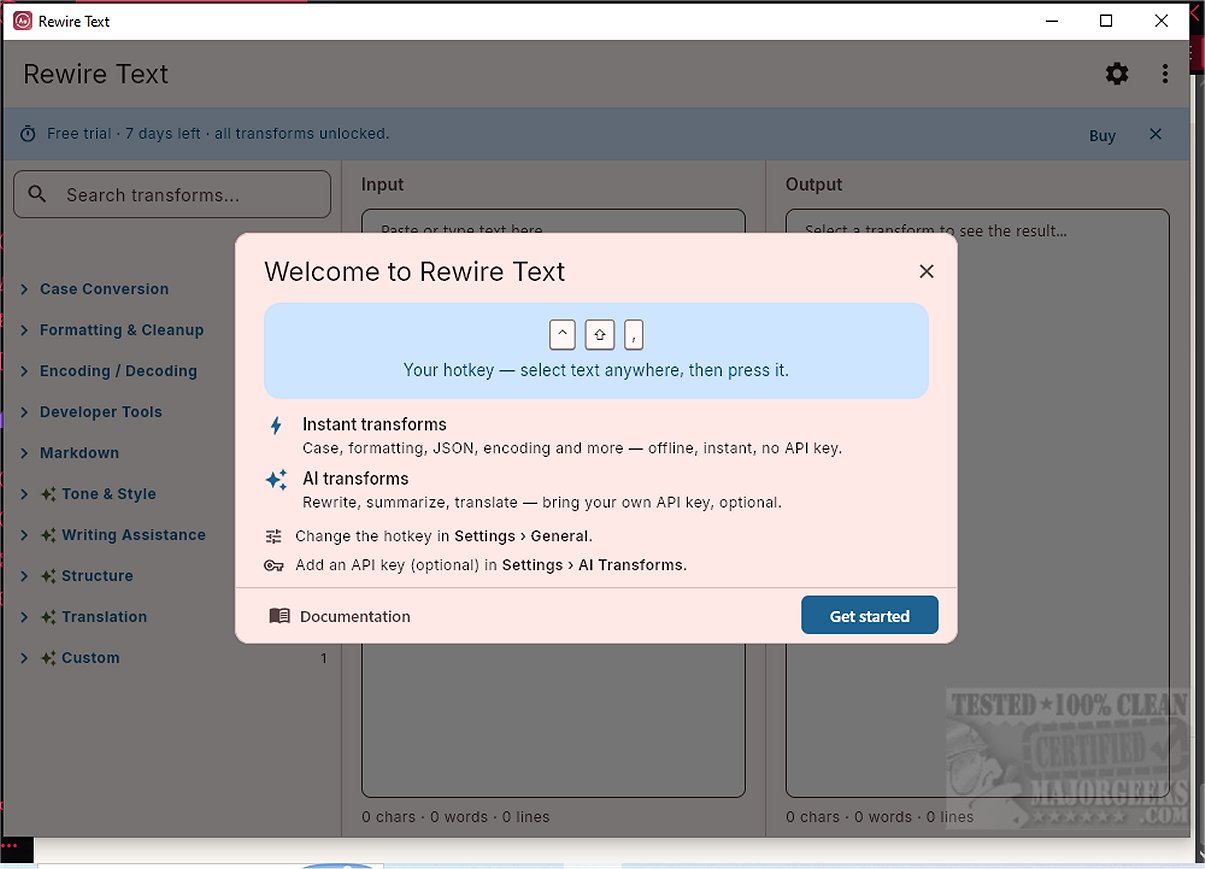
Rewire Text is an innovative tool designed to streamline the process of transforming selected text across various applications on both macOS and Windows platforms. This utility operates from the menu bar or system tray, allowing users to perform text transformations with just a simple keystroke.
How Rewire Text Works
To use Rewire Text, simply select text in any application—such as a web browser, email client, or messaging platform—then press a designated hotkey. This action opens a command palette where users can choose from a variety of transformations to apply directly to the selected text, eliminating the need for cumbersome copy-pasting into separate tools.
Practical Uses for Rewire Text
Rewire Text offers a multitude of practical applications, including:
- Adjusting the tone of an email before sending
- Summarizing or rephrasing notes in applications like Obsidian or Notion
- Translating text inline without needing a separate browser tab
- Correcting text that is formatted incorrectly (e.g., wrong case)
- Modifying Markdown headings during document merging
- Cleaning up messy text for clarity and readability
Users can customize the default hotkeys—Cmd+Shift+Comma for Mac and Ctrl+Shift+Comma for Windows—to suit their personal preferences.
Additional Features
Users also have the option to open the full application window, where they can type or paste their text, apply transformations, and view results side by side. This window allows for the pinning of frequently used transformations for quick access.
Transformations Supported
Rewire Text supports a variety of deterministic transformations that operate locally, such as case changes, whitespace cleanup, and formatting for markdown and JSON. Additionally, it provides AI-driven transformations, including style and tone rewrites, summarization, and translation. For AI functionalities, Rewire Text incorporates a BYOK (bring your own key) model, allowing users to integrate an API key from their preferred AI service. For users with the appropriate hardware, there's an option to run a local AI model, promoting data privacy and avoiding additional costs by keeping all processing on-device. Users can also save custom presets to maintain a consistent writing style.
Final Thoughts
Rewire Text 1.2.1 revolutionizes text management by enabling users to apply transformations quickly and effortlessly across applications. Whether you need simple adjustments like case changes and whitespace removal or more complex tasks such as AI-powered rewriting and translation, Rewire Text is your go-to solution. Its presence in the system tray ensures that efficient text management is always within reach, enhancing productivity and simplifying everyday tasks
How Rewire Text Works
To use Rewire Text, simply select text in any application—such as a web browser, email client, or messaging platform—then press a designated hotkey. This action opens a command palette where users can choose from a variety of transformations to apply directly to the selected text, eliminating the need for cumbersome copy-pasting into separate tools.
Practical Uses for Rewire Text
Rewire Text offers a multitude of practical applications, including:
- Adjusting the tone of an email before sending
- Summarizing or rephrasing notes in applications like Obsidian or Notion
- Translating text inline without needing a separate browser tab
- Correcting text that is formatted incorrectly (e.g., wrong case)
- Modifying Markdown headings during document merging
- Cleaning up messy text for clarity and readability
Users can customize the default hotkeys—Cmd+Shift+Comma for Mac and Ctrl+Shift+Comma for Windows—to suit their personal preferences.
Additional Features
Users also have the option to open the full application window, where they can type or paste their text, apply transformations, and view results side by side. This window allows for the pinning of frequently used transformations for quick access.
Transformations Supported
Rewire Text supports a variety of deterministic transformations that operate locally, such as case changes, whitespace cleanup, and formatting for markdown and JSON. Additionally, it provides AI-driven transformations, including style and tone rewrites, summarization, and translation. For AI functionalities, Rewire Text incorporates a BYOK (bring your own key) model, allowing users to integrate an API key from their preferred AI service. For users with the appropriate hardware, there's an option to run a local AI model, promoting data privacy and avoiding additional costs by keeping all processing on-device. Users can also save custom presets to maintain a consistent writing style.
Final Thoughts
Rewire Text 1.2.1 revolutionizes text management by enabling users to apply transformations quickly and effortlessly across applications. Whether you need simple adjustments like case changes and whitespace removal or more complex tasks such as AI-powered rewriting and translation, Rewire Text is your go-to solution. Its presence in the system tray ensures that efficient text management is always within reach, enhancing productivity and simplifying everyday tasks
Rewire Text 1.2.1 released
Rewire Text is a versatile utility designed for transforming selected text across any application on macOS and Windows. It operates from the menu bar or system tray, ready to execute transformations with a simple keystroke.