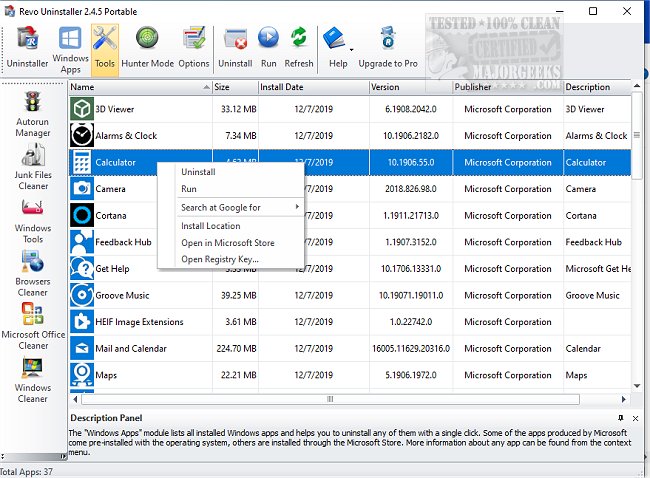
Revo Uninstaller has released its latest versions, 5.5.2 Pro and 2.7.0 Free, which enhance the process of removing unwanted applications from Windows computers. Unlike the default Windows uninstaller that often leaves residual files and registry entries behind, Revo Uninstaller offers a more thorough approach. It utilizes advanced "scan before and after" technology to ensure complete removal of all traces of uninstalled programs.
One of its standout features is the "Forced Uninstall" option, which allows users to remove stubborn programs that may be partially installed or corrupted. Additionally, the "Hunter Mode" feature lets users uninstall applications directly from their windows or system tray icons, providing a convenient and effective way to manage software.
Revo Uninstaller is more than just an uninstaller; it includes a range of utilities such as a Junk File Cleaner, Autorun Manager, Browser Cleaner, Evidence Remover, and Unrecoverable Delete, among others. These tools help users maintain a clean and efficient system by managing startup programs and clearing internet traces.
The software is designed to cater to both casual users and tech enthusiasts. The Free version covers basic uninstall needs, while the Pro version offers advanced features like real-time system monitoring and multi-level backup options. A portable version is also available for users who want to carry it on a USB stick, all backed by a 60-day money-back guarantee.
In conclusion, Revo Uninstaller combines power, speed, and user-friendliness, making it an essential tool for anyone looking to optimize their Windows experience. With features that ensure thorough program removal and additional utilities for system maintenance, it stands out as a superior choice for managing applications on Windows computers.
For those interested in maintaining a clean, efficient PC, downloading Revo Uninstaller is highly recommended. It not only simplifies the uninstall process but also enhances overall system performance
One of its standout features is the "Forced Uninstall" option, which allows users to remove stubborn programs that may be partially installed or corrupted. Additionally, the "Hunter Mode" feature lets users uninstall applications directly from their windows or system tray icons, providing a convenient and effective way to manage software.
Revo Uninstaller is more than just an uninstaller; it includes a range of utilities such as a Junk File Cleaner, Autorun Manager, Browser Cleaner, Evidence Remover, and Unrecoverable Delete, among others. These tools help users maintain a clean and efficient system by managing startup programs and clearing internet traces.
The software is designed to cater to both casual users and tech enthusiasts. The Free version covers basic uninstall needs, while the Pro version offers advanced features like real-time system monitoring and multi-level backup options. A portable version is also available for users who want to carry it on a USB stick, all backed by a 60-day money-back guarantee.
In conclusion, Revo Uninstaller combines power, speed, and user-friendliness, making it an essential tool for anyone looking to optimize their Windows experience. With features that ensure thorough program removal and additional utilities for system maintenance, it stands out as a superior choice for managing applications on Windows computers.
For those interested in maintaining a clean, efficient PC, downloading Revo Uninstaller is highly recommended. It not only simplifies the uninstall process but also enhances overall system performance
Revo Uninstaller 5.5.2 Pro / 2.7.0 Free released
Revo Uninstaller helps you to remove any unwanted applications installed on your computer.
Revo Uninstaller 5.5.2 Pro / 2.7.0 Free released @ MajorGeeks