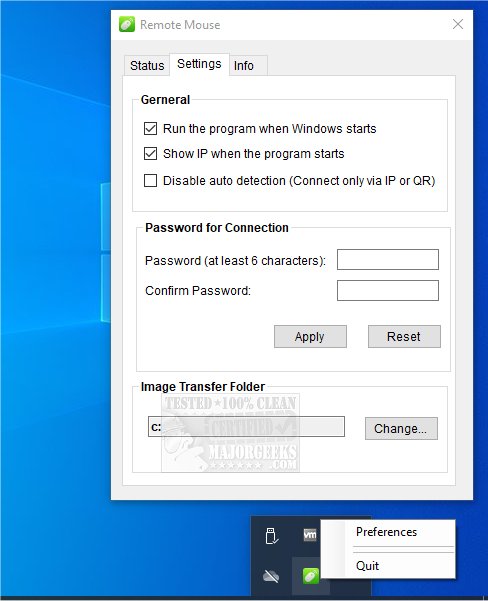
Remote Mouse has released version 4.725 of its multiplatform application, designed to convert smartphones or tablets into Wi-Fi-connected mice, touchpads, and keyboards. The app is divided into two components: one for mobile devices (available on Android, iPhone, and iPad) and the other for PCs (compatible with Windows, Mac, and Linux). It's recommended to download these components in sequence for optimal functionality.
The Remote Mouse application replicates the capabilities of a wireless mouse, keyboard, and touchpad, making it especially useful in situations where traditional input devices are unavailable, such as during work presentations or while enjoying online media. It features an intuitive design for one-handed use and supports multiple connection methods, including auto-connect, IP address, QR code, and historical connections, functioning seamlessly over Wi-Fi or mobile networks.
Key features of Remote Mouse include:
- Mouse Functionality: A fully simulated mouse experience, including a gyro mouse option that allows cursor movement through device motion.
- Keyboard Capabilities: Integration with both system and third-party keyboards, support for multiple languages, voice typing (if compatible), and various keyboard shortcuts (available as in-app purchases).
- Touchpad Simulation: Mimics the Apple Magic Trackpad and enables multi-touch gestures.
- Specialty Control Panels: These include a Media Remote (in-app purchase) for popular media applications like iTunes and VLC, a Web Remote for browsers like Chrome and Firefox, and an Application Switcher for quick program navigation. Additionally, power options for remote shutdown, sleep, restart, and logoff are included.
- Other Features: Users can control volume using their device's physical buttons, set connection passwords for added security, and customize the app's wallpaper.
With its extensive capabilities, Remote Mouse not only enhances productivity in various tasks but also offers a convenient solution for remote device control across multiple scenarios.
In summary, Remote Mouse 4.725 expands the versatility of controlling PCs from mobile devices, making it a valuable tool for users seeking flexibility and ease of use in their computing experience. The app's continuous updates and feature enhancements promise to keep it relevant in a rapidly evolving technological landscape
The Remote Mouse application replicates the capabilities of a wireless mouse, keyboard, and touchpad, making it especially useful in situations where traditional input devices are unavailable, such as during work presentations or while enjoying online media. It features an intuitive design for one-handed use and supports multiple connection methods, including auto-connect, IP address, QR code, and historical connections, functioning seamlessly over Wi-Fi or mobile networks.
Key features of Remote Mouse include:
- Mouse Functionality: A fully simulated mouse experience, including a gyro mouse option that allows cursor movement through device motion.
- Keyboard Capabilities: Integration with both system and third-party keyboards, support for multiple languages, voice typing (if compatible), and various keyboard shortcuts (available as in-app purchases).
- Touchpad Simulation: Mimics the Apple Magic Trackpad and enables multi-touch gestures.
- Specialty Control Panels: These include a Media Remote (in-app purchase) for popular media applications like iTunes and VLC, a Web Remote for browsers like Chrome and Firefox, and an Application Switcher for quick program navigation. Additionally, power options for remote shutdown, sleep, restart, and logoff are included.
- Other Features: Users can control volume using their device's physical buttons, set connection passwords for added security, and customize the app's wallpaper.
With its extensive capabilities, Remote Mouse not only enhances productivity in various tasks but also offers a convenient solution for remote device control across multiple scenarios.
In summary, Remote Mouse 4.725 expands the versatility of controlling PCs from mobile devices, making it a valuable tool for users seeking flexibility and ease of use in their computing experience. The app's continuous updates and feature enhancements promise to keep it relevant in a rapidly evolving technological landscape
Remote Mouse 4.725 released
Remote Mouse is a multiplatform app that transforms your smartphone or tablet into a Wi-Fi-connected mouse, touchpad, and keyboard.