The Reader View extension for Chrome, Firefox, Edge, and Opera has been recently updated to version 0.8.4, providing users with an enhanced reading experience on the web. This extension enables users to open any webpage in a simplified reader view mode, effectively eliminating distractions and clutter.
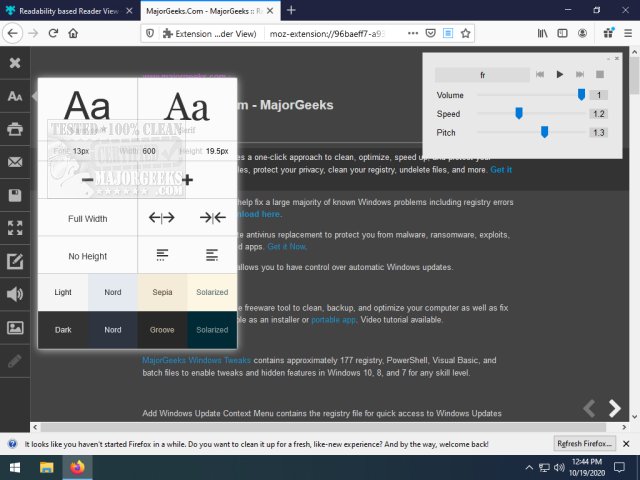
Once in reader view, users can customize their experience by selecting from eight different color tones and adjusting the layout to suit their preferences. Additional features include the ability to email the content of the page, save it in HTML format, and utilize text-to-speech functionality with a variety of voices and languages. Users also have the option to toggle images on and off, making it easier to focus on the text.
Reader View is designed to cater to those who appreciate a streamlined reading experience, offering just the right amount of features to enhance usability without being overwhelming.
In addition to its core functionalities, users might find it beneficial to explore related topics such as adding and removing speech voices in Windows 10 & 11, optimizing browsing performance with Google Chrome flags, or revitalizing their Chrome and Firefox browsers to ensure they run smoothly.
As web browsing continues to evolve, tools like Reader View will remain essential for users seeking to improve their online reading habits and overall browsing efficiency. Future updates may also include additional customization options or integrations with other productivity tools, further enhancing the user experience
Once in reader view, users can customize their experience by selecting from eight different color tones and adjusting the layout to suit their preferences. Additional features include the ability to email the content of the page, save it in HTML format, and utilize text-to-speech functionality with a variety of voices and languages. Users also have the option to toggle images on and off, making it easier to focus on the text.
Reader View is designed to cater to those who appreciate a streamlined reading experience, offering just the right amount of features to enhance usability without being overwhelming.
In addition to its core functionalities, users might find it beneficial to explore related topics such as adding and removing speech voices in Windows 10 & 11, optimizing browsing performance with Google Chrome flags, or revitalizing their Chrome and Firefox browsers to ensure they run smoothly.
As web browsing continues to evolve, tools like Reader View will remain essential for users seeking to improve their online reading habits and overall browsing efficiency. Future updates may also include additional customization options or integrations with other productivity tools, further enhancing the user experience
Reader View for Chrome, Firefox, Edge, and Opera 0.8.4 released
Reader View for Chrome, Firefox, Edge, and Opera is a helpful extension/add-on that permits you to open any page in reader view mode and more.
Reader View for Chrome, Firefox, Edge, and Opera 0.8.4 released @ MajorGeeks