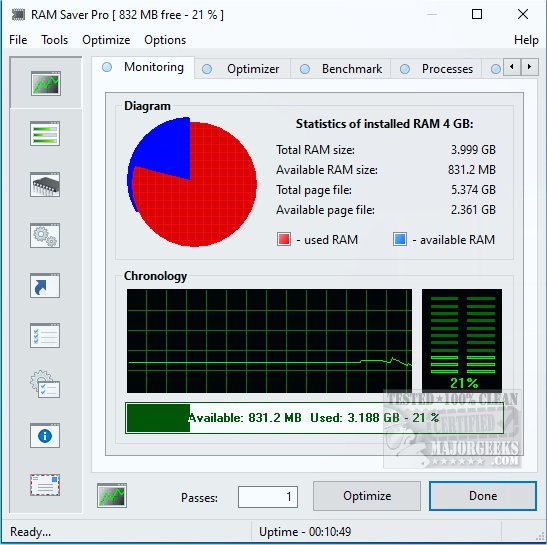
Ram Saver Pro is a specialized RAM optimization software designed for Windows systems, providing users with enhanced control over their memory management. This tool is particularly beneficial for those experiencing slow performance due to multiple applications or browser tabs being open. By effectively reducing memory usage and freeing up system resources, Ram Saver Pro can significantly boost the performance of older PCs or those under heavy load without necessitating hardware upgrades.
Windows often struggles with efficient memory management, especially when numerous background applications are running. Ram Saver Pro addresses this by actively monitoring and cleaning RAM in real-time. It optimizes the performance of your system by clearing out unused memory and enhancing the efficiency of active processes. Users can access detailed statistics on memory usage, including how much is being utilized, what remains free, and which applications are consuming the most resources. The software allows for automatic memory optimization based on a schedule, or users can manually trigger it during slowdowns.
- Real-Time RAM Monitoring: Provides live tracking of memory usage via an intuitive interface.
- One-Click RAM Optimization: Instantly frees up unused memory to enhance performance, especially useful during gaming or multitasking.
- System Tray Integration: Facilitates quick access to controls without needing to open the full application.
- Memory Benchmarking Tool: Lets users evaluate their system's performance against built-in benchmarks.
- Startup Manager: Helps manage background startup applications that can delay boot times.
Ram Saver Pro is particularly beneficial for users with older Windows desktops or budget laptops equipped with limited RAM (ranging from 4 to 8 GB). It's also suitable for individuals who frequently utilize multiple browser tabs or resource-intensive software like Photoshop or Integrated Development Environments (IDEs). Even casual users can appreciate its ability to minimize slowdowns during routine tasks such as streaming or document editing.
Pros:
- Effective real-time RAM optimization.
- Lightweight and minimally impacts system resources.
- Customizable with scheduling and automatic tweaks.
- Bundles useful system tools in a single application.
Cons:
- The interface may seem outdated compared to more modern Windows applications.
- Some advanced features are restricted to the paid version.
- Lacks a portable version for use on different devices.
Ram Saver Pro stands out as a powerful utility for optimizing RAM usage on Windows systems, offering users a level of control and insight that Windows' built-in tools may not provide. While it may not have the most modern interface, its functionality and straightforward operation make it a valuable asset for anyone looking to enhance their PC's performance without investing in new hardware. Whether you're gaming, editing videos, or juggling multiple applications, Ram Saver Pro can help maintain a smooth computing experience with minimal effort.
For users interested in optimizing their system further, consider exploring:
- Comparisons of disk cleaning tools like CCleaner and Wise Disk Cleaner.
- Guides on utilizing Storage Sense for automatic junk file deletion in Windows 10 and 11.
- Instructions on securely deleting files with PowerShell and Cipher in Windows.
- Tips for backing up or restoring the Windows Registry.
Overall, Ram Saver Pro is a practical solution for enhancing system performance, making it a worthy consideration for users facing sluggishness in their computing experience
Key Functions of Ram Saver Pro
Windows often struggles with efficient memory management, especially when numerous background applications are running. Ram Saver Pro addresses this by actively monitoring and cleaning RAM in real-time. It optimizes the performance of your system by clearing out unused memory and enhancing the efficiency of active processes. Users can access detailed statistics on memory usage, including how much is being utilized, what remains free, and which applications are consuming the most resources. The software allows for automatic memory optimization based on a schedule, or users can manually trigger it during slowdowns.
Notable Features
- Real-Time RAM Monitoring: Provides live tracking of memory usage via an intuitive interface.
- One-Click RAM Optimization: Instantly frees up unused memory to enhance performance, especially useful during gaming or multitasking.
- System Tray Integration: Facilitates quick access to controls without needing to open the full application.
- Memory Benchmarking Tool: Lets users evaluate their system's performance against built-in benchmarks.
- Startup Manager: Helps manage background startup applications that can delay boot times.
Target Audience
Ram Saver Pro is particularly beneficial for users with older Windows desktops or budget laptops equipped with limited RAM (ranging from 4 to 8 GB). It's also suitable for individuals who frequently utilize multiple browser tabs or resource-intensive software like Photoshop or Integrated Development Environments (IDEs). Even casual users can appreciate its ability to minimize slowdowns during routine tasks such as streaming or document editing.
Pros and Cons
Pros:
- Effective real-time RAM optimization.
- Lightweight and minimally impacts system resources.
- Customizable with scheduling and automatic tweaks.
- Bundles useful system tools in a single application.
Cons:
- The interface may seem outdated compared to more modern Windows applications.
- Some advanced features are restricted to the paid version.
- Lacks a portable version for use on different devices.
Conclusion
Ram Saver Pro stands out as a powerful utility for optimizing RAM usage on Windows systems, offering users a level of control and insight that Windows' built-in tools may not provide. While it may not have the most modern interface, its functionality and straightforward operation make it a valuable asset for anyone looking to enhance their PC's performance without investing in new hardware. Whether you're gaming, editing videos, or juggling multiple applications, Ram Saver Pro can help maintain a smooth computing experience with minimal effort.
Additional Resources
For users interested in optimizing their system further, consider exploring:
- Comparisons of disk cleaning tools like CCleaner and Wise Disk Cleaner.
- Guides on utilizing Storage Sense for automatic junk file deletion in Windows 10 and 11.
- Instructions on securely deleting files with PowerShell and Cipher in Windows.
- Tips for backing up or restoring the Windows Registry.
Overall, Ram Saver Pro is a practical solution for enhancing system performance, making it a worthy consideration for users facing sluggishness in their computing experience
Ram Saver Pro 26.7.1 released
Ram Saver Pro is a RAM optimizer for Windows that gives you direct control over your system's memory management.