FreeFileSync, the open-source file and folder comparison and synchronization tool, has introduced its latest version, 14.11. This software simplifies the processes of syncing and backing up files, providing users with a reliable, efficient, and user-friendly experience without the clutter of bloatware or intrusive ads.
Key Features of FreeFileSync
FreeFileSync is designed to help users maintain identical folders across various devices, safeguard critical data, and manage extensive file transfers seamlessly. The tool offers several advantages over manual file copying, which can be slow and prone to errors. Here's what makes FreeFileSync stand out:
- Fast & Smart Syncing: It compares files by size, date, and content to ensure accurate synchronization.
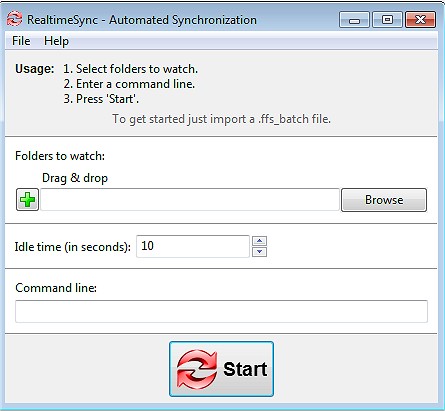
- Real-Time Syncing: Automatically updates files as changes occur.
- Flexible Sync Options: Users can choose from mirror, two-way, or custom sync settings to manage their data effectively.
- Batch Jobs & Automation: Schedule sync tasks for hands-free operation.
- Cross-Platform Support: Compatible with Windows, macOS, and Linux.
- Versioning & Conflict Detection: Keeps previous versions of files to prevent data loss.
- No Unwanted Extras: A clean interface focused solely on file synchronization.
Who Can Benefit from FreeFileSync?
FreeFileSync is suitable for a diverse range of users, including:
- Everyday Users: Easily back up personal files, documents, and photos.
- Professionals & Businesses: Synchronize work projects across multiple locations.
- Creative Professionals: Photographers and videographers can safeguard their media libraries by mirroring them to external drives.
- Gamers: Sync saved games across different PCs.
- IT Administrators: Automate data backups and server synchronization.
- Cloud Storage Users: Manage backups for services like Google Drive, OneDrive, or Dropbox effectively.
Additional Features
FreeFileSync offers a variety of additional features to enhance usability:
- Drag & Drop Support: Simplifies the setup of sync tasks.
- Portable Version: Run the software directly from a USB drive.
- Support for External & Network Drives: Sync with NAS devices, FTP servers, and cloud storage.
- Filters & Exclusions: Customize synchronization by selecting only necessary files.
- Multi-Threaded Performance: Utilizes all available CPU cores for faster operations.
- Detailed Sync Reports: Keep track of changes with comprehensive logs and summaries.
Best Practices for Effective Synchronization
To maximize efficiency and safety while using FreeFileSync, consider the following best practices:
- Caution with Mirror Syncing: Be aware that using Mirror Mode will delete files from one side if they are removed from the other. Opt for Two-Way Sync to avoid unintended deletions.
- Automation Setup: While batch jobs provide scheduled syncs, careful configuration is required for successful automation.
- Permissions & File Locks: Some system files may need administrative permissions to sync correctly.
Conclusion
FreeFileSync is an exceptional tool for anyone looking for a straightforward yet powerful backup and synchronization solution. It is lightweight, effective, and free, making it a great choice for keeping files safe and organized. Download FreeFileSync today to take charge of your file backups and ensure you never lose important data again!
In addition to FreeFileSync's capabilities, users may also find it beneficial to explore related topics such as navigating Windows File Explorer, optimizing file management, and enhancing productivity on various operating systems
Key Features of FreeFileSync
FreeFileSync is designed to help users maintain identical folders across various devices, safeguard critical data, and manage extensive file transfers seamlessly. The tool offers several advantages over manual file copying, which can be slow and prone to errors. Here's what makes FreeFileSync stand out:
- Fast & Smart Syncing: It compares files by size, date, and content to ensure accurate synchronization.
- Real-Time Syncing: Automatically updates files as changes occur.
- Flexible Sync Options: Users can choose from mirror, two-way, or custom sync settings to manage their data effectively.
- Batch Jobs & Automation: Schedule sync tasks for hands-free operation.
- Cross-Platform Support: Compatible with Windows, macOS, and Linux.
- Versioning & Conflict Detection: Keeps previous versions of files to prevent data loss.
- No Unwanted Extras: A clean interface focused solely on file synchronization.
Who Can Benefit from FreeFileSync?
FreeFileSync is suitable for a diverse range of users, including:
- Everyday Users: Easily back up personal files, documents, and photos.
- Professionals & Businesses: Synchronize work projects across multiple locations.
- Creative Professionals: Photographers and videographers can safeguard their media libraries by mirroring them to external drives.
- Gamers: Sync saved games across different PCs.
- IT Administrators: Automate data backups and server synchronization.
- Cloud Storage Users: Manage backups for services like Google Drive, OneDrive, or Dropbox effectively.
Additional Features
FreeFileSync offers a variety of additional features to enhance usability:
- Drag & Drop Support: Simplifies the setup of sync tasks.
- Portable Version: Run the software directly from a USB drive.
- Support for External & Network Drives: Sync with NAS devices, FTP servers, and cloud storage.
- Filters & Exclusions: Customize synchronization by selecting only necessary files.
- Multi-Threaded Performance: Utilizes all available CPU cores for faster operations.
- Detailed Sync Reports: Keep track of changes with comprehensive logs and summaries.
Best Practices for Effective Synchronization
To maximize efficiency and safety while using FreeFileSync, consider the following best practices:
- Caution with Mirror Syncing: Be aware that using Mirror Mode will delete files from one side if they are removed from the other. Opt for Two-Way Sync to avoid unintended deletions.
- Automation Setup: While batch jobs provide scheduled syncs, careful configuration is required for successful automation.
- Permissions & File Locks: Some system files may need administrative permissions to sync correctly.
Conclusion
FreeFileSync is an exceptional tool for anyone looking for a straightforward yet powerful backup and synchronization solution. It is lightweight, effective, and free, making it a great choice for keeping files safe and organized. Download FreeFileSync today to take charge of your file backups and ensure you never lose important data again!
In addition to FreeFileSync's capabilities, users may also find it beneficial to explore related topics such as navigating Windows File Explorer, optimizing file management, and enhancing productivity on various operating systems
FreeFileSync 14.11 released
FreeFileSync is a file/folder comparison and synchronization tool.