RadeonTuner 0.11.0.0 has been released as a simplified and accessible alternative to the AMD Radeon Adrenalin Edition suite. This tool is designed to help users adjust essential settings related to display, GPU performance, and gaming graphics without the complexities of the full software suite.
What is RadeonTuner?
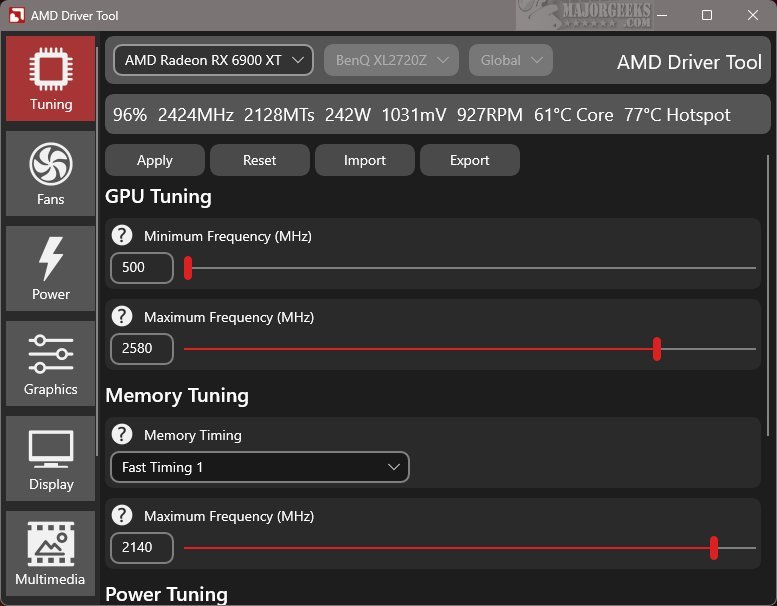
RadeonTuner focuses on providing core functionalities in a user-friendly format. Its interface is designed for easy navigation, allowing users to quickly access desired settings. Notably, the interface displays the currently selected AMD GPU model, which is helpful for users with multiple graphics cards.
Key Features of RadeonTuner
RadeonTuner allows users to make fundamental adjustments, including modifying clock speeds, fan curves, and power limits, as well as customizing game graphics and display preferences. A significant feature is the ability to import and export settings, which ensures that user-defined configurations can be retained after updates or driver installations, preventing resets to default settings.
This tool is particularly advantageous for users who prefer to download and install GPU drivers independently of the complete Adrenalin suite. By obtaining the latest drivers from AMD's official site, users can then utilize RadeonTuner for effective customization.
Geek Verdict
RadeonTuner is an essential tool for anyone wanting straightforward control over their AMD GPU settings without the complexities of official software. It eliminates unnecessary background services and rarely used features, offering a clean and efficient user experience. Users looking for simplicity and ease of use will find RadeonTuner a refreshing option to enhance their gaming and graphics performance.
Extension
As gaming technology continues to evolve, tools like RadeonTuner are becoming increasingly relevant. They not only simplify the user experience but also cater to the growing community of gamers and tech enthusiasts who desire more control over their hardware. Future updates to RadeonTuner could include additional features like enhanced monitoring tools, support for more GPU models, or community-driven presets that allow users to share their optimal settings. This adaptability could further solidify RadeonTuner's position as a go-to solution for GPU management, appealing to both casual users and hardcore gamers alike. Embracing this tool could lead to a more tailored and satisfying gaming experience
What is RadeonTuner?
RadeonTuner focuses on providing core functionalities in a user-friendly format. Its interface is designed for easy navigation, allowing users to quickly access desired settings. Notably, the interface displays the currently selected AMD GPU model, which is helpful for users with multiple graphics cards.
Key Features of RadeonTuner
RadeonTuner allows users to make fundamental adjustments, including modifying clock speeds, fan curves, and power limits, as well as customizing game graphics and display preferences. A significant feature is the ability to import and export settings, which ensures that user-defined configurations can be retained after updates or driver installations, preventing resets to default settings.
This tool is particularly advantageous for users who prefer to download and install GPU drivers independently of the complete Adrenalin suite. By obtaining the latest drivers from AMD's official site, users can then utilize RadeonTuner for effective customization.
Geek Verdict
RadeonTuner is an essential tool for anyone wanting straightforward control over their AMD GPU settings without the complexities of official software. It eliminates unnecessary background services and rarely used features, offering a clean and efficient user experience. Users looking for simplicity and ease of use will find RadeonTuner a refreshing option to enhance their gaming and graphics performance.
Extension
As gaming technology continues to evolve, tools like RadeonTuner are becoming increasingly relevant. They not only simplify the user experience but also cater to the growing community of gamers and tech enthusiasts who desire more control over their hardware. Future updates to RadeonTuner could include additional features like enhanced monitoring tools, support for more GPU models, or community-driven presets that allow users to share their optimal settings. This adaptability could further solidify RadeonTuner's position as a go-to solution for GPU management, appealing to both casual users and hardcore gamers alike. Embracing this tool could lead to a more tailored and satisfying gaming experience
RadeonTuner 0.11.0.0 released
RadeonTuner serves as a streamlined and user-friendly alternative to the comprehensive AMD Radeon Adrenalin Edition suite. Its primary purpose is to provide essential tools that let users easily adjust display settings, fine-tune GPU and fan performance, and manage various gaming graphics options.