RadeonTuner 0.10.0.0 has been launched as a simplified and user-friendly alternative to the AMD Radeon Adrenalin Edition software suite. Its main goal is to equip users with essential tools for adjusting display settings, optimizing GPU and fan performance, and managing gaming graphics options with ease.
What is RadeonTuner?
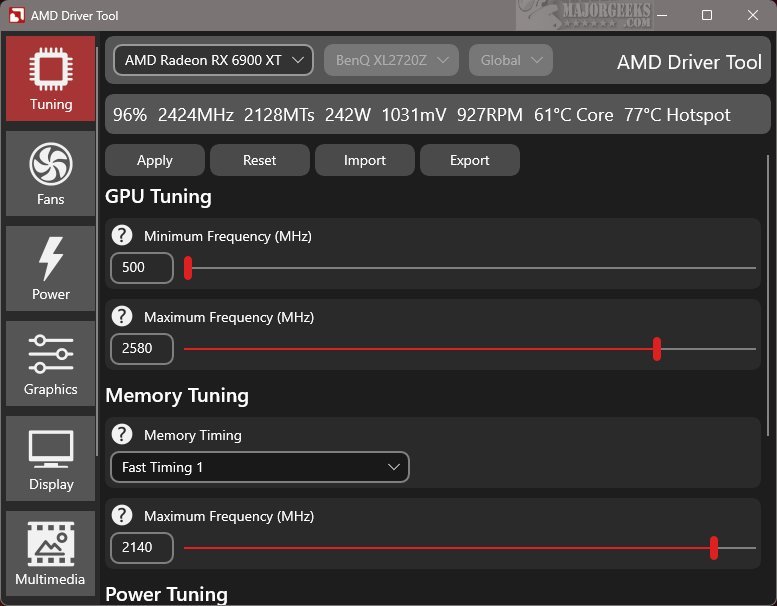
RadeonTuner is designed as a streamlined option that allows users to navigate easily through its features without the complexity often associated with the comprehensive Adrenalin suite. The interface is intuitive, showcasing primary functions on the left side for quick access, while also displaying the currently selected AMD GPU model at the top. This is particularly advantageous for users with multiple graphics cards, ensuring that settings are applied correctly.
Capabilities of RadeonTuner
RadeonTuner focuses on core adjustments, enabling users to modify clock speeds, fan curves, and power limits, as well as customize graphics settings for games and display configurations. A standout feature is the ability to import and export settings, which can be reapplied automatically after updates or driver installations. This helps prevent the often frustrating scenario of reverting to default settings.
This tool is especially useful for those who prefer to download and install GPU drivers independently of the full Adrenalin suite. Users can obtain the latest drivers directly from AMD's website and then utilize RadeonTuner for effective customization of various settings.
Geek Verdict
RadeonTuner is a must-have for users who want to manage their AMD GPU with greater control and simplicity, avoiding the complexities and unnecessary background processes that come with the Adrenalin suite. It provides a seamless experience for those who appreciate a straightforward approach to tweaking graphics settings. With RadeonTuner, users can enhance their gaming and graphics experience without the hassle.
Further Exploration
For users interested in maximizing their experience, they can refer to additional resources on how to download the latest drivers, back up and restore drivers, and manage Windows updates that affect driver installations. This adds an extra layer of utility for those looking to optimize their systems further.
In conclusion, RadeonTuner presents an efficient and effective solution for gamers and graphics enthusiasts seeking a lightweight alternative to the traditional software offerings that often come with AMD products
What is RadeonTuner?
RadeonTuner is designed as a streamlined option that allows users to navigate easily through its features without the complexity often associated with the comprehensive Adrenalin suite. The interface is intuitive, showcasing primary functions on the left side for quick access, while also displaying the currently selected AMD GPU model at the top. This is particularly advantageous for users with multiple graphics cards, ensuring that settings are applied correctly.
Capabilities of RadeonTuner
RadeonTuner focuses on core adjustments, enabling users to modify clock speeds, fan curves, and power limits, as well as customize graphics settings for games and display configurations. A standout feature is the ability to import and export settings, which can be reapplied automatically after updates or driver installations. This helps prevent the often frustrating scenario of reverting to default settings.
This tool is especially useful for those who prefer to download and install GPU drivers independently of the full Adrenalin suite. Users can obtain the latest drivers directly from AMD's website and then utilize RadeonTuner for effective customization of various settings.
Geek Verdict
RadeonTuner is a must-have for users who want to manage their AMD GPU with greater control and simplicity, avoiding the complexities and unnecessary background processes that come with the Adrenalin suite. It provides a seamless experience for those who appreciate a straightforward approach to tweaking graphics settings. With RadeonTuner, users can enhance their gaming and graphics experience without the hassle.
Further Exploration
For users interested in maximizing their experience, they can refer to additional resources on how to download the latest drivers, back up and restore drivers, and manage Windows updates that affect driver installations. This adds an extra layer of utility for those looking to optimize their systems further.
In conclusion, RadeonTuner presents an efficient and effective solution for gamers and graphics enthusiasts seeking a lightweight alternative to the traditional software offerings that often come with AMD products
RadeonTuner 0.10.0.0 released
RadeonTuner serves as a streamlined and user-friendly alternative to the comprehensive AMD Radeon Adrenalin Edition suite. Its primary purpose is to provide essential tools that let users easily adjust display settings, fine-tune GPU and fan performance, and manage various gaming graphics options.