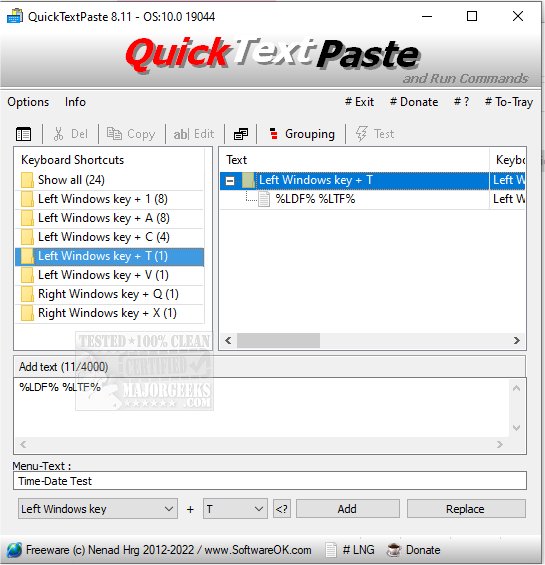
QuickTextPaste 9.61 has been released, offering a convenient and efficient way to insert pre-defined text into any Windows application using keyboard shortcuts. This portable program not only simplifies text entry but also enables users to execute commands and launch programs directly via hotkeys, significantly reducing time spent on repetitive tasks while minimizing spelling errors.
Key features of QuickTextPaste include:
- The ability to select text fields with a single hotkey.
- The option to execute multiple commands or launch programs with one hotkey.
- Customizable Windows shortcuts for various functions.
- Support for inserting multi-line text.
- Capability to run programs from the command line using keyboard shortcuts.
- A feature to paste frequently used text snippets.
- Low CPU usage, ensuring system performance remains unaffected.
- Multilingual support for a broader user base.
In addition to its core functionalities, QuickTextPaste can enhance productivity for both casual and professional users. By offering quick access to frequently used text and commands, it can streamline workflows across various applications.
For those looking to improve their efficiency further, related tools and tips include:
- Learning how to copy the path of a file or folder to the clipboard.
- Clearing clipboard history using shortcuts.
- Disabling clipboard history in Windows 10 and 11 for privacy or performance reasons.
Overall, QuickTextPaste 9.61 stands out as a powerful desktop utility for Windows users seeking to optimize their text input and command execution processes
Key features of QuickTextPaste include:
- The ability to select text fields with a single hotkey.
- The option to execute multiple commands or launch programs with one hotkey.
- Customizable Windows shortcuts for various functions.
- Support for inserting multi-line text.
- Capability to run programs from the command line using keyboard shortcuts.
- A feature to paste frequently used text snippets.
- Low CPU usage, ensuring system performance remains unaffected.
- Multilingual support for a broader user base.
In addition to its core functionalities, QuickTextPaste can enhance productivity for both casual and professional users. By offering quick access to frequently used text and commands, it can streamline workflows across various applications.
For those looking to improve their efficiency further, related tools and tips include:
- Learning how to copy the path of a file or folder to the clipboard.
- Clearing clipboard history using shortcuts.
- Disabling clipboard history in Windows 10 and 11 for privacy or performance reasons.
Overall, QuickTextPaste 9.61 stands out as a powerful desktop utility for Windows users seeking to optimize their text input and command execution processes
QuickTextPaste 9.61 released
QuickTextPaste is a small, portable program that allows you to insert (paste) pre-defined text in any Windows application via keyboard shortcuts.