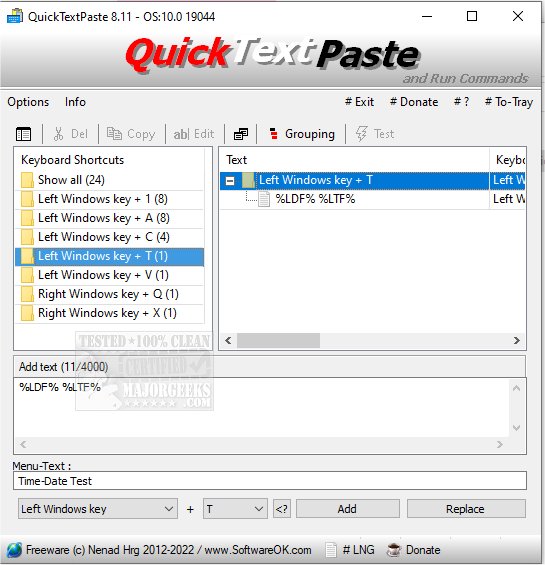
QuickTextPaste 9.51 has been released, offering users an efficient tool for inserting pre-defined text into any Windows application using keyboard shortcuts. This lightweight and portable program not only simplifies text insertion but also enables users to execute commands and launch programs with ease, ultimately saving time and reducing the likelihood of spelling errors.
Key features of QuickTextPaste include:
- The ability to select text fields using a single hotkey.
- The option to execute multiple commands or launch programs with just one keyboard shortcut.
- Support for arbitrary Windows shortcuts.
- Capability to insert multi-line text.
- The ability to launch programs directly from the command line using keyboard shortcuts.
- A function to quickly paste frequently used text.
- Low CPU usage, ensuring it runs smoothly without taxing system resources.
- Multilingual support, making it accessible to a wider audience.
In addition to its main functionalities, users can benefit from related tips, such as how to copy file paths to the clipboard, clear clipboard history with shortcuts, and disable clipboard history in Windows 10 and 11.
As technology continues to advance, tools like QuickTextPaste are essential for enhancing productivity and streamlining workflows, especially for those who frequently input repetitive text or commands. Future updates may include additional features based on user feedback, further improving the user experience and functionality of the program
Key features of QuickTextPaste include:
- The ability to select text fields using a single hotkey.
- The option to execute multiple commands or launch programs with just one keyboard shortcut.
- Support for arbitrary Windows shortcuts.
- Capability to insert multi-line text.
- The ability to launch programs directly from the command line using keyboard shortcuts.
- A function to quickly paste frequently used text.
- Low CPU usage, ensuring it runs smoothly without taxing system resources.
- Multilingual support, making it accessible to a wider audience.
In addition to its main functionalities, users can benefit from related tips, such as how to copy file paths to the clipboard, clear clipboard history with shortcuts, and disable clipboard history in Windows 10 and 11.
As technology continues to advance, tools like QuickTextPaste are essential for enhancing productivity and streamlining workflows, especially for those who frequently input repetitive text or commands. Future updates may include additional features based on user feedback, further improving the user experience and functionality of the program
QuickTextPaste 9.51 released
QuickTextPaste is a small, portable program that allows you to insert (paste) pre-defined text in any Windows application via keyboard shortcuts.