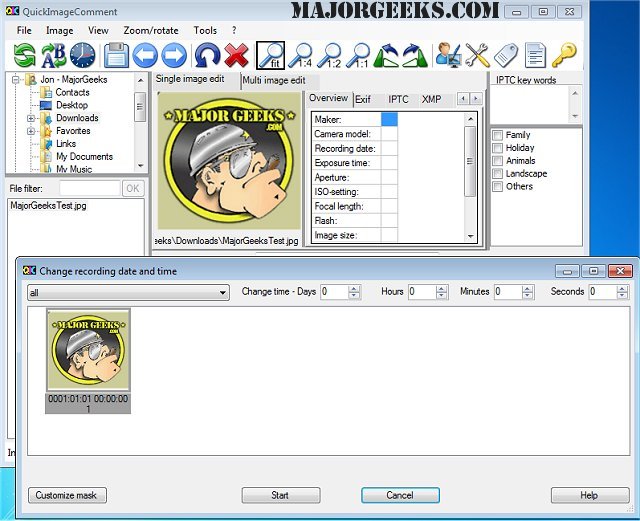
The latest release of QuickImageComment, version 5.03, enhances the capabilities of this software designed for managing digital photo information. The application supports both 32-bit and 64-bit versions, allowing users to easily edit and view essential metadata associated with their digital images. QuickImageComment provides access to a range of data formats including EXIF, IPTC, and XMP, as well as other file attributes such as modification dates.
One of the notable features of QuickImageComment is the ability to rename image files based on their metadata properties and export this data to a text file for future reference. Users can also delete specific EXIF, IPTC, and XMP properties selectively, providing flexibility in managing their image data. This capability enables users to define exceptions and remove individual properties as needed.
In addition to its editing features, QuickImageComment offers organizational tools to help users maintain an orderly image collection. This includes the use of special masks that allow users to synchronize recording times for images captured with different cameras. By grouping images based on properties, primarily camera models, users can input time shifts to ensure that their images are accurately sorted chronologically.
Overall, QuickImageComment 5.03 represents a powerful tool for both casual and professional photographers looking to manage their image data effectively, ensuring that their photo collections are not only organized but also tailored to their specific needs.
Further extensions to the software could include integration with cloud storage solutions for automatic backups, advanced tagging features for enhanced searchability, and the option for batch processing of images to streamline workflow. Additionally, incorporating AI-driven enhancements for automatic metadata tagging and organization could significantly improve user experience
One of the notable features of QuickImageComment is the ability to rename image files based on their metadata properties and export this data to a text file for future reference. Users can also delete specific EXIF, IPTC, and XMP properties selectively, providing flexibility in managing their image data. This capability enables users to define exceptions and remove individual properties as needed.
In addition to its editing features, QuickImageComment offers organizational tools to help users maintain an orderly image collection. This includes the use of special masks that allow users to synchronize recording times for images captured with different cameras. By grouping images based on properties, primarily camera models, users can input time shifts to ensure that their images are accurately sorted chronologically.
Overall, QuickImageComment 5.03 represents a powerful tool for both casual and professional photographers looking to manage their image data effectively, ensuring that their photo collections are not only organized but also tailored to their specific needs.
Further extensions to the software could include integration with cloud storage solutions for automatic backups, advanced tagging features for enhanced searchability, and the option for batch processing of images to streamline workflow. Additionally, incorporating AI-driven enhancements for automatic metadata tagging and organization could significantly improve user experience
QuickImageComment 5.03 released
QuickImageComment allows for the editing and viewing of digital photo info. A 32-bit version is also available.