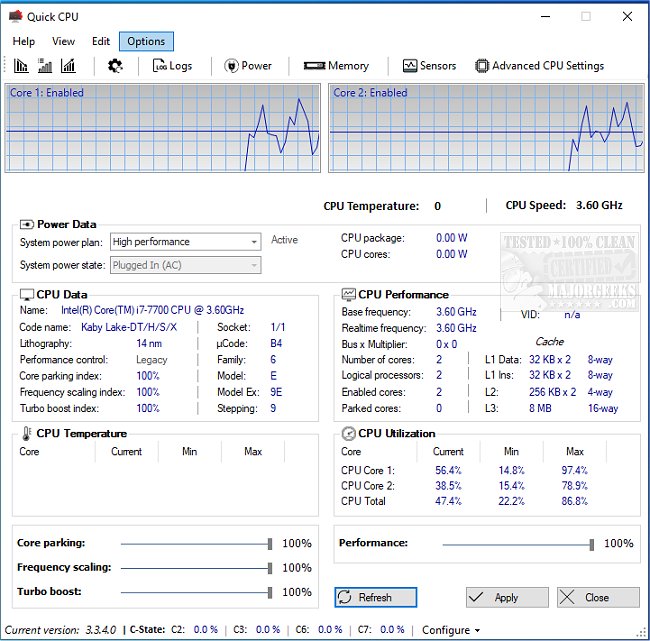
Quick CPU has released version 6.8.0.0, a powerful tool designed for users to fine-tune and monitor various CPU and system parameters. This user-friendly application is ideal for anyone looking to optimize their computer’s performance, whether you're gaming, video editing, or simply trying to improve battery life on your laptop. Quick CPU allows users to monitor crucial metrics such as CPU temperature, core utilization, power consumption, and voltage all in real-time, making it easier to diagnose issues and maintain system efficiency during demanding tasks.
Key features include advanced CPU tuning options, allowing users to adjust Core Parking, Turbo Boost, and Frequency Scaling based on their performance needs. Users can also switch between preset performance modes—Minimal, Balanced, or Maximum—making it accessible for beginners while offering advanced settings for experienced tech enthusiasts. Custom alerts ensure users are notified of changes before they are applied, and the interface is highly customizable with various themes and dockable panels. Additionally, the software provides insights into CPU core activity, power plan management, and advanced options for deeper control of CPU features.
Quick CPU caters to a diverse range of users: gamers can reduce lag and optimize performance, content creators can enhance rendering and editing speeds, laptop users can improve battery life, and power users can explore advanced controls without risking system damage. The software stands out against competitors by combining expert-level functionality with a user-friendly design, making it a comprehensive solution for CPU and system optimization.
Pros of Quick CPU include its extensive monitoring capabilities, high customization, and compatibility with various Intel and AMD CPUs. However, some advanced settings may seem daunting for novice users, and it currently lacks support for macOS or Linux systems. Overall, Quick CPU is described as a versatile tool that can unlock a computer's hidden potential, making it suitable for anyone interested in maximizing their system's performance. Download Quick CPU today to take control of your CPU's performance and ensure your computer runs at its best.
In addition to its current features, future versions of Quick CPU could benefit from expanding compatibility to include macOS and Linux systems, as well as enhancing the user interface to further simplify access to advanced settings. Additional features like built-in tutorials or guided setups could also help new users navigate the software more comfortably, ensuring that everyone can harness the full power of their CPU with ease
Key features include advanced CPU tuning options, allowing users to adjust Core Parking, Turbo Boost, and Frequency Scaling based on their performance needs. Users can also switch between preset performance modes—Minimal, Balanced, or Maximum—making it accessible for beginners while offering advanced settings for experienced tech enthusiasts. Custom alerts ensure users are notified of changes before they are applied, and the interface is highly customizable with various themes and dockable panels. Additionally, the software provides insights into CPU core activity, power plan management, and advanced options for deeper control of CPU features.
Quick CPU caters to a diverse range of users: gamers can reduce lag and optimize performance, content creators can enhance rendering and editing speeds, laptop users can improve battery life, and power users can explore advanced controls without risking system damage. The software stands out against competitors by combining expert-level functionality with a user-friendly design, making it a comprehensive solution for CPU and system optimization.
Pros of Quick CPU include its extensive monitoring capabilities, high customization, and compatibility with various Intel and AMD CPUs. However, some advanced settings may seem daunting for novice users, and it currently lacks support for macOS or Linux systems. Overall, Quick CPU is described as a versatile tool that can unlock a computer's hidden potential, making it suitable for anyone interested in maximizing their system's performance. Download Quick CPU today to take control of your CPU's performance and ensure your computer runs at its best.
In addition to its current features, future versions of Quick CPU could benefit from expanding compatibility to include macOS and Linux systems, as well as enhancing the user interface to further simplify access to advanced settings. Additional features like built-in tutorials or guided setups could also help new users navigate the software more comfortably, ensuring that everyone can harness the full power of their CPU with ease
Quick CPU 6.8.0.0 released
Quick CPU enables fine-tuning and monitoring of a myriad of essential CPU and system parameters.