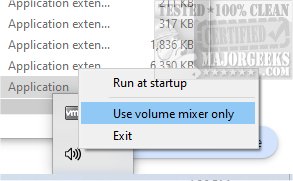
QontrolPanel, previously known as QuickSoundSwitcher, has unveiled its latest version, 2.5.1, offering users an efficient solution for managing audio devices on their machines. This application simplifies the often tedious process of switching between different audio outputs such as headphones, speakers, and external sound systems, enabling users to make changes with just a click.
Enhanced Sound Control
One of the core features of QontrolPanel is its ability to enhance sound management without the need for navigating through extensive settings menus. Users can quickly toggle between audio devices, improving their listening experience and saving time. The application operates without a traditional user interface, meaning installation is straightforward—simply launch the app and it integrates into your System Tray for instant access.
Key Features
From the System Tray icon, users can access three main functionalities:
- Input Management: Easily switch between various microphone settings, ensuring optimal performance whether you're gaming, video conferencing, or recording.
- Output Switching: Seamlessly change between multiple audio output devices, making it ideal for those who frequently switch between headphones and speakers.
- Volume Mixer: This feature provides granular control over sound levels for individual applications. Users can adjust the volume for each app independently and mute them with a quick button, allowing for a custom audio experience.
User-Friendly Experience
QontrolPanel's design prioritizes user-friendliness, catering to those who prefer simplicity over complicated interfaces. The ability to control audio levels for different applications enhances its usability, making it a valuable tool for anyone who regularly toggles between audio devices.
Conclusion
In summary, QontrolPanel 2.5.1 is an essential tool for efficient audio management. Its straightforward functionality and seamless integration into the system make it perfect for users looking to enhance their audio experience without the hassle of complex settings. Whether you're a gamer, a musician, or someone who simply enjoys high-quality sound, QontrolPanel is a must-have application.
Additional Resources:
For users interested in optimizing their audio experience further, consider exploring guides on enabling Windows Sonic Surround Sound or toggling key sounds in Windows 10 and 11
Enhanced Sound Control
One of the core features of QontrolPanel is its ability to enhance sound management without the need for navigating through extensive settings menus. Users can quickly toggle between audio devices, improving their listening experience and saving time. The application operates without a traditional user interface, meaning installation is straightforward—simply launch the app and it integrates into your System Tray for instant access.
Key Features
From the System Tray icon, users can access three main functionalities:
- Input Management: Easily switch between various microphone settings, ensuring optimal performance whether you're gaming, video conferencing, or recording.
- Output Switching: Seamlessly change between multiple audio output devices, making it ideal for those who frequently switch between headphones and speakers.
- Volume Mixer: This feature provides granular control over sound levels for individual applications. Users can adjust the volume for each app independently and mute them with a quick button, allowing for a custom audio experience.
User-Friendly Experience
QontrolPanel's design prioritizes user-friendliness, catering to those who prefer simplicity over complicated interfaces. The ability to control audio levels for different applications enhances its usability, making it a valuable tool for anyone who regularly toggles between audio devices.
Conclusion
In summary, QontrolPanel 2.5.1 is an essential tool for efficient audio management. Its straightforward functionality and seamless integration into the system make it perfect for users looking to enhance their audio experience without the hassle of complex settings. Whether you're a gamer, a musician, or someone who simply enjoys high-quality sound, QontrolPanel is a must-have application.
Additional Resources:
For users interested in optimizing their audio experience further, consider exploring guides on enabling Windows Sonic Surround Sound or toggling key sounds in Windows 10 and 11
QontrolPanel 2.5.1 released
QontrolPanel (formerly QuickSoundSwitcher) simplifies the process of switching between various audio devices on your machine.