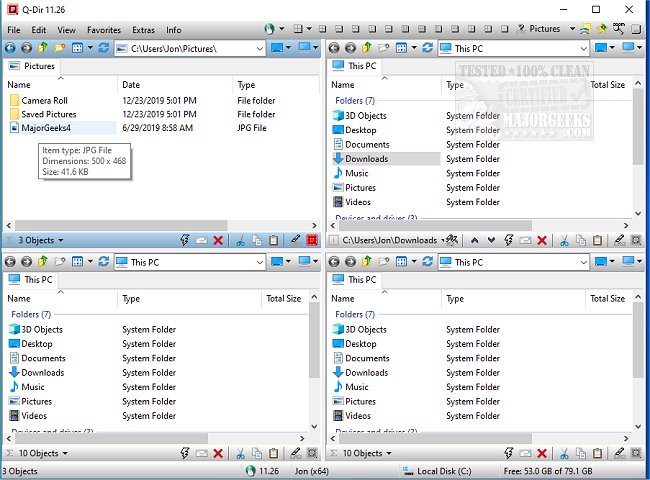
Q-Dir 12.73 has been released, offering a powerful and free file management solution that simplifies the organization of files and folders across various storage devices, including hard disks, network folders, USB drives, and floppy disks. Designed as a more efficient alternative to Windows File Explorer, Q-Dir features a unique quad-pane interface, which allows users to navigate and manage up to four folders at once. This functionality streamlines file operations such as copying, moving, and organizing, making it ideal for users who frequently need to access multiple locations simultaneously.
Key features of Q-Dir include:
- Quad-Pane Interface: Navigate and manage multiple folders in one view.
- Drag & Drop Support: Easily move files between panels.
- Custom Layouts & Color Filters: Personalize your workflow for enhanced efficiency.
- Tab Support: Open multiple folders in each pane.
- Fast File Operations: Quickly copy, move, and delete files.
- Portable Version: No installation needed, allowing for easy use on various systems.
- Lightweight & Resource-Friendly: Performs well even on older computers.
Q-Dir caters to a diverse range of users, from everyday individuals organizing personal files to IT professionals managing system files and backups. Developers and designers can benefit from keeping project directories side by side, while network admins can easily handle file transfers across different locations.
To further enhance productivity, Q-Dir includes tools like Favorites & Quick Access for bookmarking frequently used folders, a File Preview feature for instant access to file contents, and Multi-Monitor Support for managing files across screens. Users can also apply built-in File Filters to highlight specific file types, utilize Tree View for better navigation, and manage ZIP & FTP files seamlessly. The interface can be customized with Dark Mode and themes for a personalized touch.
However, new users may find the quad-pane interface overwhelming at first, so it is recommended to start with default layouts. Additionally, Q-Dir does not offer a built-in file search feature, which means users might need to rely on Windows Search for more comprehensive file lookups. Customization options, including hotkeys and color filters, can help users create a workflow that suits their needs.
In conclusion, if you find Windows File Explorer insufficient for your file management tasks, Q-Dir is an excellent alternative, combining speed, efficiency, and extensive customization options. Download Q-Dir today to experience its robust features and improve your file management capabilities!
For related tips, you can explore how to manage default apps, reset folder view settings, and show or hide file name extensions in Windows File Explorer
Key features of Q-Dir include:
- Quad-Pane Interface: Navigate and manage multiple folders in one view.
- Drag & Drop Support: Easily move files between panels.
- Custom Layouts & Color Filters: Personalize your workflow for enhanced efficiency.
- Tab Support: Open multiple folders in each pane.
- Fast File Operations: Quickly copy, move, and delete files.
- Portable Version: No installation needed, allowing for easy use on various systems.
- Lightweight & Resource-Friendly: Performs well even on older computers.
Q-Dir caters to a diverse range of users, from everyday individuals organizing personal files to IT professionals managing system files and backups. Developers and designers can benefit from keeping project directories side by side, while network admins can easily handle file transfers across different locations.
To further enhance productivity, Q-Dir includes tools like Favorites & Quick Access for bookmarking frequently used folders, a File Preview feature for instant access to file contents, and Multi-Monitor Support for managing files across screens. Users can also apply built-in File Filters to highlight specific file types, utilize Tree View for better navigation, and manage ZIP & FTP files seamlessly. The interface can be customized with Dark Mode and themes for a personalized touch.
However, new users may find the quad-pane interface overwhelming at first, so it is recommended to start with default layouts. Additionally, Q-Dir does not offer a built-in file search feature, which means users might need to rely on Windows Search for more comprehensive file lookups. Customization options, including hotkeys and color filters, can help users create a workflow that suits their needs.
In conclusion, if you find Windows File Explorer insufficient for your file management tasks, Q-Dir is an excellent alternative, combining speed, efficiency, and extensive customization options. Download Q-Dir today to experience its robust features and improve your file management capabilities!
For related tips, you can explore how to manage default apps, reset folder view settings, and show or hide file name extensions in Windows File Explorer
Q-Dir 12.73 released
Q-Dir is a free option to make managing your files and folders easy by allowing you to quickly regulate your hard disks, network folders, USB-drives, floppy disks, and other storage devices.