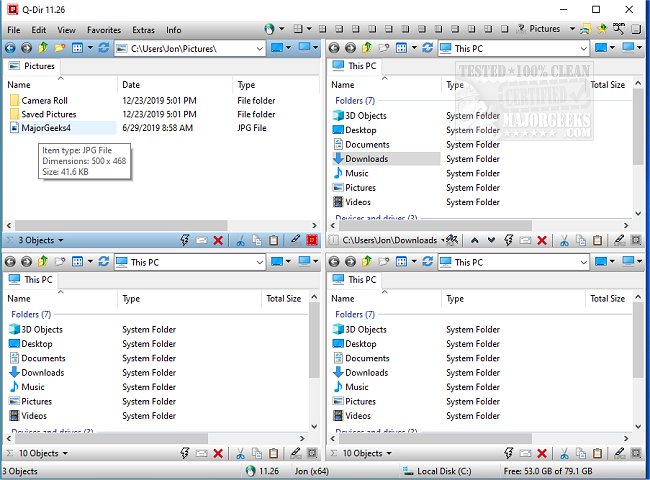
Q-Dir is a free and powerful file management tool designed to simplify the organization of files and folders across various storage devices, including hard disks, USB drives, and network locations. The latest version, Q-Dir 12.69, enhances user experience with its innovative quad-pane interface, allowing users to manage up to four folders simultaneously. This feature significantly improves efficiency, particularly for those who regularly transfer or organize files.
Why Q-Dir Stands Out
While the standard Windows File Explorer is suitable for basic tasks, Q-Dir offers speed and enhanced control for users who require more from their file management. Its unique features include:
- Quad-Pane Interface: Easily view and manage multiple folders at once.
- Drag & Drop Support: Simplifies file movement between panels.
- Custom Layouts & Color Filters: Personalize your workspace for improved workflow.
- Tab Support: Open multiple folders in each pane.
- Fast File Operations: Quickly copy, move, and delete files.
- Portability: A version that requires no installation is available.
- Lightweight Performance: Efficient on resources, even on older systems.
Optimizing Your Workflow with Q-Dir
Q-Dir is designed for a diverse audience:
- Everyday Users: Ideal for organizing personal documents and photos.
- IT Professionals: Helps in managing system files and backups.
- Developers & Designers: Facilitates quick access to project directories.
- Power Users: Enables faster bulk file operations.
- Network Admins: Streamlines file transfers across multiple locations.
Unlocking Additional Features
Q-Dir includes various productivity-enhancing tools:
- Favorites & Quick Access: Bookmark frequently used folders.
- File Preview Feature: View files without opening them.
- Clipboard & Shortcut Integration: Streamlines the creation of shortcuts and copying of paths.
- Multi-Monitor Support: Manage files across multiple displays.
- Custom File Filters: Highlight specific file types using colors.
- ZIP & FTP Support: Handle compressed files and remote directories easily.
- Dark Mode & Custom Themes: Personalize the interface to suit user preferences.
Mastering Q-Dir: Tips for New Users
New users may initially find the quad-pane layout overwhelming. It's recommended to start with default layouts for a smoother learning curve. Note that while Q-Dir excels at file management, it lacks built-in file search capabilities, so users might still rely on Windows Search for comprehensive lookups. Customization is crucial; leveraging hotkeys, color filters, and layouts can significantly enhance productivity.
Conclusion: The Geek Verdict
Q-Dir is an excellent alternative to Windows File Explorer for those seeking a more robust file management solution. Its speed, efficiency, and extensive customization options make it one of the top free file management tools available. Download Q-Dir today to transform your file management experience.
Related Topics:
- Managing Default Apps and File Associations
- Resetting Folder View Settings in Windows 10 & 11
- Showing or Hiding File Name Extensions in File Explorer
- Displaying the Actual Path in Windows 10 & 11 File Explore
Why Q-Dir Stands Out
While the standard Windows File Explorer is suitable for basic tasks, Q-Dir offers speed and enhanced control for users who require more from their file management. Its unique features include:
- Quad-Pane Interface: Easily view and manage multiple folders at once.
- Drag & Drop Support: Simplifies file movement between panels.
- Custom Layouts & Color Filters: Personalize your workspace for improved workflow.
- Tab Support: Open multiple folders in each pane.
- Fast File Operations: Quickly copy, move, and delete files.
- Portability: A version that requires no installation is available.
- Lightweight Performance: Efficient on resources, even on older systems.
Optimizing Your Workflow with Q-Dir
Q-Dir is designed for a diverse audience:
- Everyday Users: Ideal for organizing personal documents and photos.
- IT Professionals: Helps in managing system files and backups.
- Developers & Designers: Facilitates quick access to project directories.
- Power Users: Enables faster bulk file operations.
- Network Admins: Streamlines file transfers across multiple locations.
Unlocking Additional Features
Q-Dir includes various productivity-enhancing tools:
- Favorites & Quick Access: Bookmark frequently used folders.
- File Preview Feature: View files without opening them.
- Clipboard & Shortcut Integration: Streamlines the creation of shortcuts and copying of paths.
- Multi-Monitor Support: Manage files across multiple displays.
- Custom File Filters: Highlight specific file types using colors.
- ZIP & FTP Support: Handle compressed files and remote directories easily.
- Dark Mode & Custom Themes: Personalize the interface to suit user preferences.
Mastering Q-Dir: Tips for New Users
New users may initially find the quad-pane layout overwhelming. It's recommended to start with default layouts for a smoother learning curve. Note that while Q-Dir excels at file management, it lacks built-in file search capabilities, so users might still rely on Windows Search for comprehensive lookups. Customization is crucial; leveraging hotkeys, color filters, and layouts can significantly enhance productivity.
Conclusion: The Geek Verdict
Q-Dir is an excellent alternative to Windows File Explorer for those seeking a more robust file management solution. Its speed, efficiency, and extensive customization options make it one of the top free file management tools available. Download Q-Dir today to transform your file management experience.
Related Topics:
- Managing Default Apps and File Associations
- Resetting Folder View Settings in Windows 10 & 11
- Showing or Hiding File Name Extensions in File Explorer
- Displaying the Actual Path in Windows 10 & 11 File Explore
Q-Dir 12.69 released
Q-Dir is a free option to make managing your files and folders easy by allowing you to quickly regulate your hard disks, network folders, USB-drives, floppy disks, and other storage devices.