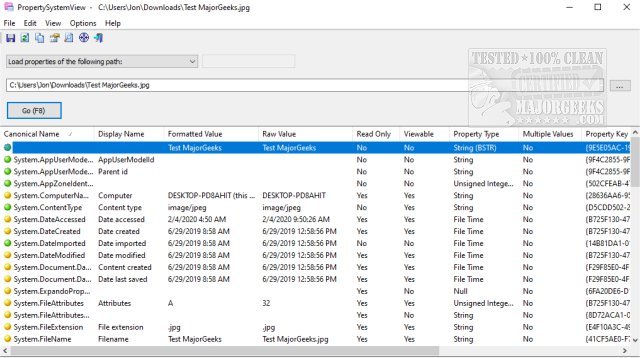
PropertySystemView 1.22 has been released as a portable application designed for viewing and modifying file properties using the Windows property system. The user-friendly interface allows users to easily adjust various metadata attributes in files, including the 'Media Created' timestamp for .mp4 files (System.Media.DateEncoded) and other data in media files and office documents. Users can modify details like Title, Comments, Authors, Tags, and various dates related to the file's lifecycle, such as Date Acquired, Last Saved Date, Content Created Date, Date Imported, and Date Taken (for .jpg files).
To use PropertySystemView, users can simply drag files from Windows Explorer into the application's main window or utilize the Browse feature to select a file and press F8 to view its properties. Additionally, users can access window properties by dragging the target icon from the toolbar into the desired window or entering the window handle in the combo-box. For a comprehensive overview of all properties available within the system, users can opt to list all properties and press F8.
Furthermore, PropertySystemView enables users to set properties for Windows itself, such as modifying the System.AppUserModel.ID property to manage taskbar grouping for specific windows.
In summary, PropertySystemView 1.22 is an efficient tool for managing file and window properties within the Windows operating system, offering a straightforward method for users to customize and control metadata associated with their files.
In future updates, it would be valuable to see additional features such as batch processing capabilities, cloud integration for accessing files directly from cloud services, and enhanced compatibility with more file formats. Additionally, incorporating a user manual or tutorial could assist new users in maximizing the tool's potential. As digital privacy concerns grow, ensuring that such tools are secure and respect user data will also be critical for maintaining trust in software solutions
To use PropertySystemView, users can simply drag files from Windows Explorer into the application's main window or utilize the Browse feature to select a file and press F8 to view its properties. Additionally, users can access window properties by dragging the target icon from the toolbar into the desired window or entering the window handle in the combo-box. For a comprehensive overview of all properties available within the system, users can opt to list all properties and press F8.
Furthermore, PropertySystemView enables users to set properties for Windows itself, such as modifying the System.AppUserModel.ID property to manage taskbar grouping for specific windows.
In summary, PropertySystemView 1.22 is an efficient tool for managing file and window properties within the Windows operating system, offering a straightforward method for users to customize and control metadata associated with their files.
Extension:
With the increasing complexity of digital media and documentation, tools like PropertySystemView become essential for users who require precise control over file metadata. The ability to edit properties can be particularly beneficial for content creators, archivists, and professionals managing large volumes of digital assets. As file management continues to evolve, having a portable and intuitive solution can streamline workflows, improve organization, and enhance productivity.In future updates, it would be valuable to see additional features such as batch processing capabilities, cloud integration for accessing files directly from cloud services, and enhanced compatibility with more file formats. Additionally, incorporating a user manual or tutorial could assist new users in maximizing the tool's potential. As digital privacy concerns grow, ensuring that such tools are secure and respect user data will also be critical for maintaining trust in software solutions
PropertySystemView 1.22 released
PropertySystemView is a portable tool that allows you to view and modify the properties of files using the Windows property system.