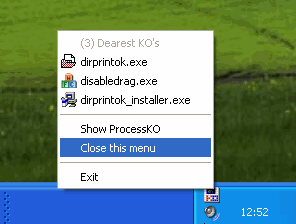
ProcessKO 6.77 has been released, offering users a convenient solution for quickly terminating unresponsive or frozen processes. This lightweight and portable application is especially beneficial for developers and program testers who frequently encounter issues with programs that fail to close properly, often requiring them to rely on Task Manager for termination.
Typically, when a program hangs, users must go through several steps: pressing CTRL+ALT+DEL to access Task Manager, locating the frozen application, selecting "End Process," and then confirming the termination. ProcessKO simplifies this process, allowing users to kill stubborn applications with minimal effort and time. The utility can also restart processes directly from its interface, enhancing efficiency.
ProcessKO does not require installation and can be run directly from a desktop or USB drive, making it a versatile tool for Windows users. Beyond its primary function, the app serves as a practical alternative to the traditional Task Manager, streamlining the process of managing non-responsive applications.
In addition to its core features, users may benefit from understanding related functionalities, such as how to effectively use Task Manager for diagnostics, adjust data update speeds, and customize settings for a more tailored experience. ProcessKO stands out as an essential tool for anyone seeking to manage their system processes more effectively
Typically, when a program hangs, users must go through several steps: pressing CTRL+ALT+DEL to access Task Manager, locating the frozen application, selecting "End Process," and then confirming the termination. ProcessKO simplifies this process, allowing users to kill stubborn applications with minimal effort and time. The utility can also restart processes directly from its interface, enhancing efficiency.
ProcessKO does not require installation and can be run directly from a desktop or USB drive, making it a versatile tool for Windows users. Beyond its primary function, the app serves as a practical alternative to the traditional Task Manager, streamlining the process of managing non-responsive applications.
In addition to its core features, users may benefit from understanding related functionalities, such as how to effectively use Task Manager for diagnostics, adjust data update speeds, and customize settings for a more tailored experience. ProcessKO stands out as an essential tool for anyone seeking to manage their system processes more effectively
ProcessKO 6.77 released
ProcessKO is a small free portable app to kill a running or hanging process or program quickly.