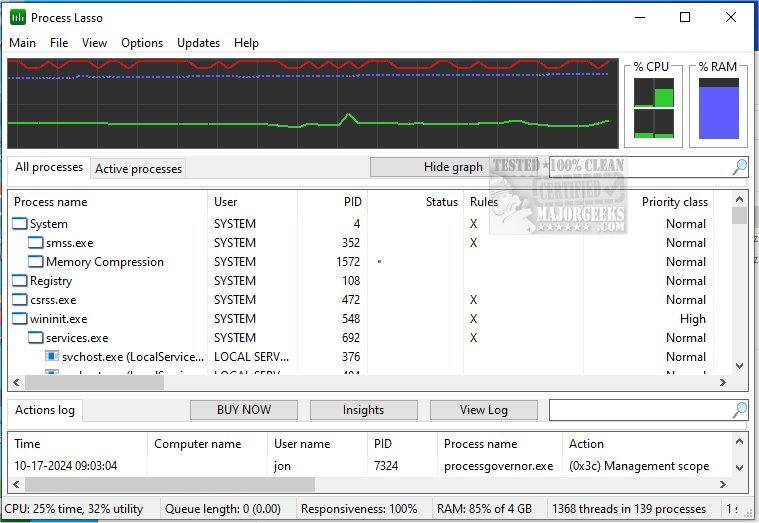
Process Lasso has recently released its latest beta version 18.3.0.1, following version 18.2.3.42. This free tool is specifically designed to optimize and manage the way processes and services operate on your computer. It boasts a comprehensive suite of features aimed at enhancing system performance and user experience.
Key features of Process Lasso include:
- ProBalance: A dynamic priority optimization tool that ensures high-priority processes receive the necessary CPU resources during heavy system load.
- Persistent Priorities and CPU Affinities: Users can set sticky priorities and affinities for processes to control their execution more effectively.
- Instance Count Limits: This feature allows users to limit the number of instances of a particular process that can run simultaneously.
- Disallowed Processes: Users can specify processes that should not be allowed to run, helping to maintain system integrity and performance.
- Auto-Restart Functionality: Ensures that critical processes are kept running by automatically restarting them if they terminate unexpectedly.
- System Responsiveness Graph: A unique tool that visually displays the responsiveness of the system, allowing users to monitor performance in real-time.
- Prevent PC Sleep: Users can designate certain processes to prevent the computer from entering sleep mode.
- Differentiation of svchost.exe Instances: This feature helps users manage multiple instances of the svchost.exe process, providing clearer visibility and control.
- Minimal Resource Usage: The tool is designed to be lightweight, using as little as 1MB of RAM, which allows for efficient process management without taxing system resources.
- Event Logging: Keeps a log of process activities for monitoring and troubleshooting purposes.
Additionally, for users looking to manage their systems more effectively, the tool complements other resources such as guides for identifying processes, saving process lists, customizing Task Manager views, and managing startup applications in Windows 10 and 11.
As Process Lasso continues to evolve, users can expect further enhancements and optimizations that cater to the growing demands of modern computing. The tool not only aids in process management but also contributes significantly to overall system stability and responsiveness
Key features of Process Lasso include:
- ProBalance: A dynamic priority optimization tool that ensures high-priority processes receive the necessary CPU resources during heavy system load.
- Persistent Priorities and CPU Affinities: Users can set sticky priorities and affinities for processes to control their execution more effectively.
- Instance Count Limits: This feature allows users to limit the number of instances of a particular process that can run simultaneously.
- Disallowed Processes: Users can specify processes that should not be allowed to run, helping to maintain system integrity and performance.
- Auto-Restart Functionality: Ensures that critical processes are kept running by automatically restarting them if they terminate unexpectedly.
- System Responsiveness Graph: A unique tool that visually displays the responsiveness of the system, allowing users to monitor performance in real-time.
- Prevent PC Sleep: Users can designate certain processes to prevent the computer from entering sleep mode.
- Differentiation of svchost.exe Instances: This feature helps users manage multiple instances of the svchost.exe process, providing clearer visibility and control.
- Minimal Resource Usage: The tool is designed to be lightweight, using as little as 1MB of RAM, which allows for efficient process management without taxing system resources.
- Event Logging: Keeps a log of process activities for monitoring and troubleshooting purposes.
Additionally, for users looking to manage their systems more effectively, the tool complements other resources such as guides for identifying processes, saving process lists, customizing Task Manager views, and managing startup applications in Windows 10 and 11.
As Process Lasso continues to evolve, users can expect further enhancements and optimizations that cater to the growing demands of modern computing. The tool not only aids in process management but also contributes significantly to overall system stability and responsiveness
Process Lasso 18.3.0.1 Beta / 18.2.3.42 released
Process Lasso is a free tool designed to manage and edit how your processes and services run.
Process Lasso 18.3.0.1 Beta / 18.2.3.42 released @ MajorGeeks