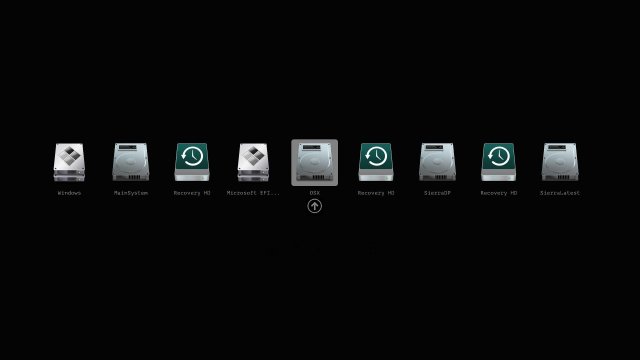
The Clover EFI Bootloader 5174 has been released, allowing users to boot various operating systems, including OS X, Windows, and Linux, on both Mac and PC platforms utilizing either UEFI or traditional BIOS firmware. This versatile bootloader supports both UEFI firmware directly and CloverEFI's UEFI firmware emulation, enabling a seamless experience across different systems.
Key features of Clover EFI Bootloader include:
- The ability to boot operating systems in either UEFI or legacy mode.
- A highly customizable graphical user interface (GUI) that supports themes, icons, fonts, animations, and mouse pointers. Users can access a theme database at https://clover-wiki.zetam.org/Theme-database.
- Options for changing GUI resolution, with native support for screen resolution adjustments.
- Multilingual help available via a dedicated F1 key, which adapts based on the selected language in the configuration settings.
- Tools for managing boot entries, saving logs, and creating custom boot entries for enhanced personalization and compatibility with various operating systems.
Additional functionalities include the ability to save original ACPI tables, test DSDT patching, save graphics firmware, capture screenshots, and manage CD/DVD drives through simple key commands. The interface also allows users to boot previously selected entries after a timeout and create Clover boot entries in NVRAM for easier access.
In summary, Clover EFI Bootloader 5174 presents a powerful solution for users looking to boot multiple operating systems on diverse hardware platforms, with extensive customization options and helpful features designed to streamline the boot process.
Looking forward, the Clover community can expect continued updates and enhancements that further improve user experience and expand compatibility with new operating systems and hardware. As technology evolves, Clover EFI Bootloader will likely adapt to incorporate new features and support the latest advancements in boot management and system firmware
Key features of Clover EFI Bootloader include:
- The ability to boot operating systems in either UEFI or legacy mode.
- A highly customizable graphical user interface (GUI) that supports themes, icons, fonts, animations, and mouse pointers. Users can access a theme database at https://clover-wiki.zetam.org/Theme-database.
- Options for changing GUI resolution, with native support for screen resolution adjustments.
- Multilingual help available via a dedicated F1 key, which adapts based on the selected language in the configuration settings.
- Tools for managing boot entries, saving logs, and creating custom boot entries for enhanced personalization and compatibility with various operating systems.
Additional functionalities include the ability to save original ACPI tables, test DSDT patching, save graphics firmware, capture screenshots, and manage CD/DVD drives through simple key commands. The interface also allows users to boot previously selected entries after a timeout and create Clover boot entries in NVRAM for easier access.
In summary, Clover EFI Bootloader 5174 presents a powerful solution for users looking to boot multiple operating systems on diverse hardware platforms, with extensive customization options and helpful features designed to streamline the boot process.
Looking forward, the Clover community can expect continued updates and enhancements that further improve user experience and expand compatibility with new operating systems and hardware. As technology evolves, Clover EFI Bootloader will likely adapt to incorporate new features and support the latest advancements in boot management and system firmware
Clover EFI Bootloader 5174 released
Clover EFI Bootloader can boot OS X, Windows, and Linux on Mac or PC with UEFI or BIOS firmware.