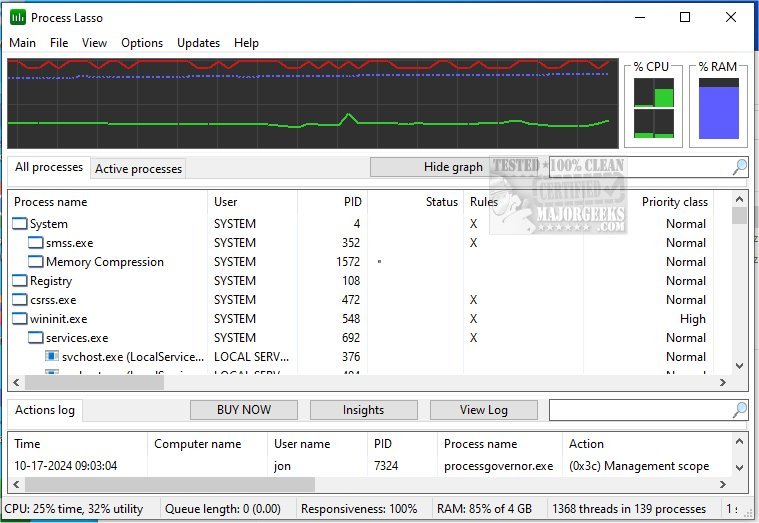
Process Lasso has recently released versions 18.2.3.17 Beta and 18.2.2.10, continuing to enhance its functionality as a free tool for managing and optimizing the performance of processes and services on your computer. This software is equipped with an extensive array of features aimed at improving system responsiveness and stability.
Key features include:
- ProBalance: A dynamic priority optimization feature that adjusts the priorities of running processes to ensure smoother operation of active applications.
- Persistent Priorities and CPU Affinities: Users can set specific priorities and CPU affinities for processes, ensuring they consistently receive the appropriate amount of system resources.
- Instance Count Limits: This feature allows users to restrict the number of instances of a particular process that can run simultaneously, preventing resource hogging.
- Disallowed Processes: Users can define processes that should not be allowed to run, enhancing security and performance.
- Auto-Restart for Critical Processes: Ensures that selected processes are automatically restarted if they terminate unexpectedly.
- System Responsiveness Graph: A unique tool that visualizes system responsiveness, helping users to identify performance issues in real-time.
- Preventing PC Sleep for Designated Processes: This feature prevents the computer from entering sleep mode while critical processes are active, ensuring uninterrupted operation.
- Differentiation Between svchost.exe Instances: This allows users to identify and manage different instances of the commonly used svchost.exe process more effectively.
- Low Resource Usage: The application is designed to have minimal impact on system resources, using as little as 1MB of RAM.
- Standalone Process Management Engine: It operates independently, providing robust process management without consuming excessive system resources.
- Event Logging: Users can log events related to processes, which aids in troubleshooting and monitoring system performance.
For users looking to further optimize their system, there are also guides available on identifying processes, saving lists of running processes, customizing the Task Manager, and managing startup applications in Windows 10 and 11.
In conclusion, Process Lasso remains a powerful tool for users seeking to take control over their system's performance, with ongoing updates that add to its capabilities and ease of use. Whether you're a casual user or someone looking for more fine-tuned control over your system's processes, Process Lasso offers valuable features to enhance your computing experience
Key features include:
- ProBalance: A dynamic priority optimization feature that adjusts the priorities of running processes to ensure smoother operation of active applications.
- Persistent Priorities and CPU Affinities: Users can set specific priorities and CPU affinities for processes, ensuring they consistently receive the appropriate amount of system resources.
- Instance Count Limits: This feature allows users to restrict the number of instances of a particular process that can run simultaneously, preventing resource hogging.
- Disallowed Processes: Users can define processes that should not be allowed to run, enhancing security and performance.
- Auto-Restart for Critical Processes: Ensures that selected processes are automatically restarted if they terminate unexpectedly.
- System Responsiveness Graph: A unique tool that visualizes system responsiveness, helping users to identify performance issues in real-time.
- Preventing PC Sleep for Designated Processes: This feature prevents the computer from entering sleep mode while critical processes are active, ensuring uninterrupted operation.
- Differentiation Between svchost.exe Instances: This allows users to identify and manage different instances of the commonly used svchost.exe process more effectively.
- Low Resource Usage: The application is designed to have minimal impact on system resources, using as little as 1MB of RAM.
- Standalone Process Management Engine: It operates independently, providing robust process management without consuming excessive system resources.
- Event Logging: Users can log events related to processes, which aids in troubleshooting and monitoring system performance.
For users looking to further optimize their system, there are also guides available on identifying processes, saving lists of running processes, customizing the Task Manager, and managing startup applications in Windows 10 and 11.
In conclusion, Process Lasso remains a powerful tool for users seeking to take control over their system's performance, with ongoing updates that add to its capabilities and ease of use. Whether you're a casual user or someone looking for more fine-tuned control over your system's processes, Process Lasso offers valuable features to enhance your computing experience
Process Lasso 18.2.3.17 Beta / 18.2.2.10 released
Process Lasso is a free tool designed to manage and edit how your processes and services run.
Process Lasso 18.2.3.17 Beta / 18.2.2.10 released @ MajorGeeks