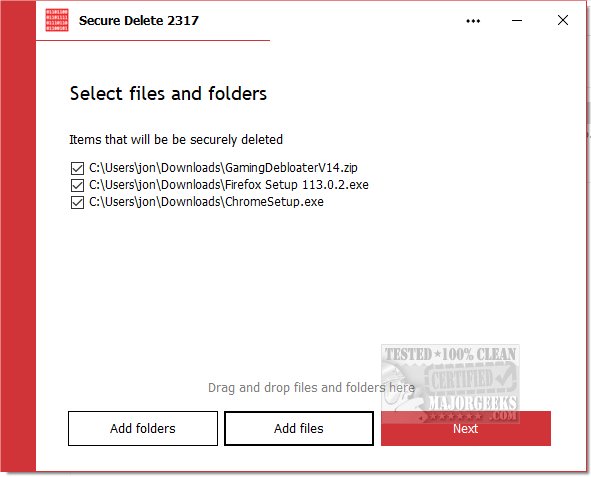
PrivacyRoot has released its latest version of Secure Delete 223, a tool that enables users to permanently erase files and folders from their computers without sending them to the recycle bin. This software offers multiple security options, allowing users to select the desired level of security for the deletion process; higher security levels result in longer deletion times.
There are three primary methods for using Secure Delete: users can drag and drop files into the main window, click "Add Files" to select files manually, or use the "Send To" option from Windows Explorer to delete selected items. The software operates through a step-by-step process, providing the user with the option to cancel if necessary. Once the deletion is complete, files and folders are permanently removed from the system, making it crucial for users to ensure they have backups of important data.
Secure Delete features a user-friendly interface designed for ease of use, especially for beginners. Despite its simplicity, the software employs robust algorithms for secure data destruction, ensuring effective and comprehensive file deletion.
In addition to Secure Delete, users may also find interest in related topics such as utilizing Storage Sense to automatically delete junk files in Windows 10 & 11, securely deleting files via PowerShell and Cipher, troubleshooting access denied errors during file deletion, and permanently disabling activity history in Windows 10 & 11.
To extend this information, users might benefit from exploring best practices for data backup before using deletion tools, understanding the implications of permanent deletion, and considering the importance of data privacy in the digital age. Moreover, it may be useful to compare Secure Delete with other file deletion tools on the market to find the best fit for personal or organizational needs
There are three primary methods for using Secure Delete: users can drag and drop files into the main window, click "Add Files" to select files manually, or use the "Send To" option from Windows Explorer to delete selected items. The software operates through a step-by-step process, providing the user with the option to cancel if necessary. Once the deletion is complete, files and folders are permanently removed from the system, making it crucial for users to ensure they have backups of important data.
Secure Delete features a user-friendly interface designed for ease of use, especially for beginners. Despite its simplicity, the software employs robust algorithms for secure data destruction, ensuring effective and comprehensive file deletion.
In addition to Secure Delete, users may also find interest in related topics such as utilizing Storage Sense to automatically delete junk files in Windows 10 & 11, securely deleting files via PowerShell and Cipher, troubleshooting access denied errors during file deletion, and permanently disabling activity history in Windows 10 & 11.
To extend this information, users might benefit from exploring best practices for data backup before using deletion tools, understanding the implications of permanent deletion, and considering the importance of data privacy in the digital age. Moreover, it may be useful to compare Secure Delete with other file deletion tools on the market to find the best fit for personal or organizational needs
PrivacyRoot Secure Delete 223 released
PrivacyRoot Secure Delete lets you securely erase files and folders permanently from your machine without going to the recycle bin.