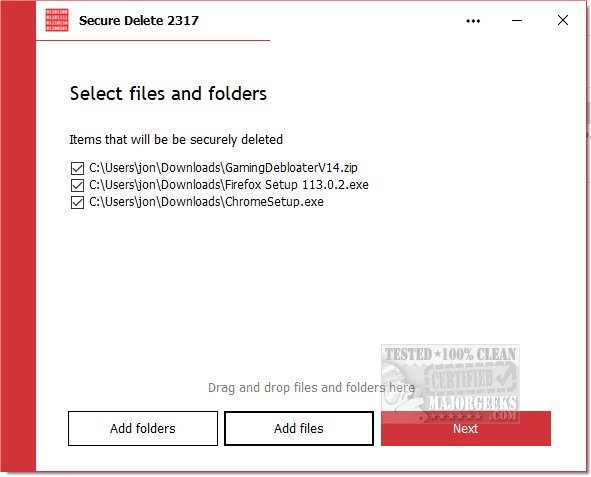
PrivacyRoot has just released a new version of its Secure Delete tool, version 222, which enables users to permanently erase files and folders from their computers without the risk of recovery. This software is designed to bypass the recycle bin, ensuring that deleted items are irretrievable.
Secure Delete offers users several options for securely erasing files, allowing them to select the desired level of security for the deletion process. Users can choose from various security levels, with higher levels providing more thorough deletion at the expense of longer processing times. The program can be used in multiple ways: users can drag and drop files into its main interface, click "Add Files" to select items, or right-click on files in Windows Explorer and choose "Send To" followed by Secure Deleter.
The application follows a straightforward step-by-step deletion process, allowing users the option to halt the operation if necessary. It emphasizes the importance of having a backup before proceeding, as it permanently deletes files without recovery options. Secure Delete is designed with a user-friendly interface that caters to novices, ensuring that even those unfamiliar with data security can effectively utilize the tool without compromising on the strength of its algorithms.
In addition to Secure Delete, users may also find value in learning about other tools and methods for managing and securely deleting files on their systems, such as Storage Sense, PowerShell, or dealing with access issues when attempting to delete files. This highlights the variety of options available to users looking to maintain their digital privacy and security
Secure Delete offers users several options for securely erasing files, allowing them to select the desired level of security for the deletion process. Users can choose from various security levels, with higher levels providing more thorough deletion at the expense of longer processing times. The program can be used in multiple ways: users can drag and drop files into its main interface, click "Add Files" to select items, or right-click on files in Windows Explorer and choose "Send To" followed by Secure Deleter.
The application follows a straightforward step-by-step deletion process, allowing users the option to halt the operation if necessary. It emphasizes the importance of having a backup before proceeding, as it permanently deletes files without recovery options. Secure Delete is designed with a user-friendly interface that caters to novices, ensuring that even those unfamiliar with data security can effectively utilize the tool without compromising on the strength of its algorithms.
In addition to Secure Delete, users may also find value in learning about other tools and methods for managing and securely deleting files on their systems, such as Storage Sense, PowerShell, or dealing with access issues when attempting to delete files. This highlights the variety of options available to users looking to maintain their digital privacy and security
PrivacyRoot Secure Delete 222 released
PrivacyRoot Secure Delete lets you securely erase files and folders permanently from your machine without going to the recycle bin.