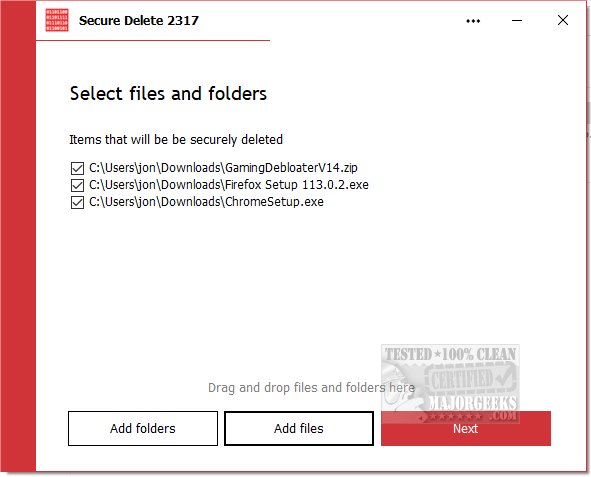
PrivacyRoot has launched the latest version of its file deletion software, PrivacyRoot Secure Delete 219. This tool is designed to permanently erase files and folders from your computer, bypassing the recycle bin entirely, ensuring complete data removal.
Key Features:
PrivacyRoot Secure Delete provides users with various security options for the deletion process, allowing for customizable levels of security. Users can choose a higher security setting for more thorough deletion, although this may result in longer processing times.
The software offers three convenient methods for deleting files:
1. Drag and Drop: Users can simply drag files or folders into the main interface.
2. Add Files: By clicking the "Add Files" button, users can select the files they wish to delete.
3. Send To Option: Users can right-click any file or folder in Windows Explorer, select "Send To," and choose Secure Deleter for quick access.
The deletion process is straightforward, allowing users to stop at any point if necessary. Once the process is initiated, files are permanently erased without being sent to the recycle bin, emphasizing the importance of having backups before proceeding with deletions.
User-Friendly Interface:
PrivacyRoot Secure Delete is designed with a simple, intuitive interface that caters to users of all experience levels. Despite its ease of use, the software employs advanced algorithms to ensure secure data destruction, making it effective for even the most cautious users.
Conclusion:
With PrivacyRoot Secure Delete 219, users can confidently manage their file deletions while maintaining robust data security. The combination of ease of use and powerful functionality makes it an essential tool for anyone looking to securely handle sensitive information on their devices.
Related Tools and Guides:
For users looking for additional ways to manage their data, similar tools and guides include:
- Utilizing Storage Sense to automatically delete junk files in Windows 10 & 11.
- Methods for securely deleting files using PowerShell and Cipher in Windows 10 & 11.
- Troubleshooting access issues when deleting files or folders.
- Steps to permanently disable Activity History in Windows 10 & 11.
Overall, PrivacyRoot Secure Delete 219 is a reliable and efficient solution for secure file deletion, reinforcing the importance of privacy and data security in today’s digital landscape
Key Features:
PrivacyRoot Secure Delete provides users with various security options for the deletion process, allowing for customizable levels of security. Users can choose a higher security setting for more thorough deletion, although this may result in longer processing times.
The software offers three convenient methods for deleting files:
1. Drag and Drop: Users can simply drag files or folders into the main interface.
2. Add Files: By clicking the "Add Files" button, users can select the files they wish to delete.
3. Send To Option: Users can right-click any file or folder in Windows Explorer, select "Send To," and choose Secure Deleter for quick access.
The deletion process is straightforward, allowing users to stop at any point if necessary. Once the process is initiated, files are permanently erased without being sent to the recycle bin, emphasizing the importance of having backups before proceeding with deletions.
User-Friendly Interface:
PrivacyRoot Secure Delete is designed with a simple, intuitive interface that caters to users of all experience levels. Despite its ease of use, the software employs advanced algorithms to ensure secure data destruction, making it effective for even the most cautious users.
Conclusion:
With PrivacyRoot Secure Delete 219, users can confidently manage their file deletions while maintaining robust data security. The combination of ease of use and powerful functionality makes it an essential tool for anyone looking to securely handle sensitive information on their devices.
Related Tools and Guides:
For users looking for additional ways to manage their data, similar tools and guides include:
- Utilizing Storage Sense to automatically delete junk files in Windows 10 & 11.
- Methods for securely deleting files using PowerShell and Cipher in Windows 10 & 11.
- Troubleshooting access issues when deleting files or folders.
- Steps to permanently disable Activity History in Windows 10 & 11.
Overall, PrivacyRoot Secure Delete 219 is a reliable and efficient solution for secure file deletion, reinforcing the importance of privacy and data security in today’s digital landscape
PrivacyRoot Secure Delete 219 released
PrivacyRoot Secure Delete lets you securely erase files and folders permanently from your machine without going to the recycle bin.