PrivacyRoot has launched Clean Space 720, a utility designed to eliminate unnecessary files that occupy space on your hard drive while also safeguarding your privacy by making deleted files irretrievable. The program can be run in Administrator mode, which enhances its functionality. Upon first launch, it prompts users to enable this mode for optimal performance.
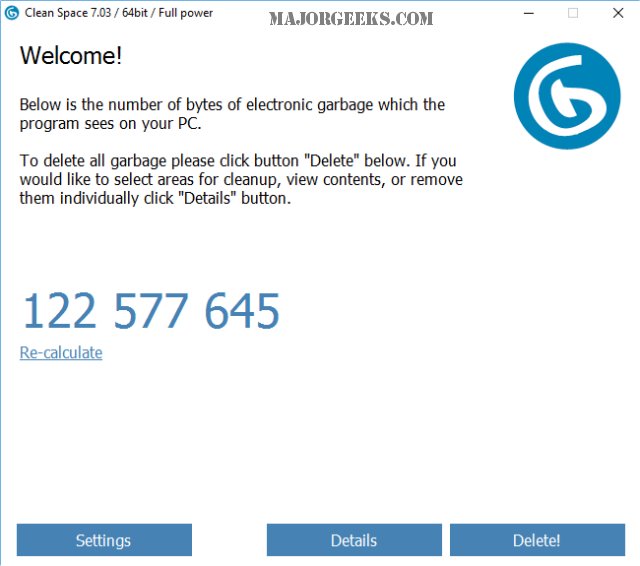
The interface is user-friendly, with the software performing a quick scan upon startup to identify files that can be deleted. Users can easily recalculate the scan results if they leave the program running for an extended period, as new files may become eligible for deletion. A detailed tab categorizes the identified files, covering various areas such as Windows 10, apps like Skype and OneDrive, as well as popular browsers like Chrome and Internet Explorer. Users have the option to selectively retain certain files, such as cookies or browsing history, by unchecking them in the removal list, making it safe to use the default settings for most users.
In terms of performance, Clean Space is comparable to established tools like CCleaner and Wise Disk Cleaner. In a recent test, Clean Space identified 139.8 MB of junk files, slightly more than CCleaner’s 139.6 MB. While Wise Disk Cleaner is known for its aggressive cleaning capabilities, it may not suit everyone. Clean Space stands out by offering a streamlined alternative to CCleaner, focusing on essential junk file cleaning without the unnecessary features that have been added to other software.
Overall, Clean Space is an excellent choice for users who wish to efficiently and securely clean their computers without the hassle of navigating complex interfaces or excessive settings. Its simplicity can make it a preferable option for those looking to declutter their systems quickly and effectively.
To further enhance the user experience, PrivacyRoot could consider adding features like scheduled cleaning options, customizable cleaning profiles, or an option for users to back up files before deletion. These additions could make Clean Space an even more versatile tool for maintaining system performance and user privacy
The interface is user-friendly, with the software performing a quick scan upon startup to identify files that can be deleted. Users can easily recalculate the scan results if they leave the program running for an extended period, as new files may become eligible for deletion. A detailed tab categorizes the identified files, covering various areas such as Windows 10, apps like Skype and OneDrive, as well as popular browsers like Chrome and Internet Explorer. Users have the option to selectively retain certain files, such as cookies or browsing history, by unchecking them in the removal list, making it safe to use the default settings for most users.
In terms of performance, Clean Space is comparable to established tools like CCleaner and Wise Disk Cleaner. In a recent test, Clean Space identified 139.8 MB of junk files, slightly more than CCleaner’s 139.6 MB. While Wise Disk Cleaner is known for its aggressive cleaning capabilities, it may not suit everyone. Clean Space stands out by offering a streamlined alternative to CCleaner, focusing on essential junk file cleaning without the unnecessary features that have been added to other software.
Overall, Clean Space is an excellent choice for users who wish to efficiently and securely clean their computers without the hassle of navigating complex interfaces or excessive settings. Its simplicity can make it a preferable option for those looking to declutter their systems quickly and effectively.
To further enhance the user experience, PrivacyRoot could consider adding features like scheduled cleaning options, customizable cleaning profiles, or an option for users to back up files before deletion. These additions could make Clean Space an even more versatile tool for maintaining system performance and user privacy
PrivacyRoot Clean Space 720 released
PrivacyRoot Clean Space can remove unneeded files that waste space on your drive and protect your privacy by making deleted files unrecoverable.