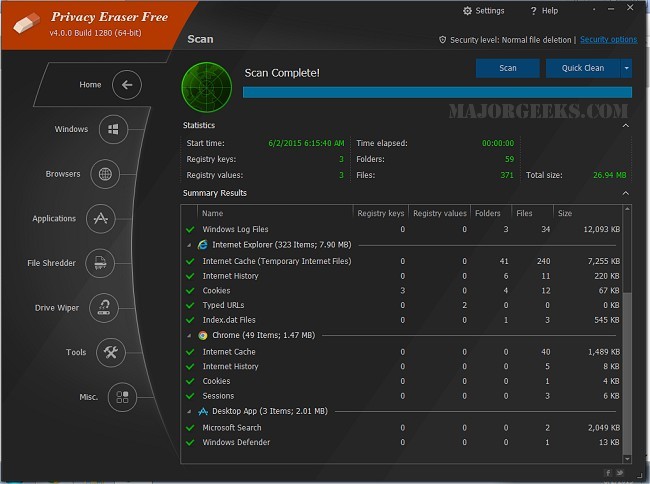
The latest release of Privacy Eraser, version 6.3.0 (Build 5566), offers an advanced solution for users seeking to enhance their privacy and optimize their computer's performance. This software goes beyond mere drive cleaning; it serves as a comprehensive privacy suite that efficiently removes traces of both online and offline activities, thereby safeguarding personal data from potential exploitation by trackers, advertisers, and cyber threats.
Key Features and Functionality
Privacy Eraser provides a multifaceted approach to system cleaning and privacy protection. Users can benefit from:
- Browser Cleaning: Eliminates browsing history, cookies, cache, and more from popular web browsers such as Chrome, Edge, Firefox, and Opera.
- Windows Cleanup: Removes temporary files, recent documents, and other system traces to streamline performance.
- Third-Party App Support: Cleans residual data from commonly used applications, ensuring unnecessary data does not accumulate.
- Secure File Deletion: Utilizes advanced erasure methods, including DoD 5220.22-M and Gutmann algorithms, to securely delete files beyond recovery.
- Registry Cleaning: Identifies and removes invalid registry entries, potentially enhancing system stability.
- Automation and Scheduling: Allows users to set up automatic cleaning at designated times, ensuring continuous privacy protection without requiring manual intervention.
Versions and Accessibility
Privacy Eraser is available in both Free and Pro versions. The Free version encompasses essential features such as browser and Windows cleaning, secure file deletion, and registry cleaning. For users requiring more advanced capabilities, the Pro version includes real-time monitoring, automatic cleaning, software updates, and premium support.
Considerations When Using Privacy Eraser
While Privacy Eraser is a powerful tool, users should exercise caution. Actions such as file shredding are irreversible, and registry cleaning can affect system stability if not done carefully. It's advisable to maintain backups and double-check before executing any significant deletions.
Pros and Cons
Pros:
- Supports a wide range of browsers and applications.
- Offers military-grade secure file deletion.
- Automates cleaning tasks for user convenience.
- The Free version provides a robust set of features.
Cons:
- Some advanced functionalities require a Pro upgrade.
- Caution is needed when performing registry cleaning.
Conclusion
Privacy Eraser stands out as an effective tool for users who prioritize privacy and system performance. With its user-friendly interface and comprehensive features, it allows both novice and experienced users to maintain their systems efficiently. The Free version covers essential cleaning needs, while the Pro version offers enhanced protection and convenience. For anyone concerned with privacy or looking to optimize their PC's performance, Privacy Eraser is certainly worth considering.
Future Enhancements
As technology continues to evolve, future updates to Privacy Eraser could focus on integrating artificial intelligence for smarter cleaning suggestions, enhancing user experience with more intuitive interfaces, and expanding support for emerging applications and browsers. Additionally, incorporating features that allow users to customize their cleaning preferences even further could enhance its appeal to a broader audience
Key Features and Functionality
Privacy Eraser provides a multifaceted approach to system cleaning and privacy protection. Users can benefit from:
- Browser Cleaning: Eliminates browsing history, cookies, cache, and more from popular web browsers such as Chrome, Edge, Firefox, and Opera.
- Windows Cleanup: Removes temporary files, recent documents, and other system traces to streamline performance.
- Third-Party App Support: Cleans residual data from commonly used applications, ensuring unnecessary data does not accumulate.
- Secure File Deletion: Utilizes advanced erasure methods, including DoD 5220.22-M and Gutmann algorithms, to securely delete files beyond recovery.
- Registry Cleaning: Identifies and removes invalid registry entries, potentially enhancing system stability.
- Automation and Scheduling: Allows users to set up automatic cleaning at designated times, ensuring continuous privacy protection without requiring manual intervention.
Versions and Accessibility
Privacy Eraser is available in both Free and Pro versions. The Free version encompasses essential features such as browser and Windows cleaning, secure file deletion, and registry cleaning. For users requiring more advanced capabilities, the Pro version includes real-time monitoring, automatic cleaning, software updates, and premium support.
Considerations When Using Privacy Eraser
While Privacy Eraser is a powerful tool, users should exercise caution. Actions such as file shredding are irreversible, and registry cleaning can affect system stability if not done carefully. It's advisable to maintain backups and double-check before executing any significant deletions.
Pros and Cons
Pros:
- Supports a wide range of browsers and applications.
- Offers military-grade secure file deletion.
- Automates cleaning tasks for user convenience.
- The Free version provides a robust set of features.
Cons:
- Some advanced functionalities require a Pro upgrade.
- Caution is needed when performing registry cleaning.
Conclusion
Privacy Eraser stands out as an effective tool for users who prioritize privacy and system performance. With its user-friendly interface and comprehensive features, it allows both novice and experienced users to maintain their systems efficiently. The Free version covers essential cleaning needs, while the Pro version offers enhanced protection and convenience. For anyone concerned with privacy or looking to optimize their PC's performance, Privacy Eraser is certainly worth considering.
Future Enhancements
As technology continues to evolve, future updates to Privacy Eraser could focus on integrating artificial intelligence for smarter cleaning suggestions, enhancing user experience with more intuitive interfaces, and expanding support for emerging applications and browsers. Additionally, incorporating features that allow users to customize their cleaning preferences even further could enhance its appeal to a broader audience
Privacy Eraser 6.3.0. Build 5566 released
Privacy Eraser is not just a drive cleaner but also an all-in-one privacy suite that protects your privacy and optimizes your computer so it runs faster. Video tutorial available.