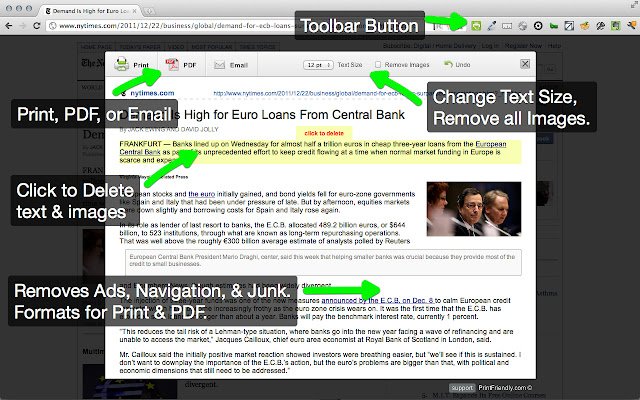
The latest version of Print Friendly & PDF, version 6.13.0, has been released for popular web browsers including Chrome, Firefox, Edge, and Safari. This tool is designed to enhance the printing experience by cleaning up web pages to remove unwanted advertisements, navigation elements, and other clutter, ultimately helping users save on paper and ink costs.
Key features of Print Friendly & PDF include:
- Print Preview: This feature optimizes the display of content specifically for printing, allowing users to see how the output will look before printing.
- Edit Before Printing: Users can customize their printout by removing images and text they do not wish to include.
- Print or Save as PDF: Users have the flexibility to either print immediately or save the content as a PDF for later use.
Usage Instructions:
- New Users: Simply go to PrintFriendly.com and copy and paste the URL of the page you want to print.
- Regular Users: For convenience, add the Print Friendly button to your browser for easy access to print-friendly versions of web pages with a single click.
- Developers and Bloggers: Enhance your website or blog by incorporating a print-friendly button, making it easier for your visitors to print content.
In addition to its main features, related tips and guides on managing PDF documents in various browsers are also available, such as enabling two-page view in Google Chrome and controlling how Microsoft Edge handles PDF files.
Overall, Print Friendly & PDF offers a user-friendly solution for anyone looking to improve their printing process by streamlining web content
Key features of Print Friendly & PDF include:
- Print Preview: This feature optimizes the display of content specifically for printing, allowing users to see how the output will look before printing.
- Edit Before Printing: Users can customize their printout by removing images and text they do not wish to include.
- Print or Save as PDF: Users have the flexibility to either print immediately or save the content as a PDF for later use.
Usage Instructions:
- New Users: Simply go to PrintFriendly.com and copy and paste the URL of the page you want to print.
- Regular Users: For convenience, add the Print Friendly button to your browser for easy access to print-friendly versions of web pages with a single click.
- Developers and Bloggers: Enhance your website or blog by incorporating a print-friendly button, making it easier for your visitors to print content.
In addition to its main features, related tips and guides on managing PDF documents in various browsers are also available, such as enabling two-page view in Google Chrome and controlling how Microsoft Edge handles PDF files.
Overall, Print Friendly & PDF offers a user-friendly solution for anyone looking to improve their printing process by streamlining web content
Print Friendly and PDF for Chrome, Firefox, Edge, and Safari 6.13.0 released
Print Friendly & PDF for Chrome, Firefox, Edge, and Safari cleans and formats web pages for the perfect print experience.
Print Friendly and PDF for Chrome, Firefox, Edge, and Safari 6.13.0 released @ MajorGeeks