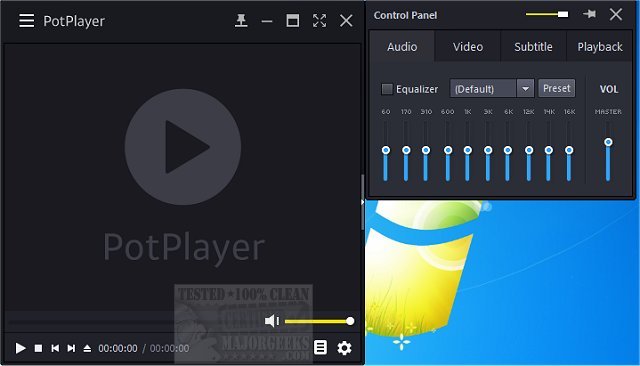
PotPlayer is a highly versatile media player that has recently released version 1.7.23118. This application not only plays a wide range of video and audio formats but also supports TV channels, subtitles, and customizable skins. For users who prefer portability, a portable version is also available.
Why PotPlayer Stands Out
PotPlayer is designed for users who seek high-quality performance without compromising on ease of use. It supports virtually every audio and video format, eliminating the need for additional codec installations. The software is optimized for hardware acceleration, enabling smooth playback even for high-definition content without overloading system resources.
Key Features of PotPlayer
- Wide Format Support: PotPlayer can handle formats such as MP4, MKV, AVI, FLV, MP3, and FLAC, making it a one-stop solution for all media playback needs.
- Smooth Performance & Hardware Acceleration: Utilizing technologies like DXVA, CUDA, and QuickSync, PotPlayer ensures seamless playback, especially beneficial for users with older computers.
- Advanced Subtitle Support: It supports various subtitle formats, including SRT, ASS, SSA, and VobSub, allowing users to customize the appearance and timing of subtitles as needed.
- Highly Customizable Playback Controls: Users can manipulate playback speed, adjust audio through equalizers, apply video filters, and manage multiple sound cards efficiently.
- Seamless Playlist Management: PotPlayer keeps track of the last 200 files played, allowing users to easily resume their viewing experience.
- 3D and 360-Degree Video Support: Beyond standard playback, PotPlayer accommodates 3D videos and immersive 360-degree experiences.
- Built-in Screen Capture & Bookmarking: Users can easily take screenshots or record video segments, alongside bookmarking favorite scenes for quick access.
- Minimal System Impact: Unlike other media players that may be resource-intensive, PotPlayer is lightweight and efficient, making it suitable for both new and older hardware.
Conclusion
PotPlayer stands out as one of the best media players available, offering a rich array of features and exceptional performance. With its extensive format support and customizable options, it competes favorably with alternatives like VLC and MPC-HC while providing a more streamlined user experience. For anyone seeking a free, feature-packed media player, PotPlayer is highly recommended. Download it today for an unparalleled media playback experience.
Additional Resources
- Explore how to enable Windows Sonic Surround Sound on Windows 10 & 11.
- Learn how to rename your sound input or output devices.
- Find out how to adjust sound audio balance in Windows 10 & 11.
- Discover how to change the default sound output device in Windows 10 & 11.
Future Developments
As technology continues to evolve, PotPlayer may expand its capabilities further, potentially integrating more advanced features such as AI-driven playback enhancements or improved streaming options. Users can look forward to continued updates that enhance both performance and usability
Why PotPlayer Stands Out
PotPlayer is designed for users who seek high-quality performance without compromising on ease of use. It supports virtually every audio and video format, eliminating the need for additional codec installations. The software is optimized for hardware acceleration, enabling smooth playback even for high-definition content without overloading system resources.
Key Features of PotPlayer
- Wide Format Support: PotPlayer can handle formats such as MP4, MKV, AVI, FLV, MP3, and FLAC, making it a one-stop solution for all media playback needs.
- Smooth Performance & Hardware Acceleration: Utilizing technologies like DXVA, CUDA, and QuickSync, PotPlayer ensures seamless playback, especially beneficial for users with older computers.
- Advanced Subtitle Support: It supports various subtitle formats, including SRT, ASS, SSA, and VobSub, allowing users to customize the appearance and timing of subtitles as needed.
- Highly Customizable Playback Controls: Users can manipulate playback speed, adjust audio through equalizers, apply video filters, and manage multiple sound cards efficiently.
- Seamless Playlist Management: PotPlayer keeps track of the last 200 files played, allowing users to easily resume their viewing experience.
- 3D and 360-Degree Video Support: Beyond standard playback, PotPlayer accommodates 3D videos and immersive 360-degree experiences.
- Built-in Screen Capture & Bookmarking: Users can easily take screenshots or record video segments, alongside bookmarking favorite scenes for quick access.
- Minimal System Impact: Unlike other media players that may be resource-intensive, PotPlayer is lightweight and efficient, making it suitable for both new and older hardware.
Conclusion
PotPlayer stands out as one of the best media players available, offering a rich array of features and exceptional performance. With its extensive format support and customizable options, it competes favorably with alternatives like VLC and MPC-HC while providing a more streamlined user experience. For anyone seeking a free, feature-packed media player, PotPlayer is highly recommended. Download it today for an unparalleled media playback experience.
Additional Resources
- Explore how to enable Windows Sonic Surround Sound on Windows 10 & 11.
- Learn how to rename your sound input or output devices.
- Find out how to adjust sound audio balance in Windows 10 & 11.
- Discover how to change the default sound output device in Windows 10 & 11.
Future Developments
As technology continues to evolve, PotPlayer may expand its capabilities further, potentially integrating more advanced features such as AI-driven playback enhancements or improved streaming options. Users can look forward to continued updates that enhance both performance and usability
PotPlayer 1.7.23118 released
PotPlayer is a comprehensive video and audio player that also supports TV channels, subtitles, and skins. Portable version also available.