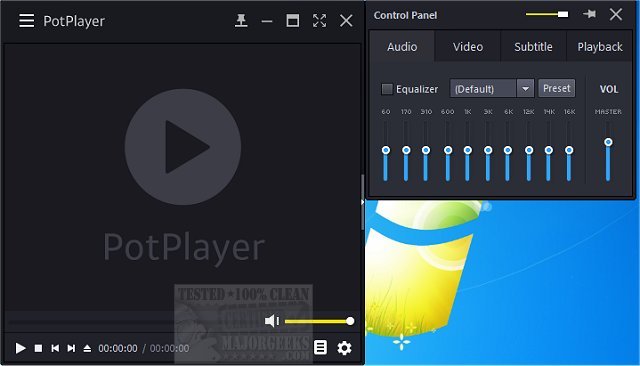
PotPlayer has recently unveiled version 1.7.22963, solidifying its reputation as a versatile video and audio player that seamlessly supports TV channels, subtitles, and customizable skins. A portable version is also available for users on the go.
Why PotPlayer Stands Out
PotPlayer is designed for users who seek a media player that offers robust performance without compromising usability. Its wide format support means it can play virtually any video or audio file without the need for additional codec installations. This feature, combined with hardware acceleration capabilities, ensures smooth playback even for high-definition content, making it ideal for both casual viewers and tech enthusiasts.
Key Features of PotPlayer:
- Broad Format Compatibility: Supports a vast range of formats such as MP4, MKV, AVI, FLV, MP3, and FLAC, eliminating compatibility issues.
- Optimized Performance: Utilizes DXVA, CUDA, and QuickSync for efficient video playback that minimizes CPU usage, preventing lag and system slowdowns.
- Advanced Subtitle Options: PotPlayer accommodates various subtitle formats, allowing users to customize their appearance and timing for the best viewing experience.
- Customizable Playback Controls: Users can easily adjust playback speed, audio settings, and video filters, offering a personalized media experience.
- Effortless Playlist Management and Auto-Resume: Keeps track of the last 200 files played, enabling seamless continuation of your viewing experience.
- Support for 3D and 360-Degree Videos: Offers advanced playback options for 3D content and interactive 360-degree videos, enhancing the multimedia experience.
- Built-in Screen Capture and Bookmarking: Allows users to take snapshots and bookmark favorite scenes for quick access later.
- Low System Impact: Designed to be lightweight and efficient, ensuring it runs smoothly on both newer and older systems.
Conclusion
In summary, PotPlayer is a top contender among media players, rivaling well-known options like VLC and MPC-HC with its extensive features, high performance, and customization capabilities. It's an excellent choice for anyone seeking a free media player that delivers a seamless and enjoyable viewing experience. Download PotPlayer today to explore its impressive features and enjoy hassle-free playback.
Future Directions
As technology continues to evolve, updates to PotPlayer could include enhanced AI-driven features for content recommendations, further improvements in user interface design, and expanded support for emerging video formats. The integration of cloud services for playlist synchronization and cross-device compatibility may also enhance the user experience, making PotPlayer an even more attractive option for media consumption
Why PotPlayer Stands Out
PotPlayer is designed for users who seek a media player that offers robust performance without compromising usability. Its wide format support means it can play virtually any video or audio file without the need for additional codec installations. This feature, combined with hardware acceleration capabilities, ensures smooth playback even for high-definition content, making it ideal for both casual viewers and tech enthusiasts.
Key Features of PotPlayer:
- Broad Format Compatibility: Supports a vast range of formats such as MP4, MKV, AVI, FLV, MP3, and FLAC, eliminating compatibility issues.
- Optimized Performance: Utilizes DXVA, CUDA, and QuickSync for efficient video playback that minimizes CPU usage, preventing lag and system slowdowns.
- Advanced Subtitle Options: PotPlayer accommodates various subtitle formats, allowing users to customize their appearance and timing for the best viewing experience.
- Customizable Playback Controls: Users can easily adjust playback speed, audio settings, and video filters, offering a personalized media experience.
- Effortless Playlist Management and Auto-Resume: Keeps track of the last 200 files played, enabling seamless continuation of your viewing experience.
- Support for 3D and 360-Degree Videos: Offers advanced playback options for 3D content and interactive 360-degree videos, enhancing the multimedia experience.
- Built-in Screen Capture and Bookmarking: Allows users to take snapshots and bookmark favorite scenes for quick access later.
- Low System Impact: Designed to be lightweight and efficient, ensuring it runs smoothly on both newer and older systems.
Conclusion
In summary, PotPlayer is a top contender among media players, rivaling well-known options like VLC and MPC-HC with its extensive features, high performance, and customization capabilities. It's an excellent choice for anyone seeking a free media player that delivers a seamless and enjoyable viewing experience. Download PotPlayer today to explore its impressive features and enjoy hassle-free playback.
Future Directions
As technology continues to evolve, updates to PotPlayer could include enhanced AI-driven features for content recommendations, further improvements in user interface design, and expanded support for emerging video formats. The integration of cloud services for playlist synchronization and cross-device compatibility may also enhance the user experience, making PotPlayer an even more attractive option for media consumption
PotPlayer 1.7.22963 released
PotPlayer is a comprehensive video and audio player that also supports TV channels, subtitles, and skins. Portable version also available.