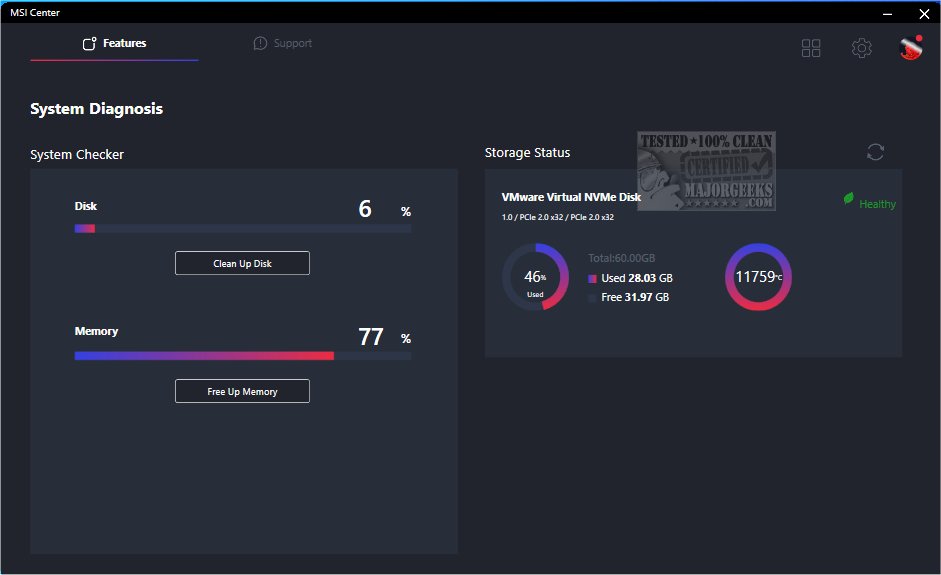
MSI Center, now in version 2.0.71.0, consolidates MSI's unique features to significantly improve both gaming and productivity experiences on your machine. This comprehensive application allows users to customize their control center with a range of exclusive tools, including Gaming Mode, Smart Priority, Smart Image Finder, and MSI Companion.
Expanded Feature Set for Tailored Experiences
MSI Center sets itself apart from other applications by offering a broad array of features specifically designed to meet individual user needs. The app includes a detailed Monitor tab that provides clear insights into system performance, displaying crucial information such as CPU and GPU usage and fan speeds.
For Gamers: Optimized Performance and Gameplay
The powerful Gaming Mode feature within MSI Center enhances system performance by shutting down unnecessary background applications, ensuring that resources are focused on gaming. It works in tandem with Smart Priority and User Scenario, which intelligently prioritize tasks based on user needs. Additionally, the Game Highlights feature enables users to effortlessly capture and replay thrilling gaming moments. For an enriched experience, options like Sound Tune and True Color are available to adjust audio and visual settings for more immersive gameplay.
Innovative Duet Display Feature
MSI Center introduces a groundbreaking Duet Display feature, allowing users to convert their tablet into a secondary display. This can be particularly useful for gamers wanting to monitor gameplay elements, like placing the League of Legends minimap on a portable device for enhanced immersion. The MSI Companion overlay also provides a convenient way to adjust PC settings without interrupting gameplay.
Compatibility and Support
MSI Center supports a wide range of MSI hardware, including:
- Motherboards: Intel X299/300/400/500/600 series and AMD X399/TRX40/A320/400/500 series.
- Notebooks: Gaming Series laptops with Intel 11th generation CPUs or AMD 5000 CPUs or newer.
- Graphics Cards: Various NVIDIA and AMD GPU models, including the latest GeForce RTX and Radeon RX series.
- Desktops: MEG/MPG Gaming Series, Creator Series, and PRO Series desktops with Intel 11th gen CPUs or newer.
- Gaming Gear: Supports VIGOR keyboards, CLUTCH mice, and IMMERSE headsets.
Conclusion
MSI Center 2.0.71.0 is a versatile tool designed to enhance both gaming and creative workflows. With its extensive feature set and compatibility with a wide range of MSI products, users can look forward to an elevated experience that allows them to maximize their potential in gaming and productivity. Whether you're a hardcore gamer or a creative professional, MSI Center provides the tools you need to take your skills to the next level
Expanded Feature Set for Tailored Experiences
MSI Center sets itself apart from other applications by offering a broad array of features specifically designed to meet individual user needs. The app includes a detailed Monitor tab that provides clear insights into system performance, displaying crucial information such as CPU and GPU usage and fan speeds.
For Gamers: Optimized Performance and Gameplay
The powerful Gaming Mode feature within MSI Center enhances system performance by shutting down unnecessary background applications, ensuring that resources are focused on gaming. It works in tandem with Smart Priority and User Scenario, which intelligently prioritize tasks based on user needs. Additionally, the Game Highlights feature enables users to effortlessly capture and replay thrilling gaming moments. For an enriched experience, options like Sound Tune and True Color are available to adjust audio and visual settings for more immersive gameplay.
Innovative Duet Display Feature
MSI Center introduces a groundbreaking Duet Display feature, allowing users to convert their tablet into a secondary display. This can be particularly useful for gamers wanting to monitor gameplay elements, like placing the League of Legends minimap on a portable device for enhanced immersion. The MSI Companion overlay also provides a convenient way to adjust PC settings without interrupting gameplay.
Compatibility and Support
MSI Center supports a wide range of MSI hardware, including:
- Motherboards: Intel X299/300/400/500/600 series and AMD X399/TRX40/A320/400/500 series.
- Notebooks: Gaming Series laptops with Intel 11th generation CPUs or AMD 5000 CPUs or newer.
- Graphics Cards: Various NVIDIA and AMD GPU models, including the latest GeForce RTX and Radeon RX series.
- Desktops: MEG/MPG Gaming Series, Creator Series, and PRO Series desktops with Intel 11th gen CPUs or newer.
- Gaming Gear: Supports VIGOR keyboards, CLUTCH mice, and IMMERSE headsets.
Conclusion
MSI Center 2.0.71.0 is a versatile tool designed to enhance both gaming and creative workflows. With its extensive feature set and compatibility with a wide range of MSI products, users can look forward to an elevated experience that allows them to maximize their potential in gaming and productivity. Whether you're a hardcore gamer or a creative professional, MSI Center provides the tools you need to take your skills to the next level
MSI Center 2.0.71.0 released
MSI Center combines all of MSI's exclusive features to elevate the time spent gaming and working on your machine.